- import javax.jms.JMSException;
- import javax.jms.Message;
- import javax.jms.MessageListener;
- import javax.jms.TextMessage;
- public class ConsumerMessageListener implements MessageListener {
- public void onMessage(Message message) {
- //这里我们知道生产者发送的就是一个纯文本消息,所以这里可以直接进行强制转换,或者直接把onMessage方法的参数改成Message的子类TextMessage
- TextMessage textMsg = (TextMessage) message;
- System.out.println("接收到一个纯文本消息。");
- try {
- System.out.println("消息内容是:" + textMsg.getText());
- } catch (JMSException e) {
- e.printStackTrace();
- }
- }
- }
阿里云产品博客 » 图片服务架构演进
现在几乎任何一个网站、Web App以及移动APP等应用都需要有图片展示的功能,对于图片功能从下至上都是很重要的。必须要具有前瞻性的规划好图片服务器,图片的上传和下载速度至关重要,当然这并不是说一上来就搞很NB的架构,至少具备一定扩展性和稳定性。虽然各种架构设计都有,在这里我只是谈谈我的一些个人想法。
对于图片服务器来说IO无疑是消耗资源最为严重的,对于web应用来说需要将图片服务器做一定的分离,否则很可能因为图片服务器的IO负载导致应用崩溃。因此尤其对于大型网站和应用来说,非常有必要将图片服务器和应用服务器分离,构建独立的图片服务器集群,构建独立的图片服务器其主要优势:
1)分担Web服务器的I/O负载-将耗费资源的图片服务分离出来,提高服务器的性能和稳定性。
2)能够专门对图片服务器进行优化-为图片服务设置有针对性的缓存方案,减少带宽网络成本,提高访问速度。
3)提高网站的可扩展性-通过增加图片服务器,提高图片服务吞吐能力。
从传统互联网的web1.0,历经web2.0时代以及发展到现在的web3.0,随着图片存储规模的增加,图片服务器的架构也在逐渐发生变化,以下主要论述三个阶段的图片服务器架构演进。
初始阶段
在介绍初始阶段的早期的小型图片服务器架构之前,首先让我们了解一下NFS技术,NFS是Network File System的缩写,即网络文件系统。NFS是由Sun开发并发展起来的一项用于在不同机器,不同操作系统之间通过网络互相分享各自的文件。NFS server也可以看作是一个FILE SERVER,用于在UNIX类系统之间共享文件,可以轻松的挂载(mount)到一个目录上,操作起来就像本地文件一样的方便。
如果不想在每台图片服务器同步所有图片,那么NFS是最简单的文件共享方式。NFS是个分布式的客户机/服务器文件系统,NFS的实质在于用户间计算机的共享,用户可以联结到共享计算机并象访问本地硬盘一样访问共享计算机上的文件。具体实现思路是:
1)所有前端web服务器都通过nfs挂载3台图片服务器export出来的目录,以接收web服务器写入的图片。然后[图片1]服务器挂载另外两台图片服务器的export目录到本地给apache对外提供访问。
2) 用户上传图片
用户通过Internet访问页面提交上传请求post到web服务器,web服务器处理完图片后由web服务器拷贝到对应的mount本地目录。
3)用户访问图片
用户访问图片时,通过[图片1]这台图片服务器来读取相应mount目录里边的图片。
以上架构存在的问题:
1)性能:现有结构过度依赖nfs,当图片服务器的nfs服务器有问题时,可能影响到前端web服务器。NFS的问题主要是锁的问题. 很容易造成死锁, 只有硬件重启才能解决。尤其当图片达到一定的量级后,nfs会有严重的性能问题。
2)高可用:对外提供下载的图片服务器只有一台,容易出现单点故障。
3) 扩展性:图片服务器之间的依赖过多,而且横向扩展余地不够。
4) 存储:web服务器上传热点不可控,造成现有图片服务器空间占用不均衡。
5) 安全性:nfs方式对于拥有web服务器的密码的人来说,可以随意修改nfs里边的内容,安全级别不高。
当然图片服务器的图片同步可以不采用NFS,也可以采用ftp或rsync,采用ftp这样的话每个图片服务器就都保存一份图片的副本,也起到了备份的作用。但是缺点是将图片ftp到服务器比较耗时,如果使用异步方式去同步图片的话又会有延时,不过一般的小图片文件也还好了。使用rsync同步,当数据文件达到一定的量级后,每次rsync扫描会耗时很久也会带来一定的延时性。
发展阶段
当网站达到一定的规模后,对图片服务器的性能和稳定性有一定的要求后,上述NFS图片服务架构面临着挑战,严重的依赖NFS,而且系统存在单点机器容易出现故障,需要对整体架构进行升级。于是出现了上图图片服务器架构,出现了分布式的图片存储。
其实现的具体思路如下:
1)用户上传图片到web服务器后,web服务器处理完图片,然后再由前端web服务器把图片post到到[图片1]、[图片2]…[图片N]其中的一个,图片服务器接收到post过来的图片,然后把图片写入到本地磁盘并返回对应成功状态码。前端web服务器根据返回状态码决定对应操作,如果成功的话,处理生成各尺寸的缩略图、打水印,把图片服务器对应的ID和对应图片路径写入DB数据库。
2) 上传控制
我们需要调节上传时,只需要修改web服务器post到的目的图片服务器的ID,就可以控制上传到哪台图片存储服务器,对应的图片存储服务器只需要安装nginx同时提供一个python或者php服务接收并保存图片,如果不想不想开启python或者php服务,也可以编写一个nginx扩展模块。
3) 用户访问流程
用户访问页面的时候,根据请求图片的URL到对应图片服务器去访问图片。
如: http://imgN.xxx.com/image1.jpg
此阶段的图片服务器架构,增加了负载均衡和分布式图片存储,能够在一定程度上解决并发访问量高和存储量大的问题。负载均衡在有一定财力的情况下可以考虑F5硬负载,当然也可以考虑使用开源的LVS软负载(同时还可开启缓存功能)。此时将极大提升访问的并发量,可以根据情况随时调配服务器。当然此时也存在一定的瑕疵,那就是可能在多台Squid上存在同一张图片,因为访问图片时可能第一次分到squid1,在LVS过期后第二次访问到squid2或者别的,当然相对并发问题的解决,此种少量的冗余完全在我们的允许范围之内。在该系统架构中二级缓存可以使用squid也可以考虑使用varnish或者traffic server,对于cache的开源软件选型要考率以下几点
1)性能:varnish本身的技术上优势要高于squid,它采用了“Visual Page Cache”技术,在内存的利用上,Varnish比Squid具有优势,它避免了Squid频繁在内存、磁盘中交换文件,性能要比Squid高。varnish是不能cache到本地硬盘上的。还有强大的通过Varnish管理端口,可以使用正则表达式快速、批量地清除部分缓存。nginx是用第三方模块ncache做的缓冲,其性能基本达到varnish,但在架构中nginx一般作为反向(静态文件现在用nginx的很多,并发能支持到2万+)。在静态架构中,如果前端直接面对的是cdn活着前端了4层负载的话,完全用nginx的cache就够了。
2)避免文件系统式的缓存,在文件数据量非常大的情况下,文件系统的性能很差,像squid,nginx的proxy_store,proxy_cache之类的方式缓存,当缓存的量级上来后,性能将不能满足要求。开源的traffic server直接用裸盘缓存,是一个不错的选择,国内大规模应用并公布出来的主要是淘宝,并不是因为它做的差,而是开源时间晚。Traffic Server 在 Yahoo 内部使用了超过 4 年,主要用于 CDN 服务,CDN 用于分发特定的HTTP 内容,通常是静态的内容如图片、JavaScript、CSS。当然使用leveldb之类的做缓存,我估计也能达到很好的效果。
3)稳定性:squid作为老牌劲旅缓存,其稳定性更可靠一些,从我身边一些使用者反馈来看varnish偶尔会出现crash的情况。Traffic Server在雅虎目前使用期间也没有出现已知的数据损坏情况,其稳定性相对也比较可靠,对于未来我其实更期待Traffic Server在国内能够拥有更多的用户。
以上图片服务架构设计消除了早期的NFS依赖以及单点问题,时能够均衡图片服务器的空间,提高了图片服务器的安全性等问题,但是又带来一个问题是图片服务器的横向扩展冗余问题。只想在普通的硬盘上存储,首先还是要考虑一下物理硬盘的实际处理能力。是 7200 转的还是 15000 转的,实际表现差别就很大。至于文件系统选择xfs、ext3、ext4还是reiserFs,需要做一些性能方面的测试,从官方的一些测试数据来看,reiserFs更适合存储一些小图片文件。创建文件系统的时候 Inode 问题也要加以考虑,选择合适大小的 inode size ,因为Linux 为每个文件分配一个称为索引节点的号码inode,可以将inode简单理解成一个指针,它永远指向本文件的具体存储位置。一个文件系统允许的inode节点数是有限的,如果文件数量太多,即使每个文件都是0字节的空文件,系统最终也会因为节点空间耗尽而不能再创建文件,因此需要在空间和速度上做取舍,构造合理的文件目录索引。
云存储阶段
2011年李彦宏在百度联盟峰会上就提到过互联网的读图时代已经到来,图片服务早已成为一个互联网应用中占比很大的部分,对图片的处理能力也相应地变成企业和开发者的一项基本技能,图片的下载和上传速度显得更加重要,要想处理好图片,需要面对的三个主要问题是:大流量、高并发、海量存储。
阿里云存储服务(OpenStorageService,简称OSS),是阿里云对外提供的海量,安全,低成本,高可靠的云存储服务。用户可以通过简单的 REST接口,在任何时间、任何地点上传和下载数据,也可以使用WEB页面对数据进行管理。同时,OSS提供Java、Python、PHP SDK,简化用户的编程。基于OSS,用户可以搭建出各种多媒体分享网站、网盘、个人企业数据备份等基于大规模数据的服务。在以下图片云存储主要以阿里云的云存储OSS为切入点介绍,上图为OSS云存储的简单架构示意图。
真正意义上的“云存储”,不是存储而是提供云服务,使用云存储服务的主要优势有以下几点:
1)用户无需了解存储设备的类型、接口、存储介质等。
2)无需关心数据的存储路径。
3)无需对存储设备进行管理、维护。
4)无需考虑数据备份和容灾
5)简单接入云存储,尽情享受存储服务。
架构模块组成
1)KV Engine
OSS中的Object源信息和数据文件都是存放在KV Engine上。在6.15的版本,V Engine将使用0.8.6版本,并使用为OSS提供的OSSFileClient。
2)Quota
此模块记录了Bucket和用户的对应关系,和以分钟为单位的Bucket资源使用情况。Quota还将提供HTTP接口供Boss系统查询。
3)安全模块
安全模块主要记录User对应的ID和Key,并提供OSS访问的用户验证功能。
OSS术语名词汇
1 )Access Key ID & Access Key Secret (API密钥)
用户注册OSS时,系统会给用户分配一对Access Key ID & Access Key Secret,称为ID对,用于标识用户,为访问OSS做签名验证。
2) Service
OSS提供给用户的虚拟存储空间,在这个虚拟空间中,每个用户可拥有一个到多个Bucket。
3) Bucket
Bucket是OSS上的命名空间;Bucket名在整个OSS中具有全局唯一性,且不能修改;存储在OSS上的每个Object必须都包含在某个Bucket中。一个应用,例如图片分享网站,可以对应一个或多个Bucket。一个用户最多可创建10个Bucket,但每个Bucket中存放的Object的数量和大小总和没有限制,用户不需要考虑数据的可扩展性。
4) Object
在OSS中,用户的每个文件都是一个Object,每个文件需小于5TB。Object包含key、data和user meta。其中,key是Object的名字;data是Object的数据;user meta是用户对该object的描述。
其使用方式非常简单,如下为java sdk:
OSSClient ossClient = new OSSClient(accessKeyId,accessKeySecret);
PutObjectResult result = ossClient.putObject(bucketname, bucketKey, inStream, new ObjectMetadata());
执行以上代码即可将图片流上传至OSS服务器上。
图片的访问方式也非常简单其url为:http://bucketname.oss.aliyuncs.com/bucketKey
分布式文件系统
用分布式存储有几个好处,分布式能自动提供冗余,不需要我们去备份,担心数据安全,在文件数量特别大的情况下,备份是一件很痛苦的事情,rsync扫一次可能是就是好几个小时,还有一点就是分布式存储动态扩容方便。当然在国内的其他一些文件系统里,TFS(http://code.taobao.org/p/tfs/src/)和FASTDFS也有一些用户,但是TFS的优势更是针对一些小文件存储,主要是淘宝在用。另外FASTDFS在并发高于300写入的情况下出现性能问题,稳定性不够友好。OSS存储使用的是阿里云基于飞天5k平台自主研发的高可用,高可靠的分布式文件系统盘古。分布式文件系统盘古和Google的GFS类似,盘古的架构是Master-Slave主从架构,Master负责元数据管理,Sliave叫做Chunk Server,负责读写请求。其中Master是基于Paxos的多Master架构,一个Master死了之后,另外一个Master可以很快接过去,基本能够做到故障恢复在一分钟以内 。文件是按照分片存放,每个会分三个副本,放在不同的机架上,最后提供端到端的数据校验。
HAPROXY负载均衡
基于haproxy的自动hash架构 ,这是一种新的缓存架构,由nginx作为最前端,代理到缓存机器。 nginx后面是缓存组,由nginx经过url hash后将请求分到缓存机器。
这个架构方便纯squid缓存升级,可以在squid的机器上加装nginx。 nginx有缓存的功能,可以将一些访问量特大的链接直接缓存在nginx上,就不用经过多一次代理的请求,能够保证图片服务器的高可用、高性能。比如favicon.ico和网站的logo。 负载均衡负责OSS所有的请求的负载均衡,后台的http服务器故障会自动切换,从而保证了OSS的服务不间断。
CDN
阿里云CDN服务是一个遍布全国的分布式缓存系统,能够将网站文件(如图片或JavaScript代码文件)缓存到全国多个城市机房中的服务器上,当一个用户访问你的网站时,会就近到靠近TA的城市的服务器上获取数据,这样最终用户访问你的服务速度会非常快。
阿里云CDN服务在全国部署超过100个节点,能提供给用户优良的网络加速效果。当网站业务突然爆发增长时,无需手忙脚乱地扩容网络带宽,使用CDN服务即可轻松应对。和OSS服务一样,使用CDN,需要先在aliyun.com网站上开通CDN服务。开通后,需要在网站上的管理中心创建你的distribution(即分发频道),每个distribution由两个必须的部分组成:distribution ID和源站地址。
使用阿里云OSS和CDN可以非常方便的针对每个bucket进行内容加速,因为每个bucket对应一个独立的二级域名,针对每个文件进行CDN删除,简单、经济地解决服务的存储和网络问题,毕竟大多数网站或应用的存储和网络带宽多半是被图片或视频消耗掉的。
从整个业界来看,最近这样的面向个人用户的云存储如国外的DropBox和Box.net非常受欢迎,国内的云存储目前比较不错的主要有七牛云存储和又拍云存储。
上传下载分而治之
图片服务器的图片下载比例远远高于上传比例,业务逻辑的处理也区别明显,上传服器对图片重命名,记录入库信息,下载服务器对图片添加水印、修改尺寸之类的动态处理。从高可用的角度,我们能容忍部分图片下载失败,但绝不能有图片上传失败,因为上传失败,意味着数据的丢失。上传与下载分开,能保证不会因下载的压力影响图片的上传,而且还有一点,下载入口和上传入口的负载均衡策略也有所不同。上传需要经过Quota Server记录用户和图片的关系等逻辑处理,下载的逻辑处理如果绕过了前端缓存处理,穿透后端业务逻辑处理,需要从OSS获取图片路径信息。近期阿里云会推出基于CDN就近上传的功能,自动选择离用户最近的CDN节点,使得数据的上传下载速度均得到最优化。相较传统IDC,访问速度提升数倍。
图片防盗链处理
如果服务不允许防盗链,那么访问量会引起带宽、服务器压力等问题。比较通用的解决方案是在nginx或者squid反向代理软件上添加refer ACL判断,OSS也提供了基于refer的防盗链技术。当然OSS也提供了更为高级的URL签名防盗链,其其实现思路如下:
首先,确认自己的bucket权限是private,即这个bucket的所有请求必须在签名认证通过后才被认为是合法的。然后根据操作类型、要访问的bucket、要访问的object以及超时时间,动态地生成一个经过签名的URL。通过这个签名URL,你授权的用户就可以在该签名URL过期时间前执行相应的操作。
签名的Python代码如下:
h=hmac.new(“OtxrzxIsfpFjA7SwPzILwy8Bw21TLhquhboDYROV”, “GET\n\n\n1141889120\n/oss-example/oss-api.jpg”,sha);
urllib.quote_plus (base64.encodestring(h.digest()).strip());
其中method可以是PUT、GET、HEAD、DELETE中的任意一种;最后一个参数“timeout”是超时的时间,单位是秒。一个通过上面Python方法,计算得到的签名URL为:
http://oss-example.oss-cn-hangzhou.aliyuncs.com/oss-api.jpg?OSSAccessKeyId=44CF9590006BF252F707&Expires=1141889120&Signature=vjbyPxybdZaNmGa%2ByT272YEAiv4%3D
通过这种动态计算签名URL的方法,可以有效地保护放在OSS上的数据,防止被其他人盗链。
图片编辑处理API
对于在线图片的编辑处理,GraphicsMagick(GraphicsMagick(http://www.graphicsmagick.org/))对于从事互联网的技术人员应该不会陌生。GraphicsMagick是从 ImageMagick 5.5.2 分支出来的,但是现在他变得更稳定和优秀,GM更小更容易安装、GM更有效率、GM的手册非常丰富GraphicsMagick的命令与ImageMagick基本是一样的。
GraphicsMagick 提供了包括裁、缩放、合成、打水印、图像转换、填充等非常丰富的接口API,其中的开发包SDK也非常丰富,包括了JAVA(im4java)、C、C++、Perl、PHP、Tcl、Ruby等的调用,支持超过88中图像格式,包括重要的DPX、GIF、JPEG、JPEG-2000、PNG、PDF、PNM和TIFF,GraphicsMagick可以再绝大多数的平台上使用,Linux、Mac、Windows都没有问题。但是独立开发这些图片处理服务,对服务器的IO要求相对要高一些,而且目前这些开源的图片处理编辑库,相对来说还不是很稳定,笔者在使用GraphicsMagick 的时候就遇到了tomcat 进程crash情况,需要手动重启tomcat服务。
阿里云目前已经对外开放图片处理API,包括了大多数常用处理解决方案:缩略图、打水印、文字水印、样式、管道等。开发者可以非常方便的使用如上图片处理方案,希望越来越多的开发者能够基于OSS开放出更多优秀的产品。
架构高性能海量图片服务器的技术要素 - 北游运维 - 开源中国社区
在笔者的另一篇文章《nginx性能改进一例》有讲到,在图片规模比大的情况,nginx处理能力受制于文件系统的io,意味着,在大规模图片的场景,如果运维还依旧采用传统文件系统的方式,无论是备份成本,还是前端成本,将是无法去衡量,不要去指望调优一点文件系统的一些参数,能带来多大的性能收益,也不要去目录hash+rewrite的方式,改进不大,因为新版的文件系统默认开启了dir_index,解决了同一个目录下文件过多而过慢的问题。不过还有一种方案就是采购SSD盘、fusion-io卡之类高性能的硬件去解决随机io,当然你得容忍备份的痛苦。
先看一下架构图逻辑图,这也是现在各大公司采用的方式。
这个是一个大致逻辑图,具体布署是根据模块的性能消耗类型去混合部署。
第一点,分布存储的必要性:存储原始图片,用分布式存储有几个好处,分布式能自动提供冗余,不需要我们去备份,担心数据安全,在文件数量特别大的情况下,备份是一件很痛苦的事情,rsync扫一次可能是就是好几个小时。还有一点就是分布式存储动态扩容方便。不过唯一遗憾的是目前适合于存小文件系统比较少,我了解的只有fastdfs,以及淘宝的tfs,还有mongodb这几个,tfs经历过淘宝那种规模的考验,文档和工具都太少,如果能驾驭tfs,我觉得值得尝试一下。。
第二点,上传和下载分开处理:通常图片服务器上传的压力与下载的压力相差很大,大多数的公司都是下载的压力是上传压力的n倍。业务逻辑的处理也区别明显,上传服务器对图片重命名,记录入库信息,下载服务器对图片添加水印、修改尺寸之类的动态处理。从数据的角度,我们能容忍部分图片下载失败,但绝不能有图片上传失败,因为上传失败,意味着数据的丢失。上传与下载分开,能保证不会因下载的压力影响图片的上传,而且还有一点,下载入口和上传入口的负载均衡策略也不同,下面有说明。
第三点,使用cache做缓层:分布式存储解决了存储安全问题,但性能问题还需要用cache去解决,直接从分布式存储取文件给用户提供服务,每秒的request高不到哪里去,像淘宝之类的网站,都做了二层cache。对于cache的开源软件选型要考虑二点,1,缓存的量级大,尽可能让热点图片缓存在cache中,像varnish之类的,纯内存的cache,虽然性能很好,但能cache的量级很限于内存,用来做图片的缓存不太适合;2,避免文件系统式的缓存,在我的另一篇文章中有测过,在文件量非常的情况下,文件系统的型能很差,像squid,nginx的proxy_store,proxy_cache之类的方式缓存,当缓存的量级上来后,性能将不能满足要求。开源的traffic server直接用裸盘缓存,是一个不错的选择,当然使用leveldb之类的做缓存,我估计也能达到很好的效果。这里说明一下cache缓存最好不要去依赖第三方CDN,现在很多第三的CDN业务,不仅提供内容分发外,还额外提供第一个二级缓存之类的服务,但这里面就一个最大的风险就是如果第三调整带来的回源压力暴增,此时你的架构能否支撑,需要认真评估一下,如果成本允许,服务控制在自己手中最靠谱。
第四点,使用一致性哈希(consistent hashing)做下载负载均衡:虽公司的业务的增加带来流量的增加,一个阶段后,一个cache通常不能解决问题,这时扩容cache就是常做的一件事,传统的哈希不足就是每扩容一次,哈希策略将重新分配,大部分cache将失效,带来的问题是后端压力暴增。对uri进行一性能哈希负载均衡,能避免增加或者减少cache引起哈希策略变化,目前大多开源的负载均衡软件都有这个功能,像haproxy都有,至于一致性哈希的最优化,可以参考一下下图(摘自网上的一张图,表示的是怎样的物理节点和虚拟节点数量关系,哈希最均匀)。
第五点,利用CDN分发和多域名访问入口:想要获得好的用户体验,利用CDN的快速分发是有必要的,从成本上考虑可以购买使用第三方的CDN平台。多域名访问方式,大多的浏览器都对单个域名进行了线程并发限制,采用多域名能够加快图片展示的速度。
关于图片服务器的部署基本算完了,其它的细节性调优这里就不说明了。
大数据处理系列之(一)Java线程池使用 - cstar(小乐) - 博客园
ThreadPoolExecutor有界队列使用
public class ThreadPool {
private final static String poolName = "mypool";
static private ThreadPool threadFixedPool = null;
public ArrayBlockingQueue<Runnable> queue = new ArrayBlockingQueue<Runnable>(2);
private ExecutorService executor;
static public ThreadPool getFixedInstance() {
return threadFixedPool;
}
private ThreadPool(int num) {
executor = new ThreadPoolExecutor(2, 4,60,TimeUnit.SECONDS, queue,new DaemonThreadFactory
(poolName), new ThreadPoolExecutor.AbortPolicy());
}
public void execute(Runnable r) {
executor.execute(r);
}
public static void main(String[] params) {
class MyRunnable implements Runnable {
public void run() {
System.out.println("OK!");
try {
Thread.sleep(10);
} catch (InterruptedException e) {
e.printStackTrace();
}
}
}
int count = 0;
for (int i = 0; i < 10; i++) {
try {
ThreadPool.getFixedInstance().execute(new MyRunnable());
} catch (RejectedExecutionException e) {
e.printStackTrace();
count++;
}
}
try {
log.info("queue size:" + ThreadPool.getFixedInstance().queue.size());
Thread.sleep(2000);
} catch (InterruptedException e) {
e.printStackTrace();
}
System.out.println("Reject task: " + count);
}
}
首先我们来看下这段代码几个重要的参数,corePoolSize 为2,maximumPoolSize为4,任务队列大小为2,每个任务平
均处理时间为10ms,一共有10个并发任务。
执行这段代码,我们会发现,有4个任务失败了。这里就验证了我们在上面提到有界队列时候线程池的执行顺序。当新任务在
方法 execute(Runnable) 中提交时, 如果运行的线程少于 corePoolSize,则创建新线程来处理请求。 如果运行的线程多于
corePoolSize 而少于 maximumPoolSize,则仅当队列满时才创建新线程,如果此时线程数量达到maximumPoolSize,并且队
列已经满,就会拒绝继续进来的请求。
现在我们调整一下代码中的几个参数,将并发任务数改为200,执行结果Reject task: 182,说明有18个任务成功了,线程处理
完一个请求后会接着去处理下一个过来的请求。在真实的线上环境中,会源源不断的有新的请求过来,当前的被拒绝了,但只要线
程池线程把当下的任务处理完之后还是可以处理下一个发送过来的请求。
通过有界队列可以实现系统的过载保护,在高压的情况下,我们的系统处理能力不会变为0,还能正常对外进行服务,虽然有些服
务可能会被拒绝,至于如何减少被拒绝的数量以及对拒绝的请求采取何种处理策略我将会在下一篇文章《系统的过载保护》中继续
阐述。
参考文献:
- ThreadPoolExecutor使用与思考(上)-线程池大小设置与BlockedQueue的三种实现区别 http://dongxuan.iteye.com/blog/901689
- ThreadPoolExecutor使用与思考(中)-keepAliveTime及拒绝策略http://dongxuan.iteye.com/blog/902571
- ThreadPoolExecutor源代码
- Java线程池介绍以及简单实例 http://wenku.baidu.com/view/e4543a7a5acfa1c7aa00cc25.html
kettle中通过 时间戳(timestamp)方式 来实现数据库的增量同步操作(一) - Armin - 博客园
这个实验主要思想是在创建数据库表的时候,
通过增加一个额外的字段,也就是时间戳字段,
例如在同步表 tt1 和表 tt2 的时候,
通过检查那个表是最新更新的,那个表就作为新表,而另外的表最为旧表被新表中的数据进行更新。
实验数据如下:
mysql database 5.1
test.tt1( id int primary key , name varchar(50) );
mysql.tt2( id int primary key, name varchar(50) );
快照表,可以将其存放在test数据库中,
同样可以为了简便,可以将其创建为temporary 表类型。
数据如图 kettle-1

kettle-1
============================================================
主流程如图 kettle-2

kettle-2
在prepare中,向 tt1,tt2 表中增加 时间戳字段,
由于tt1,tt2所在的数据库是不同的,所以分别创建两个数据库的连接。
prepare

kettle-3
在执行这个job之后,就会在数据库查询的时候看到下面的字段:

kettle-4
然后, 我们来对tt1表做一个 insert 操作 一个update操作吧~

kettle-5
在原表上无论是insert操作还是update操作,对应的updateTime都会发生变更。
如果tt1 表 和 tt2 表中 updateTime 字段为最新时间的话,则说明该表是新表 。
下面只要是对应main_thread的截图:

kettle-6
在这里介绍一下Main的层次:
Main
START
Main.prepare
Main.main_thread
{
START
main_thread.create_tempTable
main_thread.insert_tempTable
main_thread.tt1_tt2_syn
SUCCESS
}
Main.finish
SUCCESS
在main_thread中的过程是这样的:
作为一个局部的整体,使它每隔200s内进行一次循环,
这样的话,如果在其中有指定的表 tt1 或是 tt2 对应被更新或是插入的话,
该表中的updateTime字段就会被捕捉到,并且进行同步。
如果没有更新出现,则会走switch的 default 路线对应的是write to log.
继续循环。
首先创建一个快照表,然后将tt1,tt2表中的最大(最新)时间戳的值插入到快照表中。
然后,通过一个transformation来判断那个表的updateTime值最新,
来选择对应是 tt1表来更新 tt2 还是 tt2 表来更新 tt1 表;
main_thread.create_tempTable.JOB:

main_thread.insert_tempTable.Job:

PS: 对于第二个SQL 应该改成(不修改会出错的)
set @var1 = ( select MAX(updatetime) from tt2);
insert into test.temp values ( 2 , @var1 ) ;
因为conn对应的是连接mysql(数据库实例名称),
但是我们把快照表和tt1 表都存到了test(数据库实例名称)里面。
在上面这个图中对应的语句是想实现,在temp表中插入两行记录元组。
其中id为1 的元组对应的temp.lastTime 字段 是 从tt1 表中选出的 updateTime 值为最新的,
id 为2的元组对应的 temp.lastTime 字段 是 从 tt2 表中选出的 updateTime 值为最新的 字段。
当然 , id 是用来给后续 switch 操作提供参考的,用于标示最新 updateTime 是来自 tt1 还是 tt2,
同样也可以使用 tableName varchar(50) 这种字段 来存放 最新updateTime 对应的 数据库.数据表的名称也可以的。
main_thread.tt1_tt2_syn.Transformation:

首先,创建连接 test 数据库的 temp 表的连接,
选择 temp表中 对应 lastTime 值最新的所在的记录
所对应的 id 号码。
首先将temp中 lastTime 字段进行 降序排列,
然后选择id , 并且将选择记录仅限定成一行。

然后根据id的值进行 switch选择。
在这里LZ很想使用,SQL Executor,
但是它无法返回对应的id值。
但是表输入可以返回对应的id值,
并被switch接收到。

下图是对应 switch id = 1 的时候:即 tt1 更新 tt2
注意合并行比较 的新旧数据源 的选择
和Insert/Update 中的Target table的选择

下图是对应 switch id = 2 的时候:即 tt2 更新 tt1
注意合并行比较 的新旧数据源 的选择
和Insert/Update 中的Target table的选择

但是考虑到增加一个 column 会浪费很多的空间,
所以咋最终结束同步之后使用 finish操作步骤来将该 updateTime这个字段进行删除操作即可。
这个与Main中的prepare的操作是相对应的。
Main.finish

这样的话,实验环境已经搭建好了,
接下来进行,实验的数据测试了,写到下一个博客中。
当然,触发器也是一种同步的好方法,写到后续博客中吧~
时间戳的方式相比于触发器,较为简单并且通用,
但是 数据库表中的时间戳字段,很费空间,并且无法对应删除操作,
也就是说 表中删除一行记录, 该表应该作为新表来更新其余表,但是由于记录删除 时间戳无所依附所以无法记录到。
开源ETL工具kettle系列之增量更新设计技巧 - 技术门户 | ITPUB |
ETL中增量更新是一个比较依赖与工具和设计方法的过程,Kettle中主要提供Insert / Update 步骤,Delete 步骤和Database Lookup 步骤来支持增量更新,增量更新的设计方法也是根据应用场景来选取的,虽然本文讨论的是Kettle的实现方式,但也许对其他工具也有一些帮助。本文不可能涵盖所有的情况,欢迎大家讨论。
应用场景
增量更新按照数据种类的不同大概可以分成:
1. 只增加,不更新,
2. 只更新,不增加
3. 即增加也更新
4. 有删除,有增加,有更新
其中1 ,2, 3种大概都是相同的思路,使用的步骤可能略有不同,通用的方法是在原数据库增加一个时间戳,然后在转换之后的对应表保留这个时间戳,然后每次抽取数据的时候,先读取这个目标数据库表的时间戳的最大值,把这个值当作参数传给原数据库的相应表,根据这个时间戳来做限定条件来抽取数据,抽取之后同样要保留这个时间戳,并且原数据库的时间戳一定是指定默认值为sysdate当前时间(以原数据库的时间为标准),抽取之后的目标数据库的时间戳要保留原来的时间戳,而不是抽取时候的时间。
对于第一种情况,可以使用Kettle的Insert / Update 步骤,只是可以勾选Don’t perform any update选项,这个选项可以告诉Kettle你只会执行Insert 步骤。
对于第二种情况可能比较用在数据出现错误然后原数据库有一些更新,相应的目标数据库也要更新,这时可能不是更新所有的数据,而是有一些限定条件的数据,你可以使用Kettle的Update 步骤来只执行更新。关于如何动态的执行限定条件,可以参考前一篇文章。
第三种情况是最为常见的一种情况,使用的同样是 Kettle的Insert / Update 步骤,只是不要勾选Don’t perform any update 选项。
第四种情况有些复杂,后面专门讨论。
对于第1,2,3种情况,可以参考下面的例子。
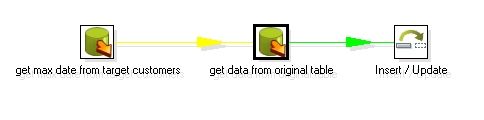
这个例子假设原数据库表为customers , 含有一个id , firstname , lastname , age 字段,主键为id , 然后还加上一个默认值为sysdate的时间戳字段。转换之后的结果类似:id , firstname , lastname , age , updatedate . 整个设计流程大概如下:

图1
其中第一个步骤的sql 大概如下模式:
Select max(updatedate) from target_customer ;
你会注意到第二个步骤和第一个步骤的连接是黄色的线,这是因为第二个table input 步骤把前面一个步骤的输出当作一个参数来用,所有Kettle用黄色的线来表示,第二个table input 的sql 模式大概如下:
Select field1 , field2 , field3 from customers where updatedate > ?
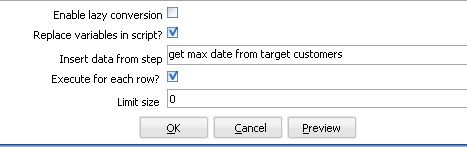
后面的一个问号就是表示它需要接受一个参数,你在这个table input 下面需要指定replace variable in script 选项和execute for each row 为选中状态,这样,Kettle就会循环执行这个sql , 执行的次数为前面参数步骤传入的数据集的大小。

图2
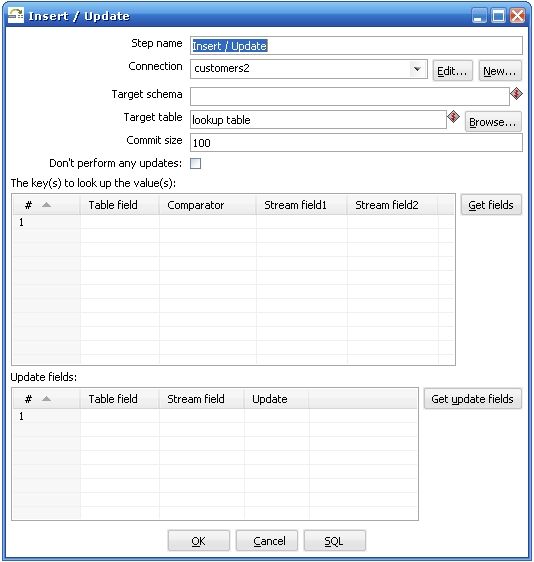
关于第三个步骤执行insert / update 步骤需要特别解释一下,

图3
Kettle执行这个步骤是需要两个数据流对比,其中一个是目标数据库,你在Target table 里面指定的,它放在The keys to look up the values(s) 左边的Table field 里面的,另外一个数据流就是你在前一个步骤传进来的,它放在The keys to look up the value(s) 的右边,Kettle首先用你传进来的key 在数据库中查询这些记录,如果没有找到,它就插入一条记录,所有的值都跟你原来的值相同,如果根据这个key找到了这条记录,kettle会比较这两条记录,根据你指定update field 来比较,如果数据完全一样,kettle就什么都不做,如果记录不完全一样,kettle就执行一个update 步骤。所以首先你要确保你指定的key字段能够唯一确定一条记录,这个时候会有两种情况:
1.维表
2.事实表
维表大都是通过一个主键字段来判断两条记录是否匹配,可能我们的原数据库的主键记录不一定对应目标数据库中相应的表的主键,这个时候原数据库的主键就变成了业务主键,你需要根据某种条件判断这个业务主键是否相等,想象一下如果是多个数据源的话,业务主键可能会有重复,这个时候你需要比较的是根据你自定义生成的新的实际的主键,这种主键可能是根据某种类似与sequence 的生成方式生成的,
事实表在经过转换之后,进目标数据库之前往往都是通过多个外键约束来确定唯一一条记录的,这个时候比较两条记录是否相等都是通过所有的维表的外键决定的,你在比较了记录相等或不等之后,还要自己判断是否需要添加一个新的主键给这个新记录。
上面两种情况都是针对特定的应用的,如果你的转换过程比较简单,只是一个原数据库对应一个目标数据库,业务主键跟代理主键完全相同的时候完全可以不用考虑这么多。
有删除,有增加,有更新
首先你需要判断你是否在处理一个维表,如果是一个维表的话,那么这可能是一个SCD情况,可以使用Kettle的Dimension Lookup 步骤来解决这个问题,如果你要处理的是事实表,方法就可能有所不同,它们之间的主要区别是主键的判断方式不一样。
事实表一般都数据量很大,需要先确定是否有变动的数据处在某一个明确的限定条件之下,比如时间上处在某个特定区间,或者某些字段有某种限定条件,尽量最大程度的先限定要处理的结果集,然后需要注意的是要先根据id 来判断记录的状态,是不存在要插入新纪录,还是已存在要更新,还是记录不存在要删除,分别对于id 的状态来进行不同的操作。
处理删除的情况使用Delete步骤,它的原理跟Insert / Update 步骤一样,只不过在找到了匹配的id之后执行的是删除操作而不是更新操作,然后处理Insert / Update 操作,你可能需要重新创建一个转换过程,然后在一个Job 里面定义这两个转换之间的执行顺序。
如果你的数据变动量比较大的话,比如超过了一定的百分比,如果执行效率比较低下,可以适当考虑重新建表。
另外需要考虑的是维表的数据删除了,对应的事实表或其他依赖于此维表的表的数据如何处理,外键约束可能不太容易去掉,或者说一旦去掉了就可能再加上去了,这可能需要先处理好事实表的依赖数据,主要是看你如何应用,如果只是简单的删除事实表数据的话还比较简单,但是如果需要保留事实表相应记录,可以在维表中增加一条记录,这条记录只有一个主键,其他字段为空,当我们删除了维表数据后,事实表的数据就更新指向这条空的维表记录。
定时执行增量更新
可能有时候我们就是定时执行更新操作,比如每天或者一个星期一次,这个时候可以不需要在目标表中增加一个时间戳字段来判断ETL进行的最大时间,直接在取得原数据库的时间加上限定条件比如:
Startdate > ? and enddate < ?
或者只有一个startdate
Startdate > ? (昨天的时间或者上个星期的时间)
这个时候需要传一个参数,用get System Info 步骤来取得,而且你还可以控制时间的精度,比如到天而不是到秒的时间。
当然,你也需要考虑一下如果更新失败了怎么处理,比如某一天因为某种原因没有更新,这样可能这一天的记录需要手工处理回来,如果失败的情况经常可能发生,那还是使用在目标数据库中增加一个时间字段取最大时间戳的方式比较通用,虽然它多了一个很少用的字段。
执行效率和复杂度
删除和更新都是一项比较耗费时间的操作,它们都需要不断的在数据库中查询记录,执行删除操作或更新操作,而且都是一条一条的执行,执行效率低下也是可以预见的,尽量可能的缩小原数据集大小。减少传输的数据集大小,降低ETL的复杂程度
时间戳方法的一些优点和缺点
优点: 实现方式简单,很容易就跨数据库实现了,运行起来也容易设计
缺点: 浪费大量的储存空间,时间戳字段除ETL过程之外都不被使用,如果是定时运行的,某一次运行失败了,就有可能造成数据有部分丢失.
其他的增量更新办法:
增量更新的核心问题在与如何找出自上次更新以后的数据,其实大多数数据库都能够有办法捕捉这种数据的变化,比较常见的方式是数据库的增量备份和数据复制,利用数据库的管理方式来处理增量更新就是需要有比较好的数据库管理能力,大多数成熟的数据库都提供了增量备份和数据复制的方法,虽然实现上各不一样,不过由于ETL的增量更新对数据库的要求是只要数据,其他的数据库对象不关心,也不需要完全的备份和完全的stand by 数据库,所以实现方式还是比较简单的.,只要你创建一个与原表结构类似的表结构,然后创建一个三种类型的触发器,分别对应insert , update , delete 操作,然后维护这个新表,在你进行ETL的过程的时候,将增量备份或者数据复制停止,然后开始读这个新表,在读完之后将这个表里面的数据删除掉就可以了,不过这种方式不太容易定时执行,需要一定的数据库特定的知识。如果你对数据的实时性要求比较高可以实现一个数据库的数据复制方案,如果对实时性的要求比较低,用增量备份会比较简单一点。
几点需要注意的地方:
1.触发器
无论是增量备份还是数据复制,如果原表中有触发器,在备份的数据库上都不要保留触发器,因为我们需要的不是一个备份库,只是需要里面的数据,最好所有不需要的数据库对象和一些比较小的表都不用处理。
2.逻辑一致和物理一致
数据库在数据库备份和同步上有所谓逻辑一致和物理一致的区别,简单来说就是同一个查询在备份数据库上和主数据库上得到的总的数据是一样的,但是里面每一条的数据排列方式可能不一样,只要没有明显的排序查询都可能有这种情况(包括group by , distinct , union等 ),而这可能会影响到生成主键的方式,需要注意在设计主键生成方式的时候最好考虑这一点,比如显式的增加order 排序. 避免在数据出错的时候,如果需要重新读一遍数据的时候主键有问题.
总结
增量更新是ETL中一个常见任务,对于不同的应用环境可能采用不同的策略,本文不可能覆盖所有的应用场景,像是多个数据源汇到一个目标数据库,id生成策略,业务主键和代理主键不统一等等,只是希望能给出一些思路处理比较常见的情况,希望能对大家有所帮助。
相关文章:
开源ETL工具kettle系列之建立缓慢增长维
http://tech.cms.it168.com/db/2008-03-21/200803211716994.shtml
开源ETL工具kettle系列之动态转换
http://tech.cms.it168.com/o/2008-03-17/200803171550713.shtml
开源ETL工具kettle系列之在应用程序中集成
http://tech.it168.com/db/2008-03-19/200803191510476.shtml
开源ETL工具kettle系列之常见问题
http://tech.it168.com/db/2008-03-19/200803191501671.shtml
Web services performance tuning - jboss web services - JBoss application server tutorials
web service performance tip #1
Use coarse grained web services
One of the biggest mistakes that many developers make when approaching web services is defining operations and messages that are too fine-grained. By doing so, developers usually define more than they really need. You need to ensure that your web service is coarse-grained and that the messages being defined are business oriented and not programmer's oriented.
The reason why top-down webservices are the pure web services is really this: you define at first the business and then the programming interface.
Don't define a web service operation for every Java method you want to expose. Rather, you should define an operation for each action you need to expose.
and this is a coarse grained web service:
for the sake of simplicity we don't have added any transaction commit/rollback however what we want to stress is that the first kind of web service is a bad design practice at first and then also will yield poor performance because of 3 round trips to the server carrying SOAP packets.
web service performance tip #2
Use primitive types, String or simple POJO as parameters and return type
Web services have been defined from the grounds up to be interoperable components. That is you can return both primitive types and Objects. How do a C# client is able to retrieve a Java type returned by a Web Service or viceversa ? that's possible because the Objects moving from/to the Webservices are flattened into XML.
As you can imagine the size of the Object which is the parameter or the returntype has a huge impact on the performance. Be careful with Objects which contain large Collections as fields- they are usually responsible of web services bad performance. If you have collections or fields which are not useful in your response mark them as transient fields.
webservice performance tip #3
Evaluate carefully how much data your need to return
Consider returning only subsets of data if the Database queries are fast but the graph of Object is fairly complex. Example:
On the other hand if your bottleneck is the Database Connectivity reduce the trips to the Service and try to return as much data as possible.
web service performance tip #4
Examine the SOAP packet
This tip is the logic continuation of the previous one: if you are dealing with complex Object types always check what is actually moving around the network. There are many ways to sniff a SOAP packet, from a tcp-proxy software which analyze the packets between two destinations. For example Apache delivers a simple tcp-monitoring utility which can be used for this purpose :
http://ws.apache.org/commons/tcpmon/
Here's how to debug SOAP messages with jboss:
http://www.mastertheboss.com/en/jboss-howto/49-jboss-http/178-how-to-monitor-webservices-soap-messages-.html
web service performance tip #5
Cache on the client when possible
If your client application requests the same information repeatedly from the server, you'll eventually realize the server's performance, and consequently your application's response time, is not fast enough.
Depending on the frequency of the messaging and the type of data, it could be necessary to cache data on the client.
This approach however needs to address one important issue: how do we know that the data we are requesting is consistent ? the technical solution to this is inverting the order of elements: when the Data in our RDBMS has become inconsistent a Notification needs to be issued so that the Client cache is refreshed. In this article you'll find an elegant approach to this topic.
http://www.javaworld.com/javaworld/jw-03-2002/jw-0308-soap.html?page=2
web service performance tip #6
Evaluate asynchronous messaging model
In some situations, responses to Web service requests are not provided immediately, but rather sometime after the initial request transactions complete. This might be due to the fact that the transport is slow and/or unreliable, or the processing is complex and/or long-running. In this situation you should consider an asynchronous messaging model.
The new WebService framework, JAX-WS, supports two models for asynchronous request-response messaging: polling and callback. Polling enables client code to repeatedly check a response object to determine whether a response has been received. Alternatively, the callback approach defines a handler that processes the response asynchronously when it is available.
Consider using asynchronous Web methods is particularly useful if you perform I/O-bound operations such as:
- Accessing streams
- File I/O operations
- Calling another Web service
In the this article I showed how to achieve asynchronous web services using JAX-WS 2.0
http://www.mastertheboss.com/en/web-interfaces/111-asynchronous-web-services-with-jboss-ws.html
web service performance tip #6
Use JAX-WS web services
The Webservices based on JAX-WS perform much better then JAX-RPC earlier Web services.
This is due to the fact that JAX-WS use JAXB for data type marshalling/unmarshalling which has a significant performance advantage over DOM based parsers.
For a detailed comparison benchmark check here:
http://java.sun.com/developer/technicalArticles/WebServices/high_performance/
webservice performance tip #7
Do you need RESTful web services ?
RESTful web services are stateless client-server architecture in which the web services are viewed as resources and can be identified by their URLs.
REST as a protocol does not define any form of message envelope, while SOAP does have this standard. So at first you don't have the overhead of headers and additional layers of SOAP elements on the XML payload. That's not a big thing, even if for limited-profile devices such as PDAs and mobile phones it can make a difference.
However the real performance difference does not rely on wire speed but with cachability. REST suggests using the web's semantics instead of trying to tunnel over it via XML, so RESTful web services are generally designed to correctly use cache headers, so they work well with the web's standard infrastructure like caching proxies and even local browser caches.
RESTFUL web services are not a silver bullet, they are adviced in these kind of scenarios:
REST web services are a good choices when your web services are completely stateless.Since there is no formal way to describe the web services interface, it's required that the service producer and service consumer have a mutual understanding of the context and content being passed along.
On the other hand a SOAP-based design may be appropriate when a formal contract must be established to describe the interface that the web service offers. The Web Services Description Language (WSDL) describes the details such as messages, operations, bindings, and location of the web service. Another scenario where it's mandatory to use SOAP based web services is an architecture that needs to handle asynchronous processing and invocation.
web service performance tip #8
Eager initialization
JBossWS may perform differently during the first method invocation of each service and the following ones when huge wsdl contracts (with hundreds of imported xml schemas) are referenced. This is due to a bunch of operations performed internally during the first invocation whose resulting data is then cached and reused during the following ones. While this is usually not a problem, you might be interested in having almost the same performance on each invocation. This can be achieved setting the org.jboss.ws.eagerInitializeJAXBContextCache system property to true, both on server side (in the JBoss start script) and on client side (a convenient constant is available in org.jboss.ws.Constants). The JAXBContext creation is usually responsible for most of the time required by the stack during the first invocation; this feature makes JBossWS try to eagerly create and cache the JAXB contexts before the first invocation is handled.
web service performance tip #9
Use Literal Message Encoding for Parameter Formatting
The encoded formatting of the parameters in messages creates larger messages than literal message encoding (literal message encoding is the default). In general, you should use literal format unless you are forced to switch to SOAP encoding for interoperability with a Web services platform that does not support the literal format. Here's an example of an RPC/encoded SOAP message for helloWorld
Here the operation name appears in the message, so the receiver has an easy time dispatching this message to the implementation of the operation.The type encoding info (such as xsi:type="xsd:int") is usually just overhead which degrades throughput performance. And this is the equivalent Document/literal wrapped SOAP message :
Analyzing Thread Dumps in Middleware - Part 2
This posting is the second section in the series Analyzing Thread Dumps in Middleware
This section details with when, how to capture and analyze thread dumps with special focus on WebLogic Application Server related thread dumps. Subsequent sections will deal with more real-world samples and tools for automatic analysis of Thread Dumps.
The Diagnosis
Everyone must have gone through periodic health checkups. As a starting point, Doctors always order for a blood test. Why this emphasis on blood test? Can't they just go by the patient's feedback or concerns? What is special about blood test?
Blood Test help via:
- Capturing a snapshot of the overall health of the body (cells/antibodies/...)
- Detecting Abnormalities (low/high hormones, elevated blood sugar levels)
- Identifying and start focusing on the problem areas with prevention and treatment.
The Thread Dump is the equivalent of a blood test for a JVM. It is a state dump of the running JVM and all its parts that are executing at that moment in time.
- It can help identify current execution patterns and help focus attention on relevant parts
- There might be 100s of components and layers but difficult to identify what is getting invoked the most and where to focus attention. A thread dump taken during load will highlight the most executed code paths.
- Dependencies and bottlenecks in code and application design
- Show pointers for enhancements and optimizations
When to capture Thread Dumps
Under what conditions should we capture thread dumps? Anytime or specific times? Capturing thread dumps are ideal for following conditions:
- To understand what is actively executed in the system when under load
- When system is sluggish or slow or hangs
- Java Virtual Process running but Server or App itself not responding
- Pages take forever to load
- Response time increases
- Application and or Server behavior erratic
- Just to observe hot spots (frequently executed code) under load
- For Performance tuning
- For Dependency analysis
- For bottleneck identification and resolution
- To capture snapshot of running state in server
The cost associated with capturing thread dumps is close to near zero; Java Profilers and other tools can consume anywhere from 5 to 20% overhead while a thread dump is more of a snapshot of threads which requires no real heavy weight processing on part of the JVM. There can be some cost only if there are too many interrupts to the JVM within real short intervals (like dumps forever every second or so).
How to capture Thread Dumps
There are various options to capture thread dumps. JVM vendor tools allow capture and gather of thread dumps. Operating System interrupt signals to the process can also be used in generating thread dumps.
Sun Hotspot's jstack tool (under JAVA_HOME or JRE Home/bin) can generate thread dumps given the jvm process id. Similarly, jrcmd (from JRockit Mission Control) can generate thread dumps given a jvm process id and using the print_threads command. Both require to be run on the same operating system as the jvm process and both dump the output to the user shell.
In Unix, kill -3 <PID> or kill -SIGQUIT<PID> will generate thread dumps on the JVM process. But the output of the thread dump will go to the STDERR. Unless the STDERR was redirected to a log file, the thread dump cannot be saved when issued via kill signals. Ensure the process is always started and STDERR is redirected to a log (best practice to also have STDOUT redirected to same log file as STDERR).
In Windows, Ctrl-Break to the JVM process running in foreground can generate thread dumps. The primary limitation is the process needs to be running in the shell. Process Explorer in windows can also help in generating thread dumps but its much more problematic to get all the thread stacks in one shot. One has to wade through each thread and gets its stack. Another thing to keep in mind is, JVM might ignore interrupts if they were started with -Xrs flag.
WebLogic Application Server allows capture of thread dumps via additional options:
- WLS Admin Console can generate thread dumps. Go to the Server Instance -> Monitoring -> Threads -> Dump Threads option.
- Using weblogic's WLST (WebLogic Scripting Tool) to issue Thread dumps.
- weblogic.Admin THREAD_DUMP command option
But generating thread dumps via Weblogic specific commands is not recommended as the JVM itself might be sluggish or hung and never respond to higher app level commands (including weblogic). Issuing thread dumps via the WLS Admin Console requires the Admin server to be first up and healthy and also in communication with the target server.
Sometimes, even the OS level or JVM vendor specific tools might not be able to generate thread dumps. The causes can include memory thrashing (Out Of Memory - OOM) and thread deaths in the JVM, the system itself under tough constraints (memory/cpu) or the process is unhealthy and cannot really respond to anything in predictable way.
What to Observe
Now that we can capture thread dumps, what to observe? Its always recommended to take multiple thread dumps at close intervals (5 or 6 dumps at 10-15 seconds intervals). Why? A thread dump is a snapshot of threads in execution or various states. Taking multiple thread dumps allows us to peek into the threads as they continue execution.
Compare threads based on thread id or name across successive thread dumps to check for change in execution. Observe change in thread execution across thread dumps. Change in the thread state and or stack content for a given thread across successive thread dumps implies there is progress while no change or absence of progress indicates either a warning condition or something benign.
So, what if a given thread is not showing progress between thread dumps? Its possible the thread is doing nothing and so has no change between dumps. Or its possible its waiting for an event to happen and continues in same state and stack appearance. These might be benign. Or it might be blocked for a lock and continues to languish in the same state as the owner of the lock is still holding on the same lock or someone else got the lock ahead of our target thread. Its good to figure out which of the conditions applies and rule out benign cases.
Identifying Idle or Benign threads
One can use the following as rule of thumb while analyzing Application Server side thread dumps. Some additional pointers for WebLogic Specific threads.
- If the thread stack depth is lesser than 5 or 6, treat it as an idle or benign thread. Why? By default, application server thread will itself take away 2-3 thread stack depths (like someRunnable or Executor.run) and if there is not much stack depth remaining, then its more likely sitting there for some job or condition.
"schedulerFactoryBean_Worker-48" id=105 idx=0x1e4 tid=7392 prio=5 alive, waiting, native_blocked
-- Waiting for notification on: org/quartz/simpl/SimpleThreadPool$WorkerThread@0xd5ddc168[fat lock]
at jrockit/vm/Threads.waitForNotifySignal(JLjava/lang/Object;)Z(Native Method)
at java/lang/Object.wait(J)V(Native Method)
at org/quartz/simpl/SimpleThreadPool$WorkerThread.run(SimpleThreadPool.java:519)
^-- Lock released while waiting: org/quartz/simpl/SimpleThreadPool$WorkerThread@0xd5ddc168[fat lock]
at jrockit/vm/RNI.c2java(JJJJJ)V(Native Method)
-- end of trace
"Agent ServerConnection" id=17 idx=0xa0 tid=7154 prio=5 alive, sleeping, native_waiting, daemon
at java/lang/Thread.sleep(J)V(Native Method)
at com/wily/introscope/agent/connection/ConnectionThread.sendData(ConnectionThread.java:312)
at com/wily/introscope/agent/connection/ConnectionThread.run(ConnectionThread.java:65)
at java/lang/Thread.run(Thread.java:662)
at jrockit/vm/RNI.c2java(JJJJJ)V(Native Method)
-- end of trace
"DynamicListenThread[Default]" id=119 idx=0x218 tid=7465 prio=9 alive, in native, daemon
at sun/nio/ch/ServerSocketChannelImpl.accept0(Ljava/io/FileDescriptor;Ljava/io/FileDescriptor;[Ljava/net/InetSocketAddress;)I(Native Method)
at sun/nio/ch/ServerSocketChannelImpl.accept(ServerSocketChannelImpl.java:145)
^-- Holding lock: java/lang/Object@0xbdc08428[thin lock]
at weblogic/socket/WeblogicServerSocket.accept(WeblogicServerSocket.java:30)
at weblogic/server/channels/DynamicListenThread$SocketAccepter.accept(DynamicListenThread.java:535)
at weblogic/server/channels/DynamicListenThread$SocketAccepter.access$200(DynamicListenThread.java:417)
at weblogic/server/channels/DynamicListenThread.run(DynamicListenThread.java:173)
at java/lang/Thread.run(Thread.java:662)
If its WebLogic specific thread dump,
- Ignore those threads in ExecuteThread.waitForRequest() method call.
"[ACTIVE] ExecuteThread: '3' for queue: 'weblogic.kernel.Default (self-tuning)'" id=71 idx=0x15c tid=10158 prio=9 alive, waiting, native_blocked, daemon
-- Waiting for notification on: weblogic/work/ExecuteThread@0x1755df6d8[fat lock]
at jrockit/vm/Threads.waitForNotifySignal(JLjava/lang/Object;)Z(Native Method)
at jrockit/vm/Locks.wait(Locks.java:1973)[inlined]
at java/lang/Object.wait(Object.java:485)[inlined]
at weblogic/work/ExecuteThread.waitForRequest(ExecuteThread.java:160)[optimized]
^-- Lock released while waiting: weblogic/work/ExecuteThread@0x1755df6d8[fat lock]
at weblogic/work/ExecuteThread.run(ExecuteThread.java:181)
at jrockit/vm/RNI.c2java(JJJJJ)V(Native Method)
-- end of trace
- Ensure the thread that is blocked is waiting for a lock held by another Muxer thread and not a non-Muxer Thread.
"ExecuteThread: '4' for queue: 'weblogic.socket.Muxer'" id=31 idx=0xc8 tid=8777 prio=5 alive, blocked, native_blocked, daemon
-- Blocked trying to get lock: java/lang/String@0x17674d0c8[fat lock]
at jrockit/vm/Threads.waitForUnblockSignal()V(Native Method)
at jrockit/vm/Locks.fatLockBlockOrSpin(Locks.java:1411)[optimized]
at jrockit/vm/Locks.lockFat(Locks.java:1512)[optimized]
at jrockit/vm/Locks.monitorEnterSecondStageHard(Locks.java:1054)[optimized]
at jrockit/vm/Locks.monitorEnterSecondStage(Locks.java:1005)[optimized]
at jrockit/vm/Locks.monitorEnter(Locks.java:2179)[optimized]
at weblogic/socket/EPollSocketMuxer.processSockets(EPollSocketMuxer.java:153)
at weblogic/socket/SocketReaderRequest.run(SocketReaderRequest.java:29)
at weblogic/socket/SocketReaderRequest.execute(SocketReaderRequest.java:42)
at weblogic/kernel/ExecuteThread.execute(ExecuteThread.java:145)
at weblogic/kernel/ExecuteThread.run(ExecuteThread.java:117)
at jrockit/vm/RNI.c2java(JJJJJ)V(Native Method)
-- end of trace
"ExecuteThread: '5' for queue: 'weblogic.socket.Muxer'" id=32 idx=0xcc tid=8778 prio=5 alive, native_blocked, daemon
at jrockit/ext/epoll/EPoll.epollWait0(ILjava/nio/ByteBuffer;II)I(Native Method)
at jrockit/ext/epoll/EPoll.epollWait(EPoll.java:115)[optimized]
at weblogic/socket/EPollSocketMuxer.processSockets(EPollSocketMuxer.java:156)
^-- Holding lock: java/lang/String@0x17674d0c8[fat lock]
at weblogic/socket/SocketReaderRequest.run(SocketReaderRequest.java:29)
at weblogic/socket/SocketReaderRequest.execute(SocketReaderRequest.java:42)
at weblogic/kernel/ExecuteThread.execute(ExecuteThread.java:145)
at weblogic/kernel/ExecuteThread.run(ExecuteThread.java:117)
at jrockit/vm/RNI.c2java(JJJJJ)V(Native Method)
-- end of trace
WebLogic Specific Thread Tagging
WebLogic tags threads internally as Active and Standby based on its internal workmanager and thread pooling implementation. There is another level of tagging based on a thread getting returned to the thread pool or not within a defined time period. If the thread does not get returned within a specified duration its tagged as Hogging and if it exceeds even higher limits (default of 10 minutes), its termed as STUCK. It means the thread is involved in a very long activity which requires some manual inspection.
- Its possible for pollers to get kicked off but never return as they just keep polling in an infinite loop. Examples are the AQ Adapter Poller threads which might wrongly get tagged as STUCK.These are benign in nature.
- Thread is doing a database read or remote invocation due to some user request execution and is tagged STUCK. This implies the thread has never really completed the request for more than 10 minutes and is definitely hung - its possibly doing a socket read on an endpoint that is bad or non-responsive or doing real big remote or local execution which should not be synchronous to begin with. Or it might be blocked for a resource which is part of a deadlocked chain and that might be the reason for the non-progress.
Analyzing a Thread Stack
The java thread stack content in a thread dump are always in text/ascii format enabling a quick read without any tools. Almost invariably, the thread stack is in English which lets the user read the package, classname and method call. These three apsects help us understand the general overview of the call the thread is executing, who invoked it and what it is invoking next thereby establishing the caller-callee chain as well as what is getting invoked. The method name gives us a general idea of what the invocation is about. All of these data points can show what is getting executed by the thread even if we haven't written the code or truly understand the implementation.
"[ExecuteThread: '4' for queue: 'weblogic.kernel.Default (self-tuning)'" waiting for lock weblogic.rjvm.ResponseImpl@1b1d86 WAITING
java.lang.Object.wait(Native Method)
weblogic.rjvm.ResponseImpl.waitForData(ResponseImpl.java:84)
weblogic.rjvm.ResponseImpl.getTxContext(ResponseImpl.java:115)
weblogic.rjvm.BasicOutboundRequest.sendReceive(BasicOutboundRequest.java:109)
weblogic.rmi.internal.BasicRemoteRef.invoke(BasicRemoteRef.java:223)
javax.management.remote.rmi.RMIConnectionImpl_1001_WLStub.getAttribute(Unknown Source)
weblogic.management.remote.common.RMIConnectionWrapper$11.run(ClientProviderBase.java:531)
……
weblogic.management.remote.common.RMIConnectionWrapper.getAttribute(ClientProviderBase.java:529)
javax.management.remote.rmi.RMIConnector$RemoteMBeanServerConnection.getAttribute(RMIConnector.java:857)
weblogic.management.mbeanservers.domainruntime.internal.ManagedMBeanServerConnection.getAttribute(ManagedMBeanServerConnection.java:281)
weblogic.management.mbeanservers.domainruntime.internal.FederatedMBeanServerInterceptor.getAttribute(FederatedMBeanServerInterceptor.java:227)
weblogic.management.jmx.mbeanserver.WLSMBeanServerInterceptorBase.getAttribute(WLSMBeanServerInterceptorBase.java:116)
….
weblogic.management.jmx.mbeanserver.WLSMBeanServer.getAttribute(WLSMBeanServer.java:269)
javax.management.remote.rmi.RMIConnectionImpl.doOperation(RMIConnectionImpl.java:1387)
javax.management.remote.rmi.RMIConnectionImpl.access$100(RMIConnectionImpl.java:81)
……
weblogic.rmi.internal.ServerRequest.sendReceive(ServerRequest.java:174)
weblogic.rmi.internal.BasicRemoteRef.invoke(BasicRemoteRef.java:223)
javax.management.remote.rmi.RMIConnectionImpl_1001_WLStub.getAttribute(Unknown Source)
javax.management.remote.rmi.RMIConnector$RemoteMBeanServerConnection.getAttribute(RMIConnector.java:857)
javax.management.MBeanServerInvocationHandler.invoke(MBeanServerInvocationHandler.java:175)
weblogic.management.jmx.MBeanServerInvocationHandler.doInvoke(MBeanServerInvocationHandler.java:504)
weblogic.management.jmx.MBeanServerInvocationHandler.invoke(MBeanServerInvocationHandler.java:380)
$Proxy61.getName(Unknown Source)
com.bea.console.utils.DeploymentUtils.getAggregatedState(DeploymentUtils.java:507)
com.bea.console.utils.DeploymentUtils.getApplicationStatusString(DeploymentUtils.java:2042)
com.bea.console.actions.app.DeploymentsControlTableAction.getCollection(DeploymentsControlTableAction.java:181)
In the above stack trace, we can see the thread belong to the "weblogic.kernel.Default (self-tuning)" group with Thread Name as "ExecuteThread: '4'" and is waiting for a notification on a lock. Some WLS Specific observations based on the stack:
- WLS Admin Console Application attempts to get ApplicationStatus of the Deployments on the remote server.
- MBeanServer.getAttribute() implies it was call to get some attributes (in this case, the application status of deployments) from the MBean Server of a Remote WLS Server instance.
- weblogic.rjvm.ResponseImpl.waitForData() signifies the thread is waiting for a weblogic RMI response from a remote WLS server for the remote MBean Server query call.
"ACTIVE ExecuteThread: '0' for queue: 'weblogic.kernel.Default (self-tuning)'" daemon prio=10 tid=0x00002aabc9820800 nid=0x7a7d runnable 0x000000004290d000 java.lang.Thread.State: RUNNABLE at java.io.FileInputStream.readBytes(Native Method) at java.io.FileInputStream.read(FileInputStream.java:199) at sun.security.provider.NativePRNG$RandomIO.readFully(NativePRNG.java:185) at sun.security.provider.NativePRNG$RandomIO.implGenerateSeed(NativePRNG.java:202) - locked <0x00002aab7b441ee0> (a java.lang.Object) at sun.security.provider.NativePRNG$RandomIO.access$300(NativePRNG.java:108) at sun.security.provider.NativePRNG.engineGenerateSeed(NativePRNG.java:102) at java.security.SecureRandom.generateSeed(SecureRandom.java:495) at com.bea.security.utils.random.AbstractRandomData.ensureInittedAndSeeded(AbstractRandomData.java:83) - locked <0x00002aab6da12720> (a com.bea.security.utils.random.SecureRandomData) at com.bea.security.utils.random.AbstractRandomData.getRandomBytes(AbstractRandomData.java:97) - locked <0x00002aab6da12720> (a com.bea.security.utils.random.SecureRandomData) at com.bea.security.utils.random.AbstractRandomData.getRandomBytes(AbstractRandomData.java:92) at weblogic.management.servlet.ConnectionSigner.signConnection(ConnectionSigner.java:132) - locked <0x00002aaab0611688> (a java.lang.Class for weblogic.management.servlet.ConnectionSigner) at weblogic.ldap.EmbeddedLDAP.getInitialReplicaFromAdminServer(EmbeddedLDAP.java:1268) at weblogic.ldap.EmbeddedLDAP.start(EmbeddedLDAP.java:221) at weblogic.t3.srvr.SubsystemRequest.run(SubsystemRequest.java:64) at weblogic.work.ExecuteThread.execute(ExecuteThread.java:201) at weblogic.work.ExecuteThread.run(ExecuteThread.java:173)
In the above thread stack, it shows WebLogic LDAP is just starting up and is attempting to generate a Random Seed Number using the entropy of the file system. This thread can stay in the same state if there is not much activity in the file system and the server might appear hung at startup.• Solution would be to add -Djava.security.egd=file:/dev/./urandom to java command line arguments to choose a urandom entropy scheme for random number generation for Linux.
Note: this is not advisable to be used for Production systems as the random number is not that truly random.
"[ACTIVE] ExecuteThread: '32' for queue: 'weblogic.kernel.Default (self-tuning)'" daemon prio=10 tid=0x0000002c5ede5000 nid=0x2ca6 waiting for monitor entry [0x000000006a6cc000]
java.lang.Thread.State: BLOCKED (on object monitor)
at weblogic.messaging.kernel.internal.QueueImpl.addReader(QueueImpl.java:1082)
- waiting to lock <0x0000002ac75d1b80> (a weblogic.messaging.kernel.internal.QueueImpl)
at weblogic.messaging.kernel.internal.ReceiveRequestImpl.start(ReceiveRequestImpl.java:178)
at weblogic.messaging.kernel.internal.ReceiveRequestImpl.<init>(ReceiveRequestImpl.java:86)
at weblogic.messaging.kernel.internal.QueueImpl.receive(QueueImpl.java:841)
at weblogic.jms.backend.BEConsumerImpl.blockingReceiveStart(BEConsumerImpl.java:1308)
at weblogic.jms.backend.BEConsumerImpl.receive(BEConsumerImpl.java:1514)
at weblogic.jms.backend.BEConsumerImpl.invoke(BEConsumerImpl.java:1224)
at weblogic.messaging.dispatcher.Request.wrappedFiniteStateMachine(Request.java:961)
at weblogic.messaging.dispatcher.DispatcherServerRef.invoke(DispatcherServerRef.java:276)
at weblogic.messaging.dispatcher.DispatcherServerRef.handleRequest(DispatcherServerRef.java:141)
at weblogic.messaging.dispatcher.DispatcherServerRef.access$000(DispatcherServerRef.java:34)
at weblogic.messaging.dispatcher.DispatcherServerRef$2.run(DispatcherServerRef.java:111)
at weblogic.work.ExecuteThread.execute(ExecuteThread.java:201)
at weblogic.work.ExecuteThread.run(ExecuteThread.java:173)
This thread stack shows WLS adding a JMS Receiver to a Queue.
Following thread stack shows Oracle Service Bus (OSB) Http Proxy service blocked for response from an outbound web service callout and got tagged as STUCK as there was no progress for more than 10 minutes.
[STUCK] ExecuteThread: '53' for queue: 'weblogic.kernel.Default (self-tuning)'" <alive, in native, suspended, waiting, priority=1, DAEMON>
-- Waiting for notification on: java.lang.Object@7ec6c98[fat lock]
java.lang.Object.wait(Object.java:485)
com.bea.wli.sb.pipeline.PipelineContextImpl$SynchronousListener.waitForResponse()
com.bea.wli.sb.pipeline.PipelineContextImpl.dispatchSync()
stages.transform.runtime.WsCalloutRuntimeStep$WsCalloutDispatcher.dispatch()
stages.transform.runtime.WsCalloutRuntimeStep.processMessage()
com.bea.wli.sb.pipeline.StatisticUpdaterRuntimeStep.processMessage()
com.bea.wli.sb.stages.StageMetadataImpl$WrapperRuntimeStep.processMessage()
com.bea.wli.sb.stages.impl.SequenceRuntimeStep.processMessage()
com.bea.wli.sb.pipeline.PipelineStage.processMessage()
com.bea.wli.sb.pipeline.PipelineContextImpl.execute()
com.bea.wli.sb.pipeline.Pipeline.processMessage()
com.bea.wli.sb.pipeline.PipelineContextImpl.execute()
com.bea.wli.sb.pipeline.PipelineNode.doRequest()
com.bea.wli.sb.pipeline.Node.processMessage()
com.bea.wli.sb.pipeline.PipelineContextImpl.execute()
com.bea.wli.sb.pipeline.Router.processMessage()
com.bea.wli.sb.pipeline.MessageProcessor.processRequest()
com.bea.wli.sb.pipeline.RouterManager$1.run()
weblogic.security.acl.internal.AuthenticatedSubject.doAs()
weblogic.security.service.SecurityManager.runAs()
com.bea.wli.sb.security.WLSSecurityContextService.runAs()
com.bea.wli.sb.pipeline.RouterManager.processMessage()
com.bea.wli.sb.transports.TransportManagerImpl.receiveMessage()
com.bea.wli.sb.transports.http.HttpTransportServlet$RequestHelper$1.run()
Identify Hot Spots
What constitutes a Hot Spot? Hot spot is a set of method calls that gets repeatedly invoked by busy running threads (not idle or dormant threads). It can be as simple healthy pattern like multiple threads executing requests to the same set of servlet or application layer or it can be a symptom of bottleneck if multiple threads are blocked waiting for the same lock.
Attempt to capture thread dumps and identify hot spots only after the server has been subjected to some decent loads by which time most of the code have been initialized and executed a few times.
For normal hot spots, try to identify possible optimizations in the code execution.
It might be that the thread is attempting to do a repeat look of JNDI resources or recreation of a resource like JMS Producer/consumer or InitialContext to a remote server.
Cache the JNDI resources, Context and producer/consumer objects. Pool the producers/consumers if possible, reuse the jms connections. Avoid repeated lookups. It can be as simple as resolving an address by doing InetAddress.getAllByName(), cache the results instead of repeat resolutions. Same way, cache XML Parsers or handlers to avoid repeat classloading of xml parsers/factories/handlers/implementations. While caching, ensure to avoid memory leaks if the instances can grow continuously.
Identify Bottlenecks
As Goldfinger says to James Bond in "Goldfinger", Once is happenstance, Twice is coincidence and the third time is enemy action when it comes to threads blocked for same lock. Start navigating the chain of the locks, and try to identify the dependencies between the threads and the nature of locking and try to resolve them as suggested in Reducing Locks Section 1 of this series.
- Identify blocked threads and dependency between the locks and the threads
- Start analyzing dependencies and try to reduce locking
- Resolve the bottlenecks.
This entire exercise can be a bit like pealing onions as one layer of bottleneck might be masking or temporarily resolving a different bottleneck. It requires repetition of analyzing, fixing, testing and analyzing.
Following the chain
Sometimes a thread blocking others from obtaining a lock might itself be on blocked list for yet another lock. In those cases, one should navigate the chain to identify who and what is blocking it. If there are deadlocks (circular dependency of locks), the JVM might report the deadlock automatically. But its best practice to navigate and understand the chains as that will help in resolving and optimizing the behavior for the better.
Let take the following thread stack. The ExecuteThread: '58' is waiting to obtain lock on the
"[STUCK] ExecuteThread: '58' for queue: 'weblogic.kernel.Default (self-tuning)'" id=131807 idx=0x90 tid=927 prio=1 alive, blocked, native_blocked, daemon
-- Blocked trying to get lock: java/util/TreeSet@0x4bba82c0[thin lock]
at jrockit/vm/Locks.monitorEnter(Locks.java:2170)[optimized]
at weblogic/common/resourcepool/ResourcePoolImpl$Group.getCheckRecord(ResourcePoolImpl.java:2369)
at weblogic/common/resourcepool/ResourcePoolImpl$Group.checkHang(ResourcePoolImpl.java:2463)
at weblogic/common/resourcepool/ResourcePoolImpl$Group.access$100(ResourcePoolImpl.java:2210)
...........
at weblogic/common/resourcepool/ResourcePoolImpl.reserveResourceInternal(ResourcePoolImpl.java:450)
at weblogic/common/resourcepool/ResourcePoolImpl.reserveResource(ResourcePoolImpl.java:329)
at weblogic/jdbc/common/internal/ConnectionPool.reserve(ConnectionPool.java:417)
at weblogic/jdbc/common/internal/ConnectionPool.reserve(ConnectionPool.java:324)
at weblogic/jdbc/common/internal/MultiPool.searchLoadBalance(MultiPool.java:312)
at weblogic/jdbc/common/internal/MultiPool.findPool(MultiPool.java:180)
at weblogic/jdbc/common/internal/ConnectionPoolManager.reserve(ConnectionPoolManager.java:89)
Search for the matching lock id among the rest of the threads. The lock is held by ExecuteThread '26' which itself is blocked fororacle/jdbc/driver/T4CConnection@0xf71f6938
...
"[STUCK] ExecuteThread: '26' for queue: 'weblogic.kernel.Default (self-tuning)'" id=1495 idx=0x354 tid=7858 prio=1 alive, blocked, native_blocked, daemon
-- Blocked trying to get lock: oracle/jdbc/driver/T4CConnection@0xf71f6938[thin lock]
at jrockit/vm/Locks.monitorEnter(Locks.java:2170)[optimized]
at oracle/jdbc/driver/OracleStatement.close(OracleStatement.java:1785)
at oracle/jdbc/driver/OracleStatementWrapper.close(OracleStatementWrapper.java:83)
at oracle/jdbc/driver/OraclePreparedStatementWrapper.close(OraclePreparedStatementWrapper.java:80)
at weblogic/jdbc/common/internal/ConnectionEnv.initializeTest(ConnectionEnv.java:940)
at weblogic/jdbc/common/internal/ConnectionEnv.destroyForFlush(ConnectionEnv.java:529)
^-- Holding lock: weblogic/jdbc/common/internal/ConnectionEnv@0xf71f6798[recursive]
at weblogic/jdbc/common/internal/ConnectionEnv.destroy(ConnectionEnv.java:507)
^-- Holding lock: weblogic/jdbc/common/internal/ConnectionEnv@0xf71f6798[biased lock]
at weblogic/common/resourcepool/ResourcePoolImpl.destroyResource(ResourcePoolImpl.java:1802)
at weblogic/common/resourcepool/ResourcePoolImpl.access$500(ResourcePoolImpl.java:41)
at weblogic/common/resourcepool/ResourcePoolImpl$Group.killAllConnectionsBeingTested(ResourcePoolImpl.java:2399)
^-- Holding lock: java/util/TreeSet@0x4bba82c0[thin lock]
at weblogic/common/resourcepool/ResourcePoolImpl$Group.destroyIdleResources(ResourcePoolImpl.java:2267)
^-- Holding lock: weblogic/jdbc/common/internal/GenericConnectionPool@0x5da625a8[thin lock]
at weblogic/common/resourcepool/ResourcePoolImpl$Group.checkHang(ResourcePoolImpl.java:2475)
at weblogic/common/resourcepool/ResourcePoolImpl$Group.access$100(ResourcePoolImpl.java:2210)
at weblogic/common/resourcepool/ResourcePoolImpl.checkResource(ResourcePoolImpl.java:1677)
at weblogic/common/resourcepool/ResourcePoolImpl.checkResource(ResourcePoolImpl.java:1662)
at weblogic/common/resourcepool/ResourcePoolImpl.makeResources(ResourcePoolImpl.java:1268)
at weblogic/common/resourcepool/ResourcePoolImpl.makeResources(ResourcePoolImpl.java:1166)
The oracle/jdbc/driver/T4CConnection@0xf71f6938 lock is held by yet another thread MDSPollingThread-owsm which is attempting to test the health of its jdbc connection (that it reserved from the datasource connection pool) by invoking some basic test on the database. The socket read from the DB appears to the one is either slow or every other thread kept getting the lock except for ExecuteThread 58 & 26 as both appear STUCK in the same position for 10 minutes or longer. Having multiple thread dumps will help confirm if the same threads are stuck in the same position or there was change in ownership of locks and these threads were just so unlucky in getting ownership of the locks.
"MDSPollingThread-[owsm, jdbc/mds/owsm]" id=94 idx=0x150 tid=2993 prio=5 alive, in native, daemon
at jrockit/net/SocketNativeIO.readBytesPinned(Ljava/io/FileDescriptor;[BIII)I(Native Method)
at jrockit/net/SocketNativeIO.socketRead(SocketNativeIO.java:32)
at java/net/SocketInputStream.socketRead0(Ljava/io/FileDescriptor;[BIII)I(SocketInputStream.java)
at java/net/SocketInputStream.read(SocketInputStream.java:129)
at oracle/net/nt/MetricsEnabledInputStream.read(TcpNTAdapter.java:718)
at oracle/net/ns/Packet.receive(Packet.java:295)
at oracle/net/ns/DataPacket.receive(DataPacket.java:106)
at oracle/net/ns/NetInputStream.getNextPacket(NetInputStream.java:317)
at oracle/net/ns/NetInputStream.read(NetInputStream.java:104)
at oracle/jdbc/driver/T4CSocketInputStreamWrapper.readNextPacket(T4CSocketInputStreamWrapper.java:126)
at oracle/jdbc/driver/T4CSocketInputStreamWrapper.read(T4CSocketInputStreamWrapper.java:82)
at oracle/jdbc/driver/T4CMAREngine.unmarshalUB1(T4CMAREngine.java:1177)
at oracle/jdbc/driver/T4CTTIfun.receive(T4CTTIfun.java:312)
at oracle/jdbc/driver/T4CTTIfun.doRPC(T4CTTIfun.java:204)
at oracle/jdbc/driver/T4C8Oall.doOALL(T4C8Oall.java:540)
at oracle/jdbc/driver/T4CPreparedStatement.executeForRows(T4CPreparedStatement.java:1079)
at oracle/jdbc/driver/OracleStatement.doExecuteWithTimeout(OracleStatement.java:1419)
at oracle/jdbc/driver/OraclePreparedStatement.executeInternal(OraclePreparedStatement.java:3752)
at oracle/jdbc/driver/OraclePreparedStatement.execute(OraclePreparedStatement.java:3937)
^-- Holding lock: oracle/jdbc/driver/T4CConnection@0xf71f6938[thin lock]
at oracle/jdbc/driver/OraclePreparedStatementWrapper.execute(OraclePreparedStatementWrapper.java:1535)
at weblogic/jdbc/common/internal/ConnectionEnv.testInternal(ConnectionEnv.java:873)
at weblogic/jdbc/common/internal/ConnectionEnv.test(ConnectionEnv.java:541)
at weblogic/common/resourcepool/ResourcePoolImpl.testResource(ResourcePoolImpl.java:2198)
The underlying cause for the whole hang was due to firewall dropping the socket connections between the server and database and leading to hung socket reads.
If the application uses java Concurrent Locks, it might be harder to identify who is holding a lock as there can be multiple threads waiting for notification on the lock but no obvious holder of lock. Sometimes the JVM itself report the lock chain. If not, enable -XX:+PrintConcurrentLocks in the java command line to get details on Concurrent Locks.
What to observe
The overall health of JVM is based on the interaction of threads, resources, partners/systems/actors along with the OS, GC policy and hardware.
- Ensure the system has been subjected to some good loads and everything has initialized/stabilized before starting the thread capture cycle.
- Ensure no deadlock exists in the JVM. If there are deadlocks, restart is the only option to kill the deadlock. Analyze the locking and try to establish a order of locking or to avoid the locks entirely.
- Verify GC or Memory is not a bottleneck
- Check that Finalizer thread is not blocked. Its possible for the Finalizer thread to be blocked for a lock held by a user thread leading to accumulation in finale objects and more frequent GCs.
- Threads requesting for new memory too frequently. These can be detected in JRockit VM by the threads executing jrockit.vm.Allocator.getNewTLA()
- Use Blocked Lock Chain information if available
- Identified by JVM as dependent chains or blocked threads. Use this to navigate the chain and reduce the locking.
- Search and Identify reason for STUCK threads
- Are they harmless or bad
- Are external systems (Database/services/backends) cause of slowness ??
- Based on hot spots/blocked call patterns.
- Sometimes the health of one server might be really linked to other servers its interacting with, especially in a clustered environment. In those cases, it might require gathering and analyzing thread dumps from multiple servers. For instance in WLS: deployment troubleshooting will require thread dump analysis of Admin Server along with Managed server where the application is getting deployed or Oracle Service Bus (OSB) along with SOA Server instance.
- Parallel capture from all linked pieces simultaneously and analyze.
- Look for excess threads. These can be for GC (a 12 core hyperthreaded box might lead to 24 Parallel GC threads) or WLS can be running with large number of Muxer threads. Try to trim number of threads as these can only lead to excess thread switching and degraded performance.
- Parallel GC threads can be controlled by using the jvm vendor specific flags.
- For WLS, best to have the number of Native Muxer threads to 4. Use -Dweblogic.SocketReaders=4 to tweak the number of Muxer threads.
- Ensure the WLS Server is using the Native Muxer and not the JavaSocketMuxer. Possible reasons might include not setting the LD_LIBRARY_PATH or SHLIB_PATH to include the directory containing the native libraries. Native Muxer delivers best performance compared to Java Socket Muxer as it uses native poll to read sockets that have readily available data instead of doing a blocking read from the socket.
What Next?
- Analyze the dependencies between code and locks
- Might require subject expert (field or customer) who can understand, identify and implement optimizations
- Resolving bottlenecks due to Locking
- Identify reason for locks and call invocations
- Avoid call patterns
- Code change to avoid locks - use finer grained locking instead of method/coarser locking
- Increase resources that are under contention or used in hot spots
- Increase size of connection pools
- Increase memory
- Cache judiciously (remote stubs, resources, handlers...)
- Separate work managers in WLS for dedicated execution threads (use wl-dispatch-policy). Useful if an application always requires dedicated threads to avoid thread starvation or delay in execution
- Avoid extraneous invocations/interruptions - like debug logging, excessive caching, frequent GCs, too many exceptions to handle logic
- Repeat the cycle - capture, analyze, optimize and fine tune ...
Summary
This section of the series discussed how to analyze thread dumps and navigate lock chains as well as some tips and pointers on what to look for and optimize. The next section will go into tools that can help automate thread dump analysis, some real world examples and limitations of thread dumps.
Analyzing Thread Dumps in Middleware - Part 1
This section details with basics of thread states and locking in general. Subsequent sections will deal with capturing thread dumps and analysis with particular emphasis on WebLogic Application Server Thread dumps.
Thread Dumps
A Thread Dump is a brief snapshot in textual format of threads within a Java Virtual Machine (JVM). This is equivalent to process dump in the native world. Data about each thread including the name of the thread, priority, thread group, state (running/blocked/waiting/parking) as well as the execution stack in form of thread stack trace is included in the thread dump. All threads - the Java VM threads (GC threads/scavengers/monitors/others) as well as application and server threads are all included in the dump. Newer versions of JVMs also report blocked thread chains (like ThreadA is locked for a resource held by ThreadB) as well as deadlocks (circular dependency among threads for locks).
Different JVM Vendors display the data in different formats (markers for start/end of thread dumps, reporting of locks and thread states, method signatures) but the underlying data exposed by the thread dumps remains the same across vendors.
Sample of a JRockit Thread Dump:
===== FULL THREAD DUMP =============== Mon Feb 06 11:38:58 2012 Oracle JRockit(R) R28.0.0-679-130297-1.6.0_17-20100312-2123-windows-ia32 "Main Thread" id=1 idx=0x4 tid=4184 prio=5 alive, in native at java/net/PlainSocketImpl.socketConnect(Ljava/net/InetAddress;II)V(Native Method) at java/net/PlainSocketImpl.doConnect(PlainSocketImpl.java:333) ^-- Holding lock: java/net/SocksSocketImpl@0x10204E50[biased lock] at java/net/PlainSocketImpl.connectToAddress(PlainSocketImpl.java:195) at java/net/PlainSocketImpl.connect(PlainSocketImpl.java:182) at java/net/SocksSocketImpl.connect(SocksSocketImpl.java:366) at java/net/Socket.connect(Socket.java:525) at java/net/Socket.connect(Socket.java:475) at sun/net/NetworkClient.doConnect(NetworkClient.java:163) at sun/net/www/http/HttpClient.openServer(HttpClient.java:394) at sun/net/www/http/HttpClient.openServer(HttpClient.java:529) ^-- Holding lock: sun/net/www/http/HttpClient@0x10203FB8[biased lock] at sun/net/www/http/HttpClient.<init>(HttpClient.java:233) at sun/net/www/http/HttpClient.New(HttpClient.java:306) at sun/net/www/http/HttpClient.New(HttpClient.java:323) at sun/net/www/protocol/http/HttpURLConnection.getNewHttpClient(HttpURLConnection.java:860) at sun/net/www/protocol/http/HttpURLConnection.plainConnect(HttpURLConnection.java:801) at sun/net/www/protocol/http/HttpURLConnection.connect(HttpURLConnection.java:726) at sun/net/www/protocol/http/HttpURLConnection.getOutputStream(HttpURLConnection.java:904) ^-- Holding lock: sun/net/www/protocol/http/HttpURLConnection@0x101FAD88[biased lock] at post.main(post.java:29) at jrockit/vm/RNI.c2java(IIIII)V(Native Method) -- end of trace "(Signal Handler)" id=2 idx=0x8 tid=4668 prio=5 alive, daemon "(OC Main Thread)" id=3 idx=0xc tid=6332 prio=5 alive, native_waiting, daemon "(GC Worker Thread 1)" id=? idx=0x10 tid=1484 prio=5 alive, daemon "(GC Worker Thread 2)" id=? idx=0x14 tid=5548 prio=5 alive, daemon "(Code Generation Thread 1)" id=4 idx=0x30 tid=8016 prio=5 alive, native_waiting, daemon "(Code Optimization Thread 1)" id=5 idx=0x34 tid=3596 prio=5 alive, native_waiting, daemon "(VM Periodic Task)" id=6 idx=0x38 tid=1352 prio=10 alive, native_blocked, daemon "(Attach Listener)" id=7 idx=0x3c tid=6592 prio=5 alive, native_blocked, daemon "Finalizer" id=8 idx=0x40 tid=1576 prio=8 alive, native_waiting, daemon at jrockit/memory/Finalizer.waitForFinalizees(J[Ljava/lang/Object;)I(Native Method) at jrockit/memory/Finalizer.access$700(Finalizer.java:12) at jrockit/memory/Finalizer$4.run(Finalizer.java:183) at java/lang/Thread.run(Thread.java:619) at jrockit/vm/RNI.c2java(IIIII)V(Native Method) -- end of trace "Reference Handler" id=9 idx=0x44 tid=3012 prio=10 alive, native_waiting, daemon at java/lang/ref/Reference.waitForActivatedQueue(J)Ljava/lang/ref/Reference;(Native Method) at java/lang/ref/Reference.access$100(Reference.java:11) at java/lang/ref/Reference$ReferenceHandler.run(Reference.java:82) at jrockit/vm/RNI.c2java(IIIII)V(Native Method) -- end of trace "(Sensor Event Thread)" id=10 idx=0x48 tid=980 prio=5 alive, native_blocked, daemon "VM JFR Buffer Thread" id=11 idx=0x4c tid=6072 prio=5 alive, in native, daemon ===== END OF THREAD DUMP ===============
Sample of a Sun Hotspot Thread Dump (executing same code as above)
2012-02-06 11:37:30 Full thread dump Java HotSpot(TM) Client VM (16.0-b13 mixed mode): "Low Memory Detector" daemon prio=6 tid=0x0264bc00 nid=0x520 runnable [0x00000000] java.lang.Thread.State: RUNNABLE "CompilerThread0" daemon prio=10 tid=0x02647400 nid=0x1ae8 waiting on condition [0x00000000] java.lang.Thread.State: RUNNABLE "Attach Listener" daemon prio=10 tid=0x02645800 nid=0x1480 runnable [0x00000000] java.lang.Thread.State: RUNNABLE "Signal Dispatcher" daemon prio=10 tid=0x02642800 nid=0x644 waiting on condition [0x00000000] java.lang.Thread.State: RUNNABLE "Finalizer" daemon prio=8 tid=0x02614800 nid=0x1e70 in Object.wait() [0x1882f000] java.lang.Thread.State: WAITING (on object monitor) at java.lang.Object.wait(Native Method) - waiting on <0x04660b18> (a java.lang.ref.ReferenceQueue$Lock) at java.lang.ref.ReferenceQueue.remove(ReferenceQueue.java:118) - locked <0x04660b18> (a java.lang.ref.ReferenceQueue$Lock) at java.lang.ref.ReferenceQueue.remove(ReferenceQueue.java:134) at java.lang.ref.Finalizer$FinalizerThread.run(Finalizer.java:159) "Reference Handler" daemon prio=10 tid=0x02610000 nid=0x1b84 in Object.wait() [0x1879f000] java.lang.Thread.State: WAITING (on object monitor) at java.lang.Object.wait(Native Method) - waiting on <0x04660a20> (a java.lang.ref.Reference$Lock) at java.lang.Object.wait(Object.java:485) at java.lang.ref.Reference$ReferenceHandler.run(Reference.java:116) - locked <0x04660a20> (a java.lang.ref.Reference$Lock) "main" prio=6 tid=0x00ec9400 nid=0x19e4 runnable [0x0024f000] java.lang.Thread.State: RUNNABLE at java.net.PlainSocketImpl.socketConnect(Native Method) at java.net.PlainSocketImpl.doConnect(PlainSocketImpl.java:333) - locked <0x04642958> (a java.net.SocksSocketImpl) at java.net.PlainSocketImpl.connectToAddress(PlainSocketImpl.java:195) at java.net.PlainSocketImpl.connect(PlainSocketImpl.java:182) at java.net.SocksSocketImpl.connect(SocksSocketImpl.java:366) at java.net.Socket.connect(Socket.java:525) at java.net.Socket.connect(Socket.java:475) at sun.net.NetworkClient.doConnect(NetworkClient.java:163) at sun.net.www.http.HttpClient.openServer(HttpClient.java:394) at sun.net.www.http.HttpClient.openServer(HttpClient.java:529) - locked <0x04642058> (a sun.net.www.http.HttpClient) at sun.net.www.http.HttpClient.<init>(HttpClient.java:233) at sun.net.www.http.HttpClient.New(HttpClient.java:306) at sun.net.www.http.HttpClient.New(HttpClient.java:323) at sun.net.www.protocol.http.HttpURLConnection.getNewHttpClient(HttpURLConnection.java:860) at sun.net.www.protocol.http.HttpURLConnection.plainConnect(HttpURLConnection.java:801) at sun.net.www.protocol.http.HttpURLConnection.connect(HttpURLConnection.java:726) at sun.net.www.protocol.http.HttpURLConnection.getOutputStream(HttpURLConnection.java:904) - locked <0x04639dd0> (a sun.net.www.protocol.http.HttpURLConnection) "VM Thread" prio=10 tid=0x0260d000 nid=0x4dc runnable "VM Periodic Task Thread" prio=10 tid=0x02656000 nid=0x16b8 waiting on condition JNI global references: 667 Heap def new generation total 4928K, used 281K [0x04660000, 0x04bb0000, 0x09bb0000) eden space 4416K, 6% used [0x04660000, 0x046a6460, 0x04ab0000) from space 512K, 0% used [0x04ab0000, 0x04ab0000, 0x04b30000) to space 512K, 0% used [0x04b30000, 0x04b30000, 0x04bb0000) tenured generation total 10944K, used 0K [0x09bb0000, 0x0a660000, 0x14660000) the space 10944K, 0% used [0x09bb0000, 0x09bb0000, 0x09bb0200, 0x0a660000) compacting perm gen total 12288K, used 1704K [0x14660000, 0x15260000, 0x18660000) the space 12288K, 13% used [0x14660000, 0x1480a290, 0x1480a400, 0x15260000) No shared spaces configured.
Sample of an IBM Thread dump
NULL ------------------------------------------------------------------------ 0SECTION THREADS subcomponent dump routine NULL ================================= NULL 1XMCURTHDINFO Current Thread Details NULL ---------------------- NULL 1XMTHDINFO All Thread Details NULL ------------------ NULL 2XMFULLTHDDUMP Full thread dump J9 VM (J2RE 6.0 IBM J9 2.4 Windows Vista x86-32 build jvmwi3260sr4ifx-20090506_3499120090506_034991_lHdSMr, native threads): 3XMTHREADINFO "main" TID:0x00554B00, j9thread_t:0x00783AE4, state:CW, prio=5 3XMTHREADINFO1 (native thread ID:0x1E48, native priority:0x5, native policy:UNKNOWN) 4XESTACKTRACE at com/ibm/oti/vm/BootstrapClassLoader.loadClass(BootstrapClassLoader.java:65) 4XESTACKTRACE at sun/net/NetworkClient.isASCIISuperset(NetworkClient.java:122) 4XESTACKTRACE at sun/net/NetworkClient.<clinit>(NetworkClient.java:83) 4XESTACKTRACE at java/lang/J9VMInternals.initializeImpl(Native Method) 4XESTACKTRACE at java/lang/J9VMInternals.initialize(J9VMInternals.java:200(Compiled Code)) 4XESTACKTRACE at java/lang/J9VMInternals.initialize(J9VMInternals.java:167(Compiled Code)) 4XESTACKTRACE at sun/net/www/protocol/http/HttpURLConnection.getNewHttpClient(HttpURLConnection.java:783) 4XESTACKTRACE at sun/net/www/protocol/http/HttpURLConnection.plainConnect(HttpURLConnection.java:724) 4XESTACKTRACE at sun/net/www/protocol/http/HttpURLConnection.connect(HttpURLConnection.java:649) 4XESTACKTRACE at sun/net/www/protocol/http/HttpURLConnection.getOutputStream(HttpURLConnection.java:827) 4XESTACKTRACE at post.main(post.java:29) 3XMTHREADINFO "JIT Compilation Thread" TID:0x00555000, j9thread_t:0x00783D48, state:CW, prio=10 3XMTHREADINFO1 (native thread ID:0x111C, native priority:0xB, native policy:UNKNOWN) 3XMTHREADINFO "Signal Dispatcher" TID:0x6B693300, j9thread_t:0x00784210, state:R, prio=5 3XMTHREADINFO1 (native thread ID:0x1E34, native priority:0x5, native policy:UNKNOWN) 4XESTACKTRACE at com/ibm/misc/SignalDispatcher.waitForSignal(Native Method) 4XESTACKTRACE at com/ibm/misc/SignalDispatcher.run(SignalDispatcher.java:54) 3XMTHREADINFO "Gc Slave Thread" TID:0x6B693800, j9thread_t:0x0078EABC, state:CW, prio=5 3XMTHREADINFO1 (native thread ID:0x1AA4, native priority:0x5, native policy:UNKNOWN) 3XMTHREADINFO "Gc Slave Thread" TID:0x6B695500, j9thread_t:0x0078ED20, state:CW, prio=5 3XMTHREADINFO1 (native thread ID:0x14F8, native priority:0x5, native policy:UNKNOWN) 3XMTHREADINFO "Gc Slave Thread" TID:0x6B695A00, j9thread_t:0x0078EF84, state:CW, prio=5 3XMTHREADINFO1 (native thread ID:0x9E0, native priority:0x5, native policy:UNKNOWN) 3XMTHREADINFO "Gc Slave Thread" TID:0x6B698800, j9thread_t:0x0078F1E8, state:CW, prio=5 3XMTHREADINFO1 (native thread ID:0x1FB8, native priority:0x5, native policy:UNKNOWN) 3XMTHREADINFO "Gc Slave Thread" TID:0x6B698D00, j9thread_t:0x0078F44C, state:CW, prio=5 3XMTHREADINFO1 (native thread ID:0x1A58, native priority:0x5, native policy:UNKNOWN) 3XMTHREADINFO "Gc Slave Thread" TID:0x6B69BB00, j9thread_t:0x0078F6B0, state:CW, prio=5 3XMTHREADINFO1 (native thread ID:0x1430, native priority:0x5, native policy:UNKNOWN) 3XMTHREADINFO "Gc Slave Thread" TID:0x6B69C000, j9thread_t:0x029D8FE4, state:CW, prio=5 3XMTHREADINFO1 (native thread ID:0xBC4, native priority:0x5, native policy:UNKNOWN) NULL ------------------------------------------------------------------------
- New
- Runnable
- Non-Runnable
- Sleep for a time duration
- Wait for a condition/event
- Blocked for a lock
- Dead
In a thread dump, we are looking at threads that have been created already and are either in running or non-running states. So, the new (unless a new thread just got created at the exact moment the thread dump was generated) & dead states are really not of value or present in a thread dump.
Running state implies the thread is actively working on something. Coming to the non-runnable states, its possible a thread has nothing to do and sleeps for some duration and periodically checks for condition to start work. Wait for a condition implies the thread is waiting for some form of notification or an event and can start work once there is a green light. Its much more efficient to use waiting for a condition pattern instead of regular sleep-wake up pattern for optimal usage of resources. If there are multiple threads regularly doing a sleep and wake up periodically, they can be optimized to wake up on notify of an event and only one thread would be successful in getting the notify call instead of all doing the regular check for event in the sleep pattern.
Blocked implies it cannot proceed with its work till it can obtain a lock which is currently held by someone else. This is similar to obtaining a lock to a Critical Region or Semaphore (in OS semantics) before proceeding with the work.
States
Each of the thread entry in a thread dump specifies the state along with name and priority.
In Sun Hotspot, the state is also part of the individual thread entry. The main thread appears as RUNNABLE while the Finalizer GC thread appears in a WAITING state.
"main" prio=6 tid=0x00ec9400 nid=0x19e4 runnable [0x0024f000] java.lang.Thread.State: RUNNABLE at java.net.PlainSocketImpl.socketConnect(Native Method)
"Finalizer" daemon prio=8 tid=0x02614800 nid=0x1e70 in Object.wait() [0x1882f000] java.lang.Thread.State: WAITING (on object monitor) at java.lang.Object.wait(Native Method) - waiting on <0x04660b18> (a java.lang.ref.ReferenceQueue$Lock)
In a JRockit thread dump, there is no state mentioned for running thread. The Finalizer appears in native_waiting state.
"Main Thread" id=1 idx=0x4 tid=4184 prio=5 alive, in native at java/net/PlainSocketImpl.socketConnect(Ljava/net/InetAddress;II)V(Native Method) at java/net/PlainSocketImpl.doConnect(PlainSocketImpl.java:333)
"Finalizer" id=8 idx=0x40 tid=1576 prio=8 alive, native_waiting, daemon at jrockit/memory/Finalizer.waitForFinalizees(J[Ljava/lang/Object;)I(Native Method) at jrockit/memory/Finalizer.access$700(Finalizer.java:12)
In IBM thread dump, the state is specified by the field state. CW stands for Condition Wait.
"main" TID:0x00554B00, j9thread_t:0x00783AE4, state:CW, prio=5 3XMTHREADINFO1 (native thread ID:0x1E48, native priority:0x5, native policy:UNKNOWN) 4XESTACKTRACE at com/ibm/oti/vm/BootstrapClassLoader.loadClass(BootstrapClassLoader.java:65) 4XESTACKTRACE at sun/net/NetworkClient.isASCIISuperset(NetworkClient.java:122) 4XESTACKTRACE at sun/net/NetworkClient.<clinit>(NetworkClient.java:83) .................... 4XESTACKTRACE at sun/net/www/protocol/http/HttpURLConnection.getOutputStream(HttpURLConnection.java:827) 4XESTACKTRACE at post.main(post.java:29) 3XMTHREADINFO "JIT Compilation Thread" TID:0x00555000, j9thread_t:0x00783D48, state:CW, prio=10 3XMTHREADINFO1 (native thread ID:0x111C, native priority:0xB, native policy:UNKNOWN) 3XMTHREADINFO "Gc Slave Thread" TID:0x6B693800, j9thread_t:0x0078EABC, state:CW, prio=5 3XMTHREADINFO1 (native thread ID:0x1AA4, native priority:0x5, native policy:UNKNOWN)
Locks
What are locks? Locks are regions that act as speed beakers or gatekeepers to ensure only one thread can obtain a temporary ownership of a resource and start work on something. This is mainly to ensure multiple threads don't work in the same region and mess up the final outcome or to ensure ordering of execution. This can be equated to only one person can operate on an ATM machine at a time as you don't want multiple different users to withdraw or deposit at the same time from the same machine without the ATM machine being able to confirm each of the operation being carried out (like credit multiple times a single deposit or credit to wrong accounts). Similar to Writer/Readers problem in OS scheduling, we don't want the multiple writers to intersperse their writes to the same page or readers to read incomplete content. JVM provides implicit locks whenever a code demarcates a method call as synchronized or a region of code within a method. The lock can be on an instance or class level or method level. JDK 1.6 provides higher level abstractions in form of concurrent.locks package (Rentrant Locks) similar to the jvm locks.
What happens when a thread requests for a Lock? If the lock is not owned by anyone, the thread becomes the new owner till it relinquishes it. What if another thread attempts to obtain ownership of the same lock when its already owned by a different thread? The new bidder gets added to a blocked list of contenders for the lock. As more threads join the waiting contenders list, the chances of getting ownership decreases among them. Normally the owner of the lock might be done finishing its job in a short duration and would relinquish the lock in a short while and one of the threads from the blocked list is chosen to become the new owner. But if the owner has to do heavy weight lifting and continues to own the lock for lot longer, and the lock is required by multiple threads, this can create a bottleneck in application or server execution as other threads cannot proceed without getting the lock which is held by the long or slow running owner. This can lead to blocked thread chains.
JRockit Thread blocking:
"ExecuteThread: '13' for queue: 'weblogic.kernel.Default (self-tuning)'" id=131 idx=0x248 tid=8047 prio=5 alive, blocked, native_blocked, daemon
-- Blocked trying to get lock: weblogic/utils/classloaders/GenericClassLoader@0xd1bacb10[fat lock]
at jrockit/vm/Threads.waitForUnblockSignal()V(Native Method)
at jrockit/vm/Locks.fatLockBlockOrSpin(Locks.java:1411)
at jrockit/vm/Locks.lockFat(Locks.java:1512)
at jrockit/vm/Locks.monitorEnterSecondStageHard(Locks.java:1054)[optimized]
at jrockit/vm/Locks.monitorEnterSecondStage(Locks.java:1005)[optimized]
at jrockit/vm/Locks.monitorEnter(Locks.java:2179)[optimized]
at java/lang/ClassLoader.loadClass(ClassLoader.java:292)
at java/lang/ClassLoader.loadClass(ClassLoader.java:248)
at weblogic/utils/classloaders/GenericClassLoader.loadClass(GenericClassLoader.java:179)
Sun Hotspot Thread blocking:
"ExecuteThread: '33' for queue: 'weblogic.kernel.Default (self-tuning)'"
waiting for lock java.util.Collections$SynchronizedSet@1dc8b68c BLOCKED
weblogic.management.provider.internal.RegistrationManagerImpl.invokeRegistrationHandlers(RegistrationManagerImpl.java:211)
weblogic.management.provider.internal.RegistrationManagerImpl.unregister(RegistrationManagerImpl.java:105)
weblogic.management.runtime.RuntimeMBeanDelegate.unregister(RuntimeMBeanDelegate.java:289)
weblogic.messaging.common.PrivilegedActionUtilities$2.run(PrivilegedActionUtilities.java:56)
weblogic.security.acl.internal.AuthenticatedSubject.doAs(AuthenticatedSubject.java:363)
weblogic.security.service.SecurityManager.runAs(SecurityManager.java:147)
What if ThreadA owning LockA now needs LockB which is held by ThreadB. ThreadA will block till it gets ownership of LockB. Everyone else waiting for LockA will continue to block for LockA till ThreadA releases it. Deadlock is the condition that occurs if ThreadA is blocked for LockB while holding LockA and ThreadB is also blocked for LockA while holding LockB. Its a mutual deadlock where neither thread can proceed as its blocked for the other to release a resource it needs for its completion. The level of circular dependency can be simply between two thread or more threads. Restart of the JVM is the only way to clear the Deadlock.
Synchronization and Wait
A thread might acquire a lock but find itself unable to proceed as it has to wait for a condition to happen (like plane boarded and ready to fly but has to wait for take off signal from Control tower). In those cases, there might be others waiting to obtain lock owned by it. The owner thread can do a wait on the lock object which will make it relinquish the lock voluntarily and place itself on the waiting list till it gets a notification that has re-obtained a lock and rechecks the condition before proceeding ahead.
The usage pattern is for the thread that has changed the condition to obtain a lock and call notify on it before releasing the lock so the waiters can obtain the lock and check for the condition.
The following table shows three threads working on the same lock object but doing different activities.
| Thread1 acquires lock on synchronized code segment and then waits for event notification. Will show up as having locked, released and now waiting for notification on the same Lock object (LockObj@0x849bb) |
void waitForRequest() {
// Acquire lock on lockObj
synchronized(lockObj) {
doSomething1();
while (!condition) {
// relinquish lock voluntarily
lockObj.wait();
}
doRestOfStuff();
}
//lock released
}
"ExecuteThread: ‘1‘
-- Waiting for notification on: LockObj@0x849bb
at Threads.waitForNotifySignal
at java/lang/Object.wait()
at ExThread.waitForRequest()
^-- Lock released while waiting: LockObj@0x849bb
|
| Thread2 acquires lock on synchronized code segment and then sends notification Will show as holding (or locked) Lock object (LockObj@0x849bb) |
void fillRequest() {
// Acquire lock on lockObj
synchronized(lockObj) {
doSomething2();
condition = true;
// notify on lock waiters
lockObj.notify();
}
//lock released
}
"ExecuteThread: ‘2‘
at doSomething2()
-- Holding lock on: LockObj@0x849bb
at ExThread.fillRequest()
|
| Thread3 waits to acquire lock on synchronized code segment. Will show up as Blocked or Waiting for Lock (on LockObj@0x849bb) |
void waitForLock() {
// wait to acquire lock on lockObj
synchronized(lockObj) {
doSomething3();
}
//lock released
}
"ExecuteThread: '3‘
-- Blocked trying to get lock: LockObj@0x849bb
at ExThread.waitForLock()
|
Reducing Locks
Now we know how locks can lead to blocked threads and affect application performance, how to reduce locking in application?
There are multiple options:
- Try to use the concurrent.locks package which provide extended capabilities compared to synchronized regions or method calls for timed lock acquisition, fairness among threads etc. But use with care as not following the guidelines can lead to locks never getting released after acquiring it and lot more suffering.
- Avoid synchronized methods. Go with smaller synchronized regions whenever possible. Try to use synchronizing on a specific object (locking a room or a cabinet) that needs to be protected rather than a bigger parent object (compared to locking the entire building).
- Increase the number of resources, where access to them leads to locking. For example, when there are finite resources, access requires owner lock the resource and release once done. If the number of resources are too little (like JDBC Connections or some pool for user objects) compared to user threads requesting for the resource, there would be higher contention. Try to increase the number of resources.
- Try to cache resources if each call to create the resource requires synchronized calls.
- Try to avoid the synchronized call entirely if possible by changing the logic of execution.
- Try to control the order of locking in cases of deadlocks. For example, every thread has to obtain LockA before obtaining LockB and not mix up the order of obtaining locks.
- If the owner of the lock has to wait for an event, then do a synchronization wait on the lock which would release the lock and put the owner itself on the blocked list for the lock automatically so other threads can obtain the lock and proceed.
Summary
In this section, we went over basics of thread states and thread locking. In the next section, we will drill deeper into capturing and analyzing Thread Dumps with special look into WebLogic Application Server specific thread dumps.
Dubbo架构设计详解 | 简单之美
Dubbo是Alibaba开源的分布式服务框架,它最大的特点是按照分层的方式来架构,使用这种方式可以使各个层之间解耦合(或者最大限度地松耦合)。从服务模型的角度来看,Dubbo采用的是一种非常简单的模型,要么是提供方提供服务,要么是消费方消费服务,所以基于这一点可以抽象出服务提供方(Provider)和服务消费方(Consumer)两个角色。关于注册中心、协议支持、服务监控等内容,详见后面描述。
总体架构
Dubbo的总体架构,如图所示:

Dubbo框架设计一共划分了10个层,而最上面的Service层是留给实际想要使用Dubbo开发分布式服务的开发者实现业务逻辑的接口层。图中左边淡蓝背景的为服务消费方使用的接口,右边淡绿色背景的为服务提供方使用的接口, 位于中轴线上的为双方都用到的接口。
下面,结合Dubbo官方文档,我们分别理解一下框架分层架构中,各个层次的设计要点:
- 服务接口层(Service):该层是与实际业务逻辑相关的,根据服务提供方和服务消费方的业务设计对应的接口和实现。
- 配置层(Config):对外配置接口,以ServiceConfig和ReferenceConfig为中心,可以直接new配置类,也可以通过spring解析配置生成配置类。
- 服务代理层(Proxy):服务接口透明代理,生成服务的客户端Stub和服务器端Skeleton,以ServiceProxy为中心,扩展接口为ProxyFactory。
- 服务注册层(Registry):封装服务地址的注册与发现,以服务URL为中心,扩展接口为RegistryFactory、Registry和RegistryService。可能没有服务注册中心,此时服务提供方直接暴露服务。
- 集群层(Cluster):封装多个提供者的路由及负载均衡,并桥接注册中心,以Invoker为中心,扩展接口为Cluster、Directory、Router和LoadBalance。将多个服务提供方组合为一个服务提供方,实现对服务消费方来透明,只需要与一个服务提供方进行交互。
- 监控层(Monitor):RPC调用次数和调用时间监控,以Statistics为中心,扩展接口为MonitorFactory、Monitor和MonitorService。
- 远程调用层(Protocol):封将RPC调用,以Invocation和Result为中心,扩展接口为Protocol、Invoker和Exporter。Protocol是服务域,它是Invoker暴露和引用的主功能入口,它负责Invoker的生命周期管理。Invoker是实体域,它是Dubbo的核心模型,其它模型都向它靠扰,或转换成它,它代表一个可执行体,可向它发起invoke调用,它有可能是一个本地的实现,也可能是一个远程的实现,也可能一个集群实现。
- 信息交换层(Exchange):封装请求响应模式,同步转异步,以Request和Response为中心,扩展接口为Exchanger、ExchangeChannel、ExchangeClient和ExchangeServer。
- 网络传输层(Transport):抽象mina和netty为统一接口,以Message为中心,扩展接口为Channel、Transporter、Client、Server和Codec。
- 数据序列化层(Serialize):可复用的一些工具,扩展接口为Serialization、 ObjectInput、ObjectOutput和ThreadPool。
从上图可以看出,Dubbo对于服务提供方和服务消费方,从框架的10层中分别提供了各自需要关心和扩展的接口,构建整个服务生态系统(服务提供方和服务消费方本身就是一个以服务为中心的)。
根据官方提供的,对于上述各层之间关系的描述,如下所示:
- 在RPC中,Protocol是核心层,也就是只要有Protocol + Invoker + Exporter就可以完成非透明的RPC调用,然后在Invoker的主过程上Filter拦截点。
- 图中的Consumer和Provider是抽象概念,只是想让看图者更直观的了解哪些类分属于客户端与服务器端,不用Client和Server的原因是Dubbo在很多场景下都使用Provider、Consumer、Registry、Monitor划分逻辑拓普节点,保持统一概念。
- 而Cluster是外围概念,所以Cluster的目的是将多个Invoker伪装成一个Invoker,这样其它人只要关注Protocol层Invoker即可,加上Cluster或者去掉Cluster对其它层都不会造成影响,因为只有一个提供者时,是不需要Cluster的。
- Proxy层封装了所有接口的透明化代理,而在其它层都以Invoker为中心,只有到了暴露给用户使用时,才用Proxy将Invoker转成接口,或将接口实现转成Invoker,也就是去掉Proxy层RPC是可以Run的,只是不那么透明,不那么看起来像调本地服务一样调远程服务。
- 而Remoting实现是Dubbo协议的实现,如果你选择RMI协议,整个Remoting都不会用上,Remoting内部再划为Transport传输层和Exchange信息交换层,Transport层只负责单向消息传输,是对Mina、Netty、Grizzly的抽象,它也可以扩展UDP传输,而Exchange层是在传输层之上封装了Request-Response语义。
- Registry和Monitor实际上不算一层,而是一个独立的节点,只是为了全局概览,用层的方式画在一起。
从上面的架构图中,我们可以了解到,Dubbo作为一个分布式服务框架,主要具有如下几个核心的要点:
服务定义
服务是围绕服务提供方和服务消费方的,服务提供方实现服务,而服务消费方调用服务。
服务注册
对于服务提供方,它需要发布服务,而且由于应用系统的复杂性,服务的数量、类型也不断膨胀;对于服务消费方,它最关心如何获取到它所需要的服务,而面对复杂的应用系统,需要管理大量的服务调用。而且,对于服务提供方和服务消费方来说,他们还有可能兼具这两种角色,即既需要提供服务,有需要消费服务。
通过将服务统一管理起来,可以有效地优化内部应用对服务发布/使用的流程和管理。服务注册中心可以通过特定协议来完成服务对外的统一。Dubbo提供的注册中心有如下几种类型可供选择:
- Multicast注册中心
- Zookeeper注册中心
- Redis注册中心
- Simple注册中心
服务监控
无论是服务提供方,还是服务消费方,他们都需要对服务调用的实际状态进行有效的监控,从而改进服务质量。
远程通信与信息交换
远程通信需要指定通信双方所约定的协议,在保证通信双方理解协议语义的基础上,还要保证高效、稳定的消息传输。Dubbo继承了当前主流的网络通信框架,主要包括如下几个:
- Mina
- Netty
- Grizzly
服务调用
下面从Dubbo官网直接拿来,看一下基于RPC层,服务提供方和服务消费方之间的调用关系,如图所示:

上图中,蓝色的表示与业务有交互,绿色的表示只对Dubbo内部交互。上述图所描述的调用流程如下:
- 服务提供方发布服务到服务注册中心;
- 服务消费方从服务注册中心订阅服务;
- 服务消费方调用已经注册的可用服务
接着,将上面抽象的调用流程图展开,详细如图所示:

注册/注销服务
服务的注册与注销,是对服务提供方角色而言,那么注册服务与注销服务的时序图,如图所示:

服务订阅/取消
为了满足应用系统的需求,服务消费方的可能需要从服务注册中心订阅指定的有服务提供方发布的服务,在得到通知可以使用服务时,就可以直接调用服务。反过来,如果不需要某一个服务了,可以取消该服务。下面看一下对应的时序图,如图所示:

协议支持
Dubbo支持多种协议,如下所示:
- Dubbo协议
- Hessian协议
- HTTP协议
- RMI协议
- WebService协议
- Thrift协议
- Memcached协议
- Redis协议
在通信过程中,不同的服务等级一般对应着不同的服务质量,那么选择合适的协议便是一件非常重要的事情。你可以根据你应用的创建来选择。例如,使用RMI协议,一般会受到防火墙的限制,所以对于外部与内部进行通信的场景,就不要使用RMI协议,而是基于HTTP协议或者Hessian协议。
参考补充
Dubbo以包结构来组织各个模块,各个模块及其关系,如图所示:

可以通过Dubbo的代码(使用Maven管理)组织,与上面的模块进行比较。简单说明各个包的情况:
- dubbo-common 公共逻辑模块,包括Util类和通用模型。
- dubbo-remoting 远程通讯模块,相当于Dubbo协议的实现,如果RPC用RMI协议则不需要使用此包。
- dubbo-rpc 远程调用模块,抽象各种协议,以及动态代理,只包含一对一的调用,不关心集群的管理。
- dubbo-cluster 集群模块,将多个服务提供方伪装为一个提供方,包括:负载均衡、容错、路由等,集群的地址列表可以是静态配置的,也可以是由注册中心下发。
- dubbo-registry 注册中心模块,基于注册中心下发地址的集群方式,以及对各种注册中心的抽象。
- dubbo-monitor 监控模块,统计服务调用次数,调用时间的,调用链跟踪的服务。
- dubbo-config 配置模块,是Dubbo对外的API,用户通过Config使用Dubbo,隐藏Dubbo所有细节。
- dubbo-container 容器模块,是一个Standalone的容器,以简单的Main加载Spring启动,因为服务通常不需要Tomcat/JBoss等Web容器的特性,没必要用Web容器去加载服务。
参考链接
dubbo 分布式服务框架安装
dubbo 分布式服务框架安装,windows安装自行切换命令。以下步骤在win7下验证成功。
0. Install the git and maven command line:
yum install git
or: apt-get install git
cd ~
wget http://www.apache.org/dist//maven/binaries/apache-maven-2.2.1-bin.tar.gz
tar zxvf apache-maven-2.2.1-bin.tar.gz
vi .bash_profile
- edit: export PATH=$PATH:~/apache-maven-2.2.1/bin
source .bash_profile
1. Checkout the dubbo source code:
cd ~
git clone https://github.com/alibaba/dubbo.git dubbo
git checkout -b dubbo-2.4.0
git checkout master
2. Import the dubbo source code to eclipse project:
cd ~/dubbo
mvn eclipse:eclipse
Eclipse -> Menu -> File -> Import -> Exsiting Projects to Workspace -> Browse -> Finish
Context Menu -> Run As -> Java Application:
dubbo-demo-provider/src/test/java/com.alibaba.dubbo.demo.provider.DemoProvider
dubbo-demo-consumer/src/test/java/com.alibaba.dubbo.demo.consumer.DemoConsumer
dubbo-monitor-simple/src/test/java/com.alibaba.dubbo.monitor.simple.SimpleMonitor
dubbo-registry-simple/src/test/java/com.alibaba.dubbo.registry.simple.SimpleRegistry
Edit Config:
dubbo-demo-provider/src/test/resources/dubbo.properties
dubbo-demo-consumer/src/test/resources/dubbo.properties
dubbo-monitor-simple/src/test/resources/dubbo.properties
dubbo-registry-simple/src/test/resources/dubbo.properties
3. Build the dubbo binary package:
cd ~/dubbo
mvn clean install -Dmaven.test.skip
cd dubbo/target
ls
4. Install the demo provider:
cd ~/dubbo/dubbo-demo-provider/target
tar zxvf dubbo-demo-provider-2.4.0-assembly.tar.gz
cd dubbo-demo-provider-2.4.0/bin
./start.sh
5. Install the demo consumer:
cd ~/dubbo/dubbo-demo-consumer/target
tar zxvf dubbo-demo-consumer-2.4.0-assembly.tar.gz
cd dubbo-demo-consumer-2.4.0/bin
./start.sh
cd ../logs
tail -f stdout.log
6. Install the simple monitor:
cd ~/dubbo/dubbo-simple-monitor/target
tar zxvf dubbo-simple-monitor-2.4.0-assembly.tar.gz
cd dubbo-simple-monitor-2.4.0/bin
./start.sh
http://127.0.0.1:8080
7. Install the simple registry:
cd ~/dubbo/dubbo-simple-registry/target
tar zxvf dubbo-simple-registry-2.4.0-assembly.tar.gz
cd dubbo-simple-registry-2.4.0/bin
./start.sh
cd ~/dubbo/dubbo-demo-provider/conf
vi dubbo.properties
- edit: dubbo.registry.adddress=dubbo://127.0.0.1:9090
cd ../bin
./restart.sh
cd ~/dubbo/dubbo-demo-consumer/conf
vi dubbo.properties
- edit: dubbo.registry.adddress=dubbo://127.0.0.1:9090
cd ../bin
./restart.sh
cd ~/dubbo/dubbo-simple-monitor/conf
vi dubbo.properties
- edit: dubbo.registry.adddress=dubbo://127.0.0.1:9090
cd ../bin
./restart.sh
8. Install the zookeeper registry:
cd ~
wget http://www.apache.org/dist//zookeeper/zookeeper-3.3.3/zookeeper-3.3.3.tar.gz
tar zxvf zookeeper-3.3.3.tar.gz
cd zookeeper-3.3.3/conf
cp zoo_sample.cfg zoo.cfg
vi zoo.cfg
- edit: dataDir=/home/xxx/data
cd ../bin
./zkServer.sh start
cd ~/dubbo/dubbo-demo-provider/conf
vi dubbo.properties
- edit: dubbo.registry.adddress=zookeeper://127.0.0.1:2181
cd ../bin
./restart.sh
cd ~/dubbo/dubbo-demo-consumer/conf
vi dubbo.properties
- edit: dubbo.registry.adddress=zookeeper://127.0.0.1:2181
cd ../bin
./restart.sh
cd ~/dubbo/dubbo-simple-monitor/conf
vi dubbo.properties
- edit: dubbo.registry.adddress=zookeeper://127.0.0.1:2181
cd ../bin
./restart.sh
9. Install the redis registry:
cd ~
wget http://redis.googlecode.com/files/redis-2.4.8.tar.gz
tar xzf redis-2.4.8.tar.gz
cd redis-2.4.8
make
nohup ./src/redis-server redis.conf &
cd ~/dubbo/dubbo-demo-provider/conf
vi dubbo.properties
- edit: dubbo.registry.adddress=redis://127.0.0.1:6379
cd ../bin
./restart.sh
cd ~/dubbo/dubbo-demo-consumer/conf
vi dubbo.properties
- edit: dubbo.registry.adddress=redis://127.0.0.1:6379
cd ../bin
./restart.sh
cd ~/dubbo/dubbo-simple-monitor/conf
vi dubbo.properties
- edit: dubbo.registry.adddress=redis://127.0.0.1:6379
cd ../bin
./restart.sh
10. Install the admin console:
cd ~/dubbo/dubbo-admin
mvn jetty:run -Ddubbo.registry.address=zookeeper://127.0.0.1:2181
http://root:[email protected]:8080
征服 Redis + Jedis + Spring (一)—— 配置&常规操作(GET SET DEL) - Snowolf的意境空间! - ITeye技术网站
我想大部分人对spring-data-hadoop、spring-data-mongodb、spring-data-redis以及spring-data-jpa表示关注。![]()
一、简述
spring把专门的数据操作独立封装在spring-data系列中,spring-data-redis自然是针对Redis的独立封装了。
当前版本1.0.1,主要是将jedis、jredis、rjc以及srp等Redis Client进行了封装,同时支持事务。已经让我垂涎欲滴了。当然,当前版本不支持Sharding。例如,前文曾经通过Jedis通过Client配置,实现一致性哈希,达到Sharding的目的。再一点,如果你早在spring1.x写过SpringJdbc的话,现在会觉得似曾相识。![]()
在经过一番思想斗争后,我最终放弃了Jedis原生实现,拥抱spring-data-redis了。为什么?因为,我需要一个有事务机制的框架,一个不需要显式调用对象池操作的框架。这些spring-data-redis都解决了。至于Sharding,当前数据量要求还不大,期待Redis 3.0吧。
二、配置
对象池配置:
- <bean
- id="jedisPoolConfig"
- class="redis.clients.jedis.JedisPoolConfig"
- >
- <property
- name="maxActive"
- value="${redis.pool.maxActive}" />
- <property
- name="maxIdle"
- value="${redis.pool.maxIdle}" />
- <property
- name="maxWait"
- value="${redis.pool.maxWait}" />
- <property
- name="testOnBorrow"
- value="${redis.pool.testOnBorrow}" />
- </bean>
工厂实现:
- <bean
- id="jedisConnectionFactory"
- class="org.springframework.data.redis.connection.jedis.JedisConnectionFactory"
- >
- <property
- name="hostName"
- value="${redis.ip}" />
- <property
- name="port"
- value="${redis.port}" />
- <property
- name="poolConfig"
- ref="jedisPoolConfig" />
- </bean>
模板类:
- <bean
- class="org.springframework.data.redis.core.RedisTemplate"
- p:connection-factory-ref="jedisConnectionFactory" />
是不是很像配置一个JdbcTemplate?其实就这么简单。![]()
redis.properties配置如下:
- #最大分配的对象数
- redis.pool.maxActive=1024
- #最大能够保持idel状态的对象数
- redis.pool.maxIdle=200
- #当池内没有返回对象时,最大等待时间
- redis.pool.maxWait=1000
- #当调用borrow Object方法时,是否进行有效性检查
- redis.pool.testOnBorrow=true
- #IP
- redis.ip=10.11.20.140
- #Port
- redis.port=6379
当前只能用一个节点,期待Redis 3.0,Sharding吧!![]()
三、GET、SET、DEL操作
Redis初来乍练,目前也就是用Memcached多些,只会这些基本的操作,在这里献丑了!![]()
假定做一个UserDao:
- public interface UserDao {
- /**
- * @param uid
- * @param address
- */
- void save(User user);
- /**
- * @param uid
- * @return
- */
- User read(String uid);
- /**
- * @param uid
- */
- void delete(String uid);
- }
User对象就这么两个属性:
- public class User implements Serializable {
- private static final long serialVersionUID = -1267719235225203410L;
- private String uid;
- private String address;
- }
实现这三个方法需要得到RedisTemplate的支持:
- @Autowired
- private RedisTemplate<Serializable, Serializable> redisTemplate;
为什么用序列化泛型?我存的数据都是可序列化的内容。还有更多为什么?其实我也解答不了很多,边练边学,我弄通了一定告诉你!![]()
1.保存-SET
做一个保存造作,使用Redis的SET命令:
- @Override
- public void save(final User user) {
- redisTemplate.execute(new RedisCallback<Object>() {
- @Override
- public Object doInRedis(RedisConnection connection)
- throws DataAccessException {
- connection.set(
- redisTemplate.getStringSerializer().serialize(
- "user.uid." + user.getUid()),
- redisTemplate.getStringSerializer().serialize(
- user.getAddress()));
- return null;
- }
- });
- }
这里是通过模板类,实现方法回调。在spring框架下,可以方便的控制事务,如果你研究过spring的dao源代码,对此一定熟悉。![]()
- 传入参数,需要final标识,禁止方法内修改。
- 调用RedisConnection的set方法实现Redis的SET命令。
- 不管是Key,还是Value都需要进行Serialize。
- 序列化操作,最好使用RedisTemplate提供的Serializer来完成。
这跟当年的SpringJdbcTemplate有那么一拼!
2.获取-GET
想要将对象从Redis中取出来,就麻烦一些,需要序列化key,最好判断下这个key是否存在,避免无用功。如果键值存在,需要对数据反序列化。
- @Override
- public User read(final String uid) {
- return redisTemplate.execute(new RedisCallback<User>() {
- @Override
- public User doInRedis(RedisConnection connection)
- throws DataAccessException {
- byte[] key = redisTemplate.getStringSerializer().serialize(
- "user.uid." + uid);
- if (connection.exists(key)) {
- byte[] value = connection.get(key);
- String address = redisTemplate.getStringSerializer()
- .deserialize(value);
- User user = new User();
- user.setAddress(address);
- user.setUid(uid);
- return user;
- }
- return null;
- }
- });
- }
当年写SpringJdbc的时候,就是这样一个字段一个字段拼装的,甭提多累人。好吧,用Spring-Data-Redis,又让我回归了!
- 记得使用泛型,如RedisCallback<User>()
- 使用同一的序列化/反序列化Serializer
- 建议使用connection.exists(key)判别键值是否存在,避免无用功
3.删除-DEL
删除,就简单点,不过也需要这样折腾一会:
- @Override
- public void delete(final String uid) {
- redisTemplate.execute(new RedisCallback<Object>() {
- public Object doInRedis(RedisConnection connection) {
- connection.del(redisTemplate.getStringSerializer().serialize(
- "user.uid." + uid));
- return null;
- }
- });
- }
做个TestCase,暂时够我用了!![]()
4. TestCase
- import static org.junit.Assert.*;
- import org.junit.Before;
- import org.junit.Test;
- import org.springframework.context.ApplicationContext;
- import org.springframework.context.support.ClassPathXmlApplicationContext;
- import org.zlex.redis.dao.UserDao;
- import org.zlex.redis.domain.User;
- public class UserDaoTest {
- private ApplicationContext app;
- private UserDao userDao;
- @Before
- public void before() throws Exception {
- app = new ClassPathXmlApplicationContext("applicationContext.xml");
- userDao = (UserDao) app.getBean("userDao");
- }
- @Test
- public void crud() {
- // -------------- Create ---------------
- String uid = "u123456";
- String address1 = "上海";
- User user = new User();
- user.setAddress(address1);
- user.setUid(uid);
- userDao.save(user);
- // ---------------Read ---------------
- user = userDao.read(uid);
- assertEquals(address1, user.getAddress());
- // --------------Update ------------
- String address2 = "北京";
- user.setAddress(address2);
- userDao.save(user);
- user = userDao.read(uid);
- assertEquals(address2, user.getAddress());
- // --------------Delete ------------
- userDao.delete(uid);
- user = userDao.read(uid);
- assertNull(user);
- }
- }
浅谈Redis及其安装配置 - linux学习 - 51CTO技术博客
|
1
2
3
4
5
6
|
cd /usr/local/srcwget http://redis.googlecode.com/files/redis-2.6.4.tar.gztar zxvf redis-2.6.4.tar.gzcd redis-2.6.4直接make就行了make |
|
1
2
3
4
5
|
mkdir /usr/local/redis/{conf,run,db} -pvcd /usr/local/src/redis-2.6.4/cp redis.conf /usr/local/redis/confcd srccp redis-benchmark redis-check-aof redis-check-dump redis-cli redis-server mkreleasehdr.sh /usr/local/redis/ |
|
1
2
3
|
/usr/local/redis/redis-server /usr/local/redis/conf/redis.confnetstat -tlnptcp 0 0 0.0.0.0:6379 0.0.0.0:* LISTEN 6432/redis-server |
|
1
2
3
4
5
6
7
8
9
10
11
12
13
14
15
16
17
18
19
20
21
22
23
24
25
26
27
28
29
30
31
32
33
34
35
36
37
38
39
40
41
42
43
44
45
46
47
48
49
50
51
52
53
54
55
56
57
58
59
60
61
62
63
64
65
66
67
68
69
70
71
72
73
74
|
daemonize yes #---默认值no,该参数用于定制redis服务是否以守护模式运行。---pidfile /usr/local/webserver/redis/run/redis.pid #默认值/var/run/redis.pid,指定redis服务的进程号文件路径,以守护模式运行时需要配置本参数;port 6379 #默认值6379,指定redis服务的端口# bind 127.0.0.1 #绑定ip,默认是本机所有网络设备;timeout 0 #客户端空闲n秒后断开连接;默认是 0 表示不断开。loglevel notice ###设置服务端的日志级别,有下列几种选择: debug:记录详细信息,用于开发或调试; verbose:提供很多有用的信息,但是又不像debug那么详尽,默认就是这一选项; notice:适度提醒,多用于产品环境; warning:仅显示重要的警告信息;logfile stdout ##指定日志的输出路径,默认值stdout,表示输出到屏幕,守护模式时则输出到/dev/null;如果要输出日志到syslog中,可以启动syslog-enabled yes,默认该选项值为no。# syslog-enabled nodatabases 16 ###指定数据库的数量,默认为16个,默认使用的数据库是DB 0。----以下为快照相关的设置:------# save <seconds> <changes> ##指定多长时间刷新快照至磁盘,这个选项有两个属性值,只有当两个属性值均满足时才会触发;可以设置多种级别,例如默认的参数文件中就设置了:save 900 1:每900秒(15分钟)至少一次键值变更时被触发;save 300 10:每300秒(5分钟)至少10次键值变更时被触发;save 60 10000:每60秒至少10000次键值变更时被触发;save 900 1save 300 10save 60 10000rdbcompression yes ##默认值yes,当dump数据库时使用LZF压缩字符串对象,如果CPU资源比较紧张,可以设置为no,选择不压缩;rdbchecksum yes# The filename where to dump the DB 数据库文件名dbfilename dump.rdb ##默认值dump.rdb,dump到文件系统中的文件名dir /usr/local/webserver/redis/db ##默认值./,即当前目录,dump出的数据文件的存储路径;----以下为复制相关的设置,复制默认是不启用的,因此在默认的参数文件下列表参数均被注释----# slaveof <masterip> <masterport> ##指定主端ip和端口,用于创建一个镜像服务# masterauth <master-password> ##如果master配置了密码的话,此处也需做设置;slave-serve-stale-data yes ##默认值yes。当slave丢失与master端的连接,或者复制仍在处理,那么slave会有下列两种表现:当本参数值为yes时,slave为继续响应客户端请求,尽管数据已不同步甚至没有数据(出现在初次同步的情况下);当本参数值为no时,slave会返回"SYNC with master in progreee"的错误信息;slave-read-only yes ##默认从Redis是只读模式# repl-ping-slave-period 10 ###默认值10,指定slave定期ping master的周期;# repl-timeout 60 ##默认值60,指定超时时间。注意本参数包括批量传输数据和ping响应的时间。------以下为安全相关的设置------# requirepass foobared ###指定一个密码,客户端连接时也需要通过密码才能成功连接;# rename-command CONFIG b840fc02d524045429941cc15f59e41cb7be6c52 ###重定义命令,例如将CONFIG命令更名为一个很复杂的名字:# rename-command CONFIG "" 取消这个命令;-----以下为资源限制方面的设置------# maxclients 10000 ##指定客户端的最大并发连接数,默认是没有限制,直到redis无法创建新的进程为止,设置该参数值为0也表示不限制,如果该参数指定了值,当并发连接达到指定值时,redis会关闭所有新连接,并返回'max number of clients reached'的错误信息;# maxmemory <bytes> ###设置redis最大可使用内存。当达到最大内存后,redis会尝试按照设置的回收策略删除键值。如果无法删除键值,或者保留策略设置为不清除,那么redis就会向发出内存的请求返回错误信息。当把redis做为一级LRU的缓存时本参数较为有用。# maxmemory-policy volatile-lru ###默认值volatile-lru,指定清除策略,有下列几种方法:volatile-lru -> remove the key with an expire set using an LRU algorithmallkeys-lru -> remove any key accordingly to the LRU algorithmvolatile-random -> remove a random key with an expire setallkeys->random -> remove a random key, any keyvolatile-ttl -> remove the key with the nearest expire time (minor TTL)noeviction -> don't expire at all, just return an error on write operations# maxmemory-samples 3 ###默认值3,LRU和最小TTL策略并非严谨的策略,而是大约估算的方式,因此可以选择取样值以便检查。-----以下为APPEND的配置----ONLY模式的设置,默认情况下redis采用异步方式dump数据到磁盘上,极端情况下这可能会导致丢失部分数据(比如服务器突然宕机),如果数据比较重要,不希望丢失,可以启用直写的模式,这种模式下redis会将所有接收到的写操作同步到appendonly.aof文件中,该文件会在redis服务启动时在内存中重建所有数据。注意这种模式对性能影响非常之大。appendonly no ##默认值no,指定是否启用直写模式;# appendfilename appendonly.aof ###直写模式的默认文件名appendonly.aofappendfsync:调用fsync()方式让操作系统写数据到磁盘上,数据同步方式,有下列几种模式: always:每次都调用,比如安全,但速度最慢; everysec:每秒同步,这也是默认方式; no:不调用fsync,由操作系统决定何时同步,比如快的模式; no-appendfsync-on-rewrite:默认值no。当AOF fsync策略设置为always或everysec,后台保存进程会执行大量的I/O操作。某些linux配置下redis可能会阻塞过多的fsync()调用。 auto-aof-rewrite-percentage:默认值100 auto-aof-rewrite-min-size:默认值64mb# appendfsync alwaysappendfsync everysec# appendfsync no-----以下为高级配置相关的设置----hash-max-zipmap-entries:默认值512,当某个map的元素个数达到最大值,但是其中最大元素的长度没有达到设定阀值时,其HASH的编码采用一种特殊的方式(更有效利用内存)。本参数与下面的参数组合使用来设置这两项阀值。设置元素个数;hash-max-zipmap-value:默认值64,设置map中元素的值的最大长度;这两个list-max-ziplist-entries:默认值512,与hash类似,满足条件的list数组也会采用特殊的方式以节省空间。list-max-ziplist-value:默认值64set-max-intset-entries:默认值512,当set类型中的数据都是数值类型,并且set中整型元素的数量不超过指定值时,使用特殊的编码方式。zset-max-ziplist-entries:默认值128,与hash和list类似。zset-max-ziplist-value:默认值64activerehashing:默认值yes,用来控制是否自动重建hash。Active rehashing每100微秒使用1微秒cpu时间排序,以重组Redis的hash表。重建是通过一种lazy方式,写入hash表的操作越多,需要执行rehashing的步骤也越多,如果服务器当前空闲,那么rehashing操作会一直执行。如果对实时性要求较高,难以接受redis时不时出现的2微秒的延迟,则可以设置activerehashing为no,否则建议设置为yes,以节省内存空间。 |
笔记本升级SSD不用愁 笔记本升级固态硬盘系统迁移教程(8)_笔记本技巧_电脑百事网-领先的电脑配置、IT技术网
SSD性能这么强,怎样才能充分发挥SSD硬盘的性能优势呢,下面小编就给出了几条比较实用的建议。
1.首先要做到分区对齐。
2.开启AHCI模式,使用SSD,必须记得在主板BIOS内开启AHCI模式,因为AHCI中的NCQ特性对SSD至关重要。
3.开启TRIM支持。开启TRIM需要SSD、主板芯片驱动、系统同时支持才可以,现在的SSD和最新的驱动基本都支持。
4.使用SSDTweaker对WIN7进行简单的优化。
5.对于部分SSD的卡顿问题的解决。这个问题其实不是SSD引起的,而是现在许多主板的节能功能引起的兼容性问题,关闭相关的节能功能就应该能解决。
6.如果要将SSD硬盘和HDD硬盘混用,应该将系统的下载目录等设置于HDD硬盘上。其原因和SSD硬盘的存储算法有关,一般民用SSD的写寿命只有几千次。所以最好将BT、迅雷等下载软件的下载目录设置在HDD硬盘上。
7.部分SSD突发状况注意事项,有部分SSD(例如C300、M4),在出现突发状况如突然蓝屏、认不到盘等后,有人可能以为盘挂了,但是,通着电放一段时间,再重启后又复活了,其实这是因为这些SSD内部自带了修复功能,通电期间SSD会自行检测纠错。所以大家遇到突发状况时,先不要急着重启,若SSD正在纠错,你重启只会令恢复的机会更小。这时硬盘灯一般不会亮,这是因为SSD内部工作时根本没有数据对外传输,灯当然不会亮了。必须记住:硬盘灯不亮不等于SSD没在工作,出状况时先冷静,通电放一会(一般30分钟够了)再重启看看。
如果能真正做到以上几点,SSD硬盘就能在我们的系统中显现出其强大的性能优势。
ActiveMq生产者流量控制(Producer Flow Control)_驯咆贸祷_新浪博客
在ActiveMQ5.0版本中,我们可以分别对一个共享连接上的各个生产者进行流量控制,而不需要挂起整个连接。“流量控制”意味着当代理(broker)检测到目标(destination)的内存,或temp-或file-store超过了限制,消息的流量可以被减慢。生产者将会被阻塞直至资源可用,或者收到一个JMSException异常:这种行为是可配置的,下面的<systemUsage>章节会描述到。
It's worth noting that the default
值得注意的是,当内存限制或<systemUsage>限制达到的时候,<systemUsage>默认的设置会引起生产值阻塞:这种阻塞行为有时会被误解为“挂起的生产者”,而事实是生产者只是勤奋地等着空间可用。
- Messages that are sent synchronously will automatically use per producer flow control; this applies generally to persistent messages which are sent synchronously
unless you enable the useAsyncSend flag. - 同步发送的消息将会自动对每一个生产者使用流量控制;除非你使能了useAsyncSend标志,否则这将对同步发送的持久化消息都适用。
- Producers that use
Async Sends - generally speaking, producers of non-persistent messages - don't bother waiting for any acknowledgement from the broker; so, if a memory limit has been exceeded, you will not get notfied. If you do want to be aware of broker limits being exceeded, you will need to configure the ProducerWindowSize connection option so that even async messages are flow controlled per producer. - 使用异步发送的生产者 ——
一般来说,就是发送非持久化消息的生产者 —— 不需要等候来自代理的任何确认消息;所以,如果内存限制被超过了,你不会被通知。如果你真的想什么时候代理的限制被超过了,你需要配置ProducerWindowSize这一连接选项,这样就算是异步消息也会对每一个生产者进行流量控制。
ActiveMQConnectionFactory connctionFactory = ...connctionFactory.setProducerWindowSize(1024000);
The ProducerWindowSize is the maximum number of bytes of data that a producer will transmit to a broker before waiting for acknowledgment messages from the broker that it has accepted the previously sent messages.
ProducerWindowSize是一个生产者在等到确认消息之前,可以发送给代理的数据的最大byte数,这个确认消息用来告诉生产者,代理已经收到先前发送的消息了。
Alternatively, if you're sending non-persisted messages (which are by default sent async), and want to be informed if the queue or topic's memory limit has been breached, then you can simply configure the connection factory to 'alwaysSyncSend'. While this is going to be slower, it will ensure that your message producer is informed immediately of memory issues.
或者,如果你要发送非持久化的消息(该消息默认是异步发送的),并且想要得到队列或者主题的内存限制是否达到,你只需将连接工厂配置为“alwaysSyncSend”。虽然这样会变得稍微慢一点,但是这将保证当出现内存问题时,你的消息生产者能够及时得到通知。
If you like, you can disable flow control for specific JMS queues and topics on the broker by setting the
如果你喜欢,你可以通过在代理的配置中,将适当的目的地(destination)的策略(policy)中的producerFlowControl标志设置为false,使代理上特定的JMS队列和主题无效,例如:
<destinationPolicy> <policyMap> <policyEntries> <policyEntry topic="FOO.>" producerFlowControl="false"/></policyEntries> </policyMap></destinationPolicy>
see
详情请看
Note that, since the introduction of the new file cursor in ActiveMQ 5.x, non-persisted messages are shunted into the temporary file store to reduce the amount of memory used for non-persistent messaging. As a result, you may find that a queue's memoryLimit is never reached, as the cursor doesn't use very much memory. If you really do want to keep all your non-persistent messages in memory, and stop producers when the limit is reached, you should configure the
注意,自从ActiveMQ 5.x中引入新的文件游标之后,非持久化消息被分流到了临时文件存储中,以此来减少非持久化消息传送使用的内存总量。结果就是,你可能会发现一个队列的内存限制永远达不到,因为游标不需要使用太多的内存。如果你真的想把所有的非持久化消息存放在内存中,并在达到内存限制的时候停掉生产者,你需要配置<vmQueueCursor>。
<policyEntry queue=">" producerFlowControl="true" memoryLimit="1mb"> <pendingQueuePolicy> <vmQueueCursor/></pendingQueuePolicy></policyEntry>
The fragment above will ensure that all non-persistent queue messages are kept in memory, with each queue having a limit of 1Mb.
上面的片段可以保证所有的非持久化队列消息都保存在内存中,每一个队列的内存限制为1Mb。
How Producer Flow Control works 生产者流量控制是如何工作的
If you are sending a persistent message (so that a response of the
如果你发送一条持久化消息(这样就会有一个对
Advantage 优势
So a nice producer might wait for a producer ack before sending more data, to avoid flooding the broker (and forcing the broker to block the entire connection if a slow consumer occurs). To see how this works in source code, check out the
所以,一个友好的生产者可以再发送更多的数据之前,等待生产者应答,以此来避免对代理的冲击(并且如果出现了一个比较慢的消费者,强制代理阻塞整个连接)。如果你想知道这部分的源代码是怎么实现的,可以看一下
Though a client can ignore the producer ACKs altogether and the broker should just stall thetransport if it has to for slow consumer handling; though this does mean it'll stall the entire connection.
然而一个客户端可以完全忽略生产者的应答消息,并且处理慢消费者的时候,代理可以在需要的时候拖延传送;虽然这意味着它将拖延整个连接。
Configure Client-Side Exceptions 配置客户端的异常
An alternative to the indefinite blocking of the
应对代理空间不足,而导致不确定的阻塞 send()操作的一种替代方案,就是将其配置成客户端抛出的一个异常。通过将sendFailIfNoSpace属性设置为true,代理将会引起send()方法失败,并抛出javax.jms.ResourceAllocationExcept
<systemUsage> <systemUsage sendFailIfNoSpace="true"> <memoryUsage> <memoryUsage limit="20 mb"/> </memoryUsage> </systemUsage></systemUsage>
The advantage of this property is that the client can catch the
这个属性的好处是,客户端可以捕获javax.jms.ResourceAllocationExcept
Starting in version 5.3.1 the
<systemUsage> <systemUsage sendFailIfNoSpaceAfterTimeout="3000"> <memoryUsage> <memoryUsage limit="20 mb"/> </memoryUsage> </systemUsage></systemUsage>
The timeout is defined in milliseconds so the example above waits for three seconds before failing the
定义超时的单位是毫秒,所以上面的例子将会在使send()方法失败并对客户端抛出异常之前,等待三秒。这个属性的优点是,它仅仅阻塞配置指定的时间,而不是立即另发送失败,或者无限期阻塞。这个属性不仅在代理端提供了一个改进,还对客户端提供了一个改进,使得客户端能捕获异常,等待一下并重试send()操作。
Disabling Flow Control 使流量控制无效
A common requirement is to disable flow control so that message dispatching continues until all available disk is used up by pending messages (whether persistent or non persistent messaging is configured). To do this enable
一个普遍的需求是使流量控制无效,使得消息分发能够持续,直到所有可用的磁盘被挂起(pending)的消息耗尽(无论是持久化的还是配置了非持久化的)。要这样做,你可以使用消息游标(Message Cursors)。
System usage 系统占用
You can also slow down producers via some attributes on the
你还可以通过<systemUsage>元素的一些属性来减慢生产者。来看一眼下面的例子:
<systemUsage> <systemUsage> <memoryUsage> <memoryUsage limit="64 mb" /> </memoryUsage> <storeUsage> <storeUsage limit="100 gb" /> </storeUsage> <tempUsage> <tempUsage limit="10 gb" /> </tempUsage> </systemUsage></systemUsage>
You can set limits of memory for
你可以为非持久化的消息(NON_PERSISTENT
使用jmeter对activemq进行压力测试的方法 - 123864643的日志 - 网易博客
使用JMETER对activemq机器进行压力测试的方法
1. 复制ActiveMQ包和其依赖包到Jmeter的lib目录下
./activemq-all-5.7.0.jar
./lib/optional/log4j-1.2.17.jar
./lib/slf4j-api-1.6.6.jar
./lib/optional/slf4j-log4j12-1.6.6.jar
JMeter 在测试时使用了 JNDI,为了提供 JNDI 提供者的信息,需要提供 jndi.properties。同时需要将 jndi.properties 放到 JMeter 的classpath 中,建议将它与 bin下的ApacheJMeter.jar 打包在一起。对于 ActiveMQ,jndi.properties 的示例内容如下:
2 在jmeter的bin目录下创建jndi.properties
vim jndi.properties
java.naming.factory.initial =org.apache.activemq.jndi.ActiveMQInitialContextFactory
java.naming.provider.url= tcp://172.24.144.99:61616
connectionFactoryNames= connectionFactory
queue.MyQueue =example.MyQueue
topic.MyTopic = example.MyTopic
######
#注册queue,格式:
#queue.[jndiName] = [physicalName]
#使用时:(Queue)context.lookup("jndiName"),此处是MyQueue
queue.MyQueue = example.MyQueue
#注册topic,格式:
# topic.[jndiName] = [physicalName]
#使用时:(Topic)context.lookup("jndiName"),此处是MyTopic
topic.MyTopic = example.MyTopic
######
3将jndi.properties添加到ApacheJMeter.jar中
Jar uf ApacheJMeter.jarjndi.properties
4 jmeter配置
=====topic
①创建线程组
②创建测试线程JMS Publisher,JMS Subscriber 具体配置如图
采用的是jndi.properties里的。
Connection Factory填入
connectionFactory
Destination填入MyTopic
注意在下方的文本框内填入测试消息
在线程组中添加线程数持续时间或循环次数
如果要测试认证消息还需要添加认证消息
====Queue
①创建线程组
②创建测试线程 JMS Point-to-Point

运行启动172.24.144.99:8161管理控制台上的Queue和Topic数量的变化。
ActiveMq性能优化 - 王 庆 - 博客园
对性能影响很大的因素:
- 消息是否持久,非持久消息快10倍
- 消息是否异步,异步消息快10倍,点对点消息默认同步,采用异步需要设置brokerURL为:
tcp://localhost:61616?jms.useAsyncSend=true |
ActiveMq运行是比较稳定的,数据的吞吐速度也很高,如果出现入队列或者出队列慢的问题,先检查一下自己的代码,是不是本身取到数据后处理过慢。
本文的关于性能优化,其实是列举出一些需要注意的点,请确保你的项目没有一下问题:
1. 使用spring的JmsTemplate
JmsTemplate的send和convertAndSend会使用持久化mode,即使你设置了NON_PERSISTENT。这会导致入队列速度变得非常慢。
解决办法,使用下面的MyJmsTemplate代替JmsTemplate。
public class MyJmsTemplate extends JmsTemplate { private Session session; public MyJmsTemplate() { super(); } public MyJmsTemplate(ConnectionFactory connectionFactory) { super(connectionFactory); } public void doSend(MessageProducer producer, Message message) throws JMSException { if (isExplicitQosEnabled()) { producer.send(message, getDeliveryMode(), getPriority(), getTimeToLive()); } else { producer.send(message); } } public Session getSession() { return session; } public void setSession(Session session) { this.session = session; } }
2. DeliveryMode的选择,如果你入队列的数据,不考虑MQ挂掉的情况(这概率很小),使用NON_PERSISTENT会显著提高数据写入速度。
3. 生产者使用事物会提高入队列性能,但是消费者如果启动了事物则会显著影响数据的消费速度。相关代码如下:
Session session = connection.createSession(false, Session.AUTO_ACKNOWLEDGE);
代码中的false代表不启动事物。
4. 消费者的消息处理即onMessage方法优化,举例如下:
public class SmsMoPool implements MessageListener { private final static Logger logger = LoggerFactory.getLogger(SmsMoPool.class); private DefaultEventPubliser moEventPublisher; private final EventFactory eventFactory = new DefaultEventFactory(); private DefaultDataGather dataGather; private ExecutorService pool = Executors.newFixedThreadPool(5); @Override public void onMessage(final Message message) { pool.execute(new Runnable() { @Override public void run() { final ObjectMessage msg = (ObjectMessage) message; Serializable obj = null; try { obj = msg.getObject(); } catch (JMSException e) { logger.error("从消息队列获得上行信息异常{}", e); } if (obj != null) { dataGather.incrementDateCount(MasEntityConstants.TRAFFIC_SMS_MO_IN); AgentToServerReq req = (AgentToServerReq) obj; if (logger.isInfoEnabled()) { logger.info("驱动-->调度:{}", req.toXmlStr()); } Event event = eventFactory.createMoEvent(req); moEventPublisher.publishEvent(event); } } }); } }
这段代码使用了线程池,另一点要注意的是msg.getObject();这个方法是一个比较耗时的方法,你的代码中不应该出现多次getObject()。
5. 消费者使用预取,如何使用预取,下面以spring版本为例
<bean class="org.apache.activemq.command.ActiveMQQueue"> <constructor-arg value="data.mo?consumer.prefetchSize=100"/> </bean>
预取数量根据具体入队列数据而定,以上设置100,是针对2000/sec入队列速度设定的。
另外如果是慢消费者,这里可设置为1。
6. 检查你的MQ数据吞吐速度,保持生产和消费的平衡,不会出现大量积压。
7. ActiveMQ使用TCP协议时 tcpNoDelay=默认是false ,设置为true可以提高性能。
还是spring版本的:
<bean id="mqPoolConnectionFactory" class="org.apache.activemq.pool.PooledConnectionFactory" destroy-method="stop"> <property name="connectionFactory"> <bean id="mqConnectionFactory" class="org.apache.activemq.ActiveMQConnectionFactory" p:useAsyncSend="true" p:brokerURL="failover://(tcp://127.0.0.1:61616?tcpNoDelay=true)"/> </property> </bean>
关于 Jms Topic 持久订阅 - Bory.Chan
息中间件的 Topic 机制,一般情况下没有保存消息。一没连接,再次连接时不会收到失去连接期间的消息。这种机制在对消息可丢失的场景应用好。当然消息中间件都有保存消息的功能。Jms 规范里定义了 DurableSubscriber。
Jms 规范中的关于持久化订阅的一小段
非持久化订阅持续到它们订阅对象的生命周期。这意味着,客户端只能在订阅者活动
时看到相关主题发布的消息。如果订阅者不活动,它会错过相关主题的消息。
如果花费较大的开销,订阅者可以被定义为durable(持久化的)。持久化的订阅者注
册一个带有JMS保持的唯一标识的持久化订阅(subscription)。带有相同标识的后续订阅
者会再续前一个订阅者的订阅状态。如果持久化订阅没有活动的订阅者,JMS会保持订阅
消息,直到消息被订阅接收或者过期。
看 Jms 规范看得晕(可能被翻译得不好),看下关键代码好理解。
要用持久化订阅,发送消息者要用 DeliveryMode.PERSISTENT 模式发现,在连接之前设定。订阅者要设置客户端名,调用 session.createDurableSubscriber。
Sender:
- Session session = connection.createSession(false, Session.AUTO_ACKNOWLEDGE);
- Destination destination = session.createTopic("my-topic");
- MessageProducer producer = session.createProducer(destination);
- producer.setDeliveryMode(DeliveryMode.PERSISTENT); //设置保存消息
- connection.start(); //设置完了后,才连接
Receiver:
- connection.setClientID("client-name");
- final Session session = connection.createSession(false, Session.AUTO_ACKNOWLEDGE);
- Topic topic = session.createTopic("my-topic");
- MessageConsumer consumer = session.createDurableSubscriber(topic, "my-sub-name");
- connection.start();
最后,先运行 Receiver,目的是注册这个客户端(好让消息中间件服务器为这个客户保存消息),然后关了这个 Receiver, 启动 Sender,发现消息,再启动 Receiver 就可以收到离线消息。
可以同时启用普通的订阅者:MessageConsumer consumer = session.createConsumer(topic); 作对比。
使用中觉得到,消息服务器为每一个离线注册的客户端保存独立的消息,它们上线时,再发给出去。
这种机制就像听课:老师在讲课,带有录音机的学生就可以签到后逃课,持久订阅者就是带有录音机的学生。
Spring整合JMS(二)——三种消息监听器 - 好好学习,天天向上 - ITeye技术网站
消息监听器MessageListener
在Spring整合JMS的应用中我们在定义消息监听器的时候一共可以定义三种类型的消息监听器,分别是MessageListener、SessionAwareMessageListener和MessageListenerAdapter。下面就分别来介绍一下这几种类型的区别。
1.3.1 MessageListener
MessageListener是最原始的消息监听器,它是JMS规范中定义的一个接口。其中定义了一个用于处理接收到的消息的onMessage方法,该方法只接收一个Message参数。我们前面在讲配置消费者的时候用的消息监听器就是MessageListener,代码如下:
1.3.2 SessionAwareMessageListener
SessionAwareMessageListener是Spring为我们提供的,它不是标准的JMS MessageListener。MessageListener的设计只是纯粹用来接收消息的,假如我们在使用MessageListener处理接收到的消息时我们需要发送一个消息通知对方我们已经收到这个消息了,那么这个时候我们就需要在代码里面去重新获取一个Connection或Session。SessionAwareMessageListener的设计就是为了方便我们在接收到消息后发送一个回复的消息,它同样为我们提供了一个处理接收到的消息的onMessage方法,但是这个方法可以同时接收两个参数,一个是表示当前接收到的消息Message,另一个就是可以用来发送消息的Session对象。先来看一段代码:
- package com.tiantian.springintejms.listener;
- import javax.jms.Destination;
- import javax.jms.JMSException;
- import javax.jms.Message;
- import javax.jms.MessageProducer;
- import javax.jms.Session;
- import javax.jms.TextMessage;
- import org.springframework.jms.listener.SessionAwareMessageListener;
- public class ConsumerSessionAwareMessageListener implements
- SessionAwareMessageListener<TextMessage> {
- private Destination destination;
- public void onMessage(TextMessage message, Session session) throws JMSException {
- System.out.println("收到一条消息");
- System.out.println("消息内容是:" + message.getText());
- MessageProducer producer = session.createProducer(destination);
- Message textMessage = session.createTextMessage("ConsumerSessionAwareMessageListener。。。");
- producer.send(textMessage);
- }
- public Destination getDestination() {
- returndestination;
- }
- public void setDestination(Destination destination) {
- this.destination = destination;
- }
- }
在上面代码中我们定义了一个SessionAwareMessageListener,在这个Listener中我们在接收到了一个消息之后,利用对应的Session创建了一个到destination的生产者和对应的消息,然后利用创建好的生产者发送对应的消息。
接着我们在Spring的配置文件中配置该消息监听器将处理来自一个叫sessionAwareQueue的目的地的消息,并且往该MessageListener中通过set方法注入其属性destination的值为queueDestination。这样当我们的SessionAwareMessageListener接收到消息之后就会往queueDestination发送一个消息。
- <?xml version="1.0" encoding="UTF-8"?>
- <beans xmlns="http://www.springframework.org/schema/beans"
- xmlns:xsi="http://www.w3.org/2001/XMLSchema-instance" xmlns:context="http://www.springframework.org/schema/context"
- xmlns:jms="http://www.springframework.org/schema/jms"
- xsi:schemaLocation="http://www.springframework.org/schema/beans
- http://www.springframework.org/schema/beans/spring-beans-3.0.xsd
- http://www.springframework.org/schema/context
- http://www.springframework.org/schema/context/spring-context-3.0.xsd
- http://www.springframework.org/schema/beans http://www.springframework.org/schema/beans/spring-beans-3.0.xsd
- http://www.springframework.org/schema/jms http://www.springframework.org/schema/jms/spring-jms-3.0.xsd">
- <context:component-scan base-package="com.tiantian" />
- <!-- Spring提供的JMS工具类,它可以进行消息发送、接收等 -->
- <bean id="jmsTemplate" class="org.springframework.jms.core.JmsTemplate">
- <!-- 这个connectionFactory对应的是我们定义的Spring提供的那个ConnectionFactory对象 -->
- <property name="connectionFactory" ref="connectionFactory"/>
- </bean>
- <!-- 真正可以产生Connection的ConnectionFactory,由对应的 JMS服务厂商提供-->
- <bean id="targetConnectionFactory" class="org.apache.activemq.ActiveMQConnectionFactory">
- <property name="brokerURL" value="tcp://localhost:61616"/>
- </bean>
- <!-- Spring用于管理真正的ConnectionFactory的ConnectionFactory -->
- <bean id="connectionFactory" class="org.springframework.jms.connection.SingleConnectionFactory">
- <!-- 目标ConnectionFactory对应真实的可以产生JMS Connection的ConnectionFactory -->
- <property name="targetConnectionFactory" ref="targetConnectionFactory"/>
- </bean>
- <!--这个是队列目的地-->
- <bean id="queueDestination" class="org.apache.activemq.command.ActiveMQQueue">
- <constructor-arg>
- <value>queue</value>
- </constructor-arg>
- </bean>
- <!--这个是sessionAwareQueue目的地-->
- <bean id="sessionAwareQueue" class="org.apache.activemq.command.ActiveMQQueue">
- <constructor-arg>
- <value>sessionAwareQueue</value>
- </constructor-arg>
- </bean>
- <!-- 消息监听器 -->
- <bean id="consumerMessageListener" class="com.tiantian.springintejms.listener.ConsumerMessageListener"/>
- <!-- 可以获取session的MessageListener -->
- <bean id="consumerSessionAwareMessageListener" class="com.tiantian.springintejms.listener.ConsumerSessionAwareMessageListener">
- <property name="destination" ref="queueDestination"/>
- </bean>
- <!-- 消息监听容器 -->
- <bean id="jmsContainer" class="org.springframework.jms.listener.DefaultMessageListenerContainer">
- <property name="connectionFactory" ref="connectionFactory" />
- <property name="destination" ref="queueDestination" />
- <property name="messageListener" ref="consumerMessageListener" />
- </bean>
- <bean id="sessionAwareListenerContainer"
- class="org.springframework.jms.listener.DefaultMessageListenerContainer">
- <property name="connectionFactory" ref="connectionFactory" />
- <property name="destination" ref="sessionAwareQueue" />
- <property name="messageListener" ref="consumerSessionAwareMessageListener" />
- </bean>
- </beans>
接着我们来做一个测试,测试代码如下:
- @RunWith(SpringJUnit4ClassRunner.class)
- @ContextConfiguration("/applicationContext.xml")
- public class ProducerConsumerTest {
- @Autowired
- private ProducerService producerService;
- @Autowired
- @Qualifier("sessionAwareQueue")
- private Destination sessionAwareQueue;
- @Test
- public void testSessionAwareMessageListener() {
- producerService.sendMessage(sessionAwareQueue, "测试SessionAwareMessageListener");
- }
- }
在上述测试代码中,我们通过前面定义好的生产者往我们定义好的SessionAwareMessageListener监听的sessionAwareQueue发送了一个消息。程序运行之后控制台输出如下:

这说明我们已经成功的往sessionAwareQueue发送了一条纯文本消息,消息会被ConsumerSessionAwareMessageListener的onMessage方法进行处理,在onMessage方法中ConsumerSessionAwareMessageListener就是简单的把接收到的纯文本信息的内容打印出来了,之后再往queueDestination发送了一个纯文本消息,消息内容是“ConsumerSessionAwareMessageListener…”,该消息随后就被ConsumerMessageListener处理了,根据我们的定义,在ConsumerMessageListener中也只是简单的打印了一下接收到的消息内容。
1.3.3 MessageListenerAdapter
MessageListenerAdapter类实现了MessageListener接口和SessionAwareMessageListener接口,它的主要作用是将接收到的消息进行类型转换,然后通过反射的形式把它交给一个普通的Java类进行处理。
MessageListenerAdapter会把接收到的消息做如下转换:
TextMessage转换为String对象;
BytesMessage转换为byte数组;
MapMessage转换为Map对象;
ObjectMessage转换为对应的Serializable对象。
既然前面说了MessageListenerAdapter会把接收到的消息做一个类型转换,然后利用反射把它交给真正的目标处理器——一个普通的Java类进行处理(如果真正的目标处理器是一个MessageListener或者是一个SessionAwareMessageListener,那么Spring将直接使用接收到的Message对象作为参数调用它们的onMessage方法,而不会再利用反射去进行调用),那么我们在定义一个MessageListenerAdapter的时候就需要为它指定这样一个目标类。这个目标类我们可以通过MessageListenerAdapter的构造方法参数指定,如:
- <!-- 消息监听适配器 -->
- <bean id="messageListenerAdapter" class="org.springframework.jms.listener.adapter.MessageListenerAdapter">
- <constructor-arg>
- <bean class="com.tiantian.springintejms.listener.ConsumerListener"/>
- </constructor-arg>
- </bean>
也可以通过它的delegate属性来指定,如:
- <!-- 消息监听适配器 -->
- <bean id="messageListenerAdapter" class="org.springframework.jms.listener.adapter.MessageListenerAdapter">
- <property name="delegate">
- <bean class="com.tiantian.springintejms.listener.ConsumerListener"/>
- </property>
- <property name="defaultListenerMethod" value="receiveMessage"/>
- </bean>
前面说了如果我们指定的这个目标处理器是一个MessageListener或者是一个SessionAwareMessageListener的时候Spring将直接利用接收到的Message对象作为方法参数调用它们的onMessage方法。但是如果指定的目标处理器是一个普通的Java类时Spring将利用Message进行了类型转换之后的对象作为参数通过反射去调用真正的目标处理器的处理方法,那么Spring是如何知道该调用哪个方法呢?这是通过MessageListenerAdapter的defaultListenerMethod属性来决定的,当我们没有指定该属性时,Spring会默认调用目标处理器的handleMessage方法。
接下来我们来看一个示例,假设我们有一个普通的Java类ConsumerListener,其对应有两个方法,handleMessage和receiveMessage,其代码如下:
- package com.tiantian.springintejms.listener;
- public class ConsumerListener {
- public void handleMessage(String message) {
- System.out.println("ConsumerListener通过handleMessage接收到一个纯文本消息,消息内容是:" + message);
- }
- public void receiveMessage(String message) {
- System.out.println("ConsumerListener通过receiveMessage接收到一个纯文本消息,消息内容是:" + message);
- }
- }
假设我们要把它作为一个消息监听器来监听发送到adapterQueue的消息,这个时候我们就可以定义一个对应的MessageListenerAdapter来把它当做一个MessageListener使用。
- <!-- 消息监听适配器 -->
- <bean id="messageListenerAdapter" class="org.springframework.jms.listener.adapter.MessageListenerAdapter">
- <property name="delegate">
- <bean class="com.tiantian.springintejms.listener.ConsumerListener"/>
- </property>
- <property name="defaultListenerMethod" value="receiveMessage"/>
- </bean>
当然,有了MessageListener之后我们还需要配置其对应的MessageListenerContainer,这里配置如下:
- <!-- 消息监听适配器对应的监听容器 -->
- <bean id="messageListenerAdapterContainer" class="org.springframework.jms.listener.DefaultMessageListenerContainer">
- <property name="connectionFactory" ref="connectionFactory"/>
- <property name="destination" ref="adapterQueue"/>
- <property name="messageListener" ref="messageListenerAdapter"/><!-- 使用MessageListenerAdapter来作为消息监听器 -->
- </bean>
在上面的MessageListenerAdapter中我们指定了其defaultListenerMethod属性的值为receiveMessage,所以当MessageListenerAdapter接收到消息之后会自动的调用我们指定的ConsumerListener的receiveMessage方法。
针对于上述代码我们定义测试代码如下:
- package com.tiantian.springintejms.test;
- import javax.jms.Destination;
- import org.junit.Test;
- import org.junit.runner.RunWith;
- import org.springframework.beans.factory.annotation.Autowired;
- import org.springframework.beans.factory.annotation.Qualifier;
- import org.springframework.test.context.ContextConfiguration;
- import org.springframework.test.context.junit4.SpringJUnit4ClassRunner;
- import com.tiantian.springintejms.service.ProducerService;
- @RunWith(SpringJUnit4ClassRunner.class)
- @ContextConfiguration("/applicationContext.xml")
- public class ProducerConsumerTest {
- @Autowired
- @Qualifier("adapterQueue")
- private Destination adapterQueue;
- @Test
- public void testMessageListenerAdapter() {
- producerService.sendMessage(adapterQueue, "测试MessageListenerAdapter");
- }
- }
这时候我们会看到控制台输出如下:

如果我们不指定MessageListenerAdapter的defaultListenerMethod属性,那么在运行上述代码时控制台会输出如下结果:

MessageListenerAdapter除了会自动的把一个普通Java类当做MessageListener来处理接收到的消息之外,其另外一个主要的功能是可以自动的发送返回消息。
当我们用于处理接收到的消息的方法的返回值不为空的时候,Spring会自动将它封装为一个JMS Message,然后自动进行回复。那么这个时候这个回复消息将发送到哪里呢?这主要有两种方式可以指定。
第一,可以通过发送的Message的setJMSReplyTo方法指定该消息对应的回复消息的目的地。这里我们把我们的生产者发送消息的代码做一下修改,在发送消息之前先指定该消息对应的回复目的地为一个叫responseQueue的队列目的地,具体代码如下所示:
- package com.tiantian.springintejms.service.impl;
- import javax.jms.Destination;
- import javax.jms.JMSException;
- import javax.jms.Message;
- import javax.jms.Session;
- import javax.jms.TextMessage;
- import org.springframework.beans.factory.annotation.Autowired;
- import org.springframework.beans.factory.annotation.Qualifier;
- import org.springframework.jms.core.JmsTemplate;
- import org.springframework.jms.core.MessageCreator;
- import org.springframework.stereotype.Component;
- import com.tiantian.springintejms.service.ProducerService;
- @Component
- public class ProducerServiceImpl implements ProducerService {
- @Autowired
- private JmsTemplate jmsTemplate;
- @Autowired
- @Qualifier("responseQueue")
- private Destination responseDestination;
- public void sendMessage(Destination destination, final String message) {
- System.out.println("---------------生产者发送消息-----------------");
- System.out.println("---------------生产者发了一个消息:" + message);
- jmsTemplate.send(destination, new MessageCreator() {
- public Message createMessage(Session session) throws JMSException {
- TextMessage textMessage = session.createTextMessage(message);
- textMessage.setJMSReplyTo(responseDestination);
- return textMessage;
- }
- });
- }
- }
接着定义一个叫responseQueue的队列目的地及其对应的消息监听器和监听容器。
- <!-- 用于测试消息回复的 -->
- <bean id="responseQueue" class="org.apache.activemq.command.ActiveMQQueue">
- <constructor-arg>
- <value>responseQueue</value>
- </constructor-arg>
- </bean>
- <!-- responseQueue对应的监听器 -->
- <bean id="responseQueueListener" class="com.tiantian.springintejms.listener.ResponseQueueListener"/>
- <!-- responseQueue对应的监听容器 -->
- <bean id="responseQueueMessageListenerContainer" class="org.springframework.jms.listener.DefaultMessageListenerContainer">
- <property name="connectionFactory" ref="connectionFactory"/>
- <property name="destination" ref="responseQueue"/>
- <property name="messageListener" ref="responseQueueListener"/>
- </bean>
ResponseQueueListener的定义如下所示:
- public class ResponseQueueListener implements MessageListener {
- public void onMessage(Message message) {
- if (message instanceof TextMessage) {
- TextMessage textMessage = (TextMessage) message;
- try {
- System.out.println("接收到发送到responseQueue的一个文本消息,内容是:" + textMessage.getText());
- } catch (JMSException e) {
- e.printStackTrace();
- }
- }
- }
- }
接着把我们接收消息的ConsumerListener的receiveMessage方法改为如下:
- /**
- * 当返回类型是非null时MessageListenerAdapter会自动把返回值封装成一个Message,然后进行回复
- * @param message
- * @return
- */
- public String receiveMessage(String message) {
- System.out.println("ConsumerListener通过receiveMessage接收到一个纯文本消息,消息内容是:" + message);
- return "这是ConsumerListener对象的receiveMessage方法的返回值。";
- }
我们可以看到在上述负责接收消息的receiveMessage方法有一个非空的返回值。
接着我们运行我们的测试代码,利用生产者往我们定义好的MessageListenerAdapter负责处理的adapterQueue目的地发送一个消息。测试代码如下所示:
- @RunWith(SpringJUnit4ClassRunner.class)
- @ContextConfiguration("/applicationContext.xml")
- public class ProducerConsumerTest {
- @Autowired
- private ProducerService producerService;
- @Qualifier("adapterQueue")
- @Autowired
- private Destination adapterQueue;
- @Test
- public void testMessageListenerAdapter() {
- producerService.sendMessage(adapterQueue, "测试MessageListenerAdapter");
- }
- }
运行上述测试代码之后,控制台输出如下:

这说明我们的生产者发送消息被MessageListenerAdapter处理之后,MessageListenerAdapter确实把监听器的返回内容封装成一个Message往原Message通过setJMSReplyTo方法指定的回复目的地发送了一个消息。对于MessageListenerAdapter对应的监听器处理方法返回的是一个null值或者返回类型是void的情况,MessageListenerAdapter是不会自动进行消息的回复的,有兴趣的网友可以自己测试一下。
第二,通过MessageListenerAdapter的defaultResponseDestination属性来指定。这里我们也来做一个测试,首先维持生产者发送消息的代码不变,即发送消息前不通过Message的setJMSReplyTo方法指定消息的回复目的地;接着我们在定义MessageListenerAdapter的时候通过其defaultResponseDestination属性指定其默认的回复目的地是“defaultResponseQueue”,并定义defaultResponseQueue对应的消息监听器和消息监听容器。
- <!-- 消息监听适配器 -->
- <bean id="messageListenerAdapter" class="org.springframework.jms.listener.adapter.MessageListenerAdapter">
- <!-- <constructor-arg>
- <bean class="com.tiantian.springintejms.listener.ConsumerListener"/>
- </constructor-arg> -->
- <property name="delegate">
- <bean class="com.tiantian.springintejms.listener.ConsumerListener"/>
- </property>
- <property name="defaultListenerMethod" value="receiveMessage"/>
- <property name="defaultResponseDestination" ref="defaultResponseQueue"/>
- </bean>
- <!-- 消息监听适配器对应的监听容器 -->
- <bean id="messageListenerAdapterContainer" class="org.springframework.jms.listener.DefaultMessageListenerContainer">
- <property name="connectionFactory" ref="connectionFactory"/>
- <property name="destination" ref="adapterQueue"/>
- <property name="messageListener" ref="messageListenerAdapter"/><!-- 使用MessageListenerAdapter来作为消息监听器 -->
- </bean>
- !-- 默认的消息回复队列 -->
- <bean id="defaultResponseQueue" class="org.apache.activemq.command.ActiveMQQueue">
- <constructor-arg>
- <value>defaultResponseQueue</value>
- </constructor-arg>
- </bean>
- <!-- defaultResponseQueue对应的监听器 -->
- <bean id="defaultResponseQueueListener" class="com.tiantian.springintejms.listener.DefaultResponseQueueListener"/>
- <!-- defaultResponseQueue对应的监听容器 -->
- <bean id="defaultResponseQueueMessageListenerContainer" class="org.springframework.jms.listener.DefaultMessageListenerContainer">
- <property name="connectionFactory" ref="connectionFactory"/>
- <property name="destination" ref="defaultResponseQueue"/>
- <property name="messageListener" ref="defaultResponseQueueListener"/>
- </bean>
DefaultResponseQueueListener的代码如下所示:
- package com.tiantian.springintejms.listener;
- import javax.jms.JMSException;
- import javax.jms.Message;
- import javax.jms.MessageListener;
- import javax.jms.TextMessage;
- public class DefaultResponseQueueListener implements MessageListener {
- public void onMessage(Message message) {
- if (message instanceof TextMessage) {
- TextMessage textMessage = (TextMessage) message;
- try {
- System.out.println("DefaultResponseQueueListener接收到发送到defaultResponseQueue的一个文本消息,内容是:" + textMessage.getText());
- } catch (JMSException e) {
- e.printStackTrace();
- }
- }
- }
- }
这时候运行如下测试代码:
- @Test
- public void testMessageListenerAdapter() {
- producerService.sendMessage(adapterQueue, "测试MessageListenerAdapter");
- }
控制台将输出如下内容:

这说明MessageListenerAdapter会自动把真正的消息处理器返回的非空内容封装成一个Message发送回复消息到通过defaultResponseDestination属性指定的默认消息回复目的地。
既然我们可以通过两种方式来指定MessageListenerAdapter自动发送回复消息的目的地,那么当我们两种方式都指定了而且它们的目的地还不一样的时候会怎么发送呢?是两个都发还是只发其中的一个呢?关于这部分的测试我这里就不赘述了,有兴趣的网友可以自己进行。这里我可以直接的告诉大家,当两种方式都指定了消息的回复目的地的时候使用发送消息的setJMSReplyTo方法指定的目的地将具有较高的优先级,MessageListenerAdapter将只往该方法指定的消息回复目的地发送回复消息。
附:
Feed系统架构资料收集 - 张兆坤 - 博客频道 - CSDN.NET
新浪微博使用推拉结合的方式,大号不推送,小号则推送,看Feeds的时候,需要将推过来的Feeds索引数据与关注的大号的Feed进行聚合,小小的牺牲下拉的性能一下子就将大号的推送问题解决掉了!
对于稍微小些的网站,比如Pinterest和花瓣都使用推的方式来实现,PInterest的直接在Redis中保存500个最新的索引信息,使用Python脚本定时来扫描,保证缓存的索引信息始终只保存最新的500个,老的信息则直接丢弃掉,花瓣则将老索引存储到LevelDBA中去了!
Pinterest网站的内容信息缓存在memcache中,关系信息则缓存到Redis中,持久化方式保存!对于那种大号的粉丝,亦或是关注的人数太多则需要将关系数据拆分之后再缓存起来,对于动态变化的部分则需要独立存放,在使用的时候需要将两部分数据聚合,在可变部分达到一定长度的时候,需要与不变的部分进行合并!
当然推送的时候,所有的网站都使用异步的方式来实现!
百万用户时尚分享网站feed系统扩展实践-CSDN.NET
Fashiolista是一个在线的时尚交流网站,用户可以在上面建立自己的档案,和他人分享自己的以及在浏览网页时看到的时尚物品。目前,Fashiolista的用户来自于全球100多个国家,用户达百万级,每日分享的时尚物品超过500万。作为一个以社交、分享的网站,feed系统占据了网站的核心架构,Fashiolista的创始人兼CTO Thierry Schellenbach撰写了一篇博客,分享了自家网站feed系统建设的经验,译文如下:
Fashiolista最初是我们作为兴趣在业余时间开发的一个项目,当初完全没有想到它会成长为规模如此大的在线时尚交流网站。最早的版本开发用了大概两周的时间,当时feed信息流推送系统相当简单。在这里分享一些我们扩展feed系统的经验。
对于许多大型的创业公司,如Pinterest、Instagram、Wanelo和Fashiolista来说,feed是一个核心组件。在Fashiolista网上的 flat feed、aggregated feed和notification系统功能都是靠feed系统来支撑的。本文中将介绍我们在扩展feed系统中遇到的问题,以及你自己方案中的设计决策。随着越来越多的应用依赖于feed系统,理解feed系统的基本工作原理变得至关重要了。
另外,Fashiolista的feed系统Python版本——Feedly已经开源了。
Feed简介
feed系统的扩展问题曾引起过广泛关注,这个解决方案是为了在网络拥挤的情况下,构建一个类似于Facebook新鲜事feed、Twitter流或Fashiolista的feed页面。这些系统的共同点在于向用户展示其关注的人的动态,我们就是基于这个标准来构建动态数据流的,诸如“Thierry在Fashiolista列表中添加了一件服饰”或“Tommaso发布了一条twitter”。
构建这个feed系统用到了两个策略:
- 拉取(Pull),读取的过程中收集feed。
-
推送(Push),写的过程中提前计算好feed。
大多数实时在线应用程序会使用这两种方法的组合,将动态推送给你的粉丝的过程被称为消息分发(fanout)。
历史和背景
Fashiolista的feed系统经过了三次重大改进。第一个版本基于PostgreSQL数据库,第二个版本使用Redis数据库,目前的版本采用Cassandra数据库。为了便于读者更好的理解这些版本更替的时间和原因,笔者会首先介绍一些背景知识。
第一部分——数据库
select * from love where user_id in (...)
令人惊讶的是这个系统的强健性还不错。当love(类似于“赞”了某件服饰)的数量达到百万时,它运行得很好,超过500万时,依然没有问题。我们还打赌说这个系统不能支持千万的数量级,但是当love到达千万时,它依然运行得很好。这个简单的系统支撑着我们的系统达到了百万的用户和过亿的love,期间只进行了一些小改动。之后随着用户的增多,这个系统开始出现波动,部分用户的延时长达数秒,在参考了很多关于feed系统的架构设计之后,我们开发了第一个基于Redis的Feedly。
第二阶段——Redis和Feedly
我们为每个用户建立一个用Redis存储的feed,当你love了一件服饰时,这个动态会分发给你所有的粉丝。我们尝试了一些小技巧来减少内存的消耗(笔者会在下面具体介绍),Redis的启动和保持确实比较简单。我们使用Twemproxy在几台Redis机器上进行共享,使用Sentinel做自动备份。
Redis是一个好的解决方案,但是几个原因迫使我们不得不寻找新的方案。首先,我们希望支持多文档类型,而Redis返回数据库查询更困难,并且提高了存储需求。另外,随着业务的增大,数据库回滚也变得越来越慢。这些问题只能靠在Redis上存储更多的数据来解决,但是这样做的成本太高了。
第三阶段——Cassandra和Feedly
通过比较HBase、DynamoDB和Cassandra2.0,我们最终选择了Cassandra,因为它拥有几个移动部件,Instagram使用的数据库就是Cassandra,并且Datastax为它提供支持。Fashiolista目前在flat feed中完全采取推送流,聚合feed采用推送和拉取混合的技术。我们在每个用户的feed中最多保存3600条动态,目前占用了2.12TB的存储空间。由明星用户带来的系统波动我们也采取了一些方式进行缓解,包括:优先队列、扩大容量和自动扩展等。
Feed设计
笔者认为Fashiolista设计的改进过程非常有代表性,在构建一个feed系统时(尤其是使用Feedly)有几个重要的设计问题需要考虑。
1.非规范化Vs规范化
规范化的方法是,你关注的人的feed列表中是每条动态的ID,非规范的存储是动态的所有信息。
仅存储ID可以大幅度减少内存消耗,然而这意味着每次加载feed都要重新访问数据库。如何选择取决于你在进行非规范化存储时,复制数据的频率。比如构建一个消息通知系统和一个feed系统有很大的区别:通知系统中每个动作的发生只需要被发送给几个用户,而feed系统中每个动态的数据可能要被复制给成千上万的粉丝。
另外,如何选择取决于你的存储架构,使用Redis时,内存是需要特别注意的问题;而使用Cassandra要占用大量的存储空间,但是对于规范化数据来说使用并不简单。
对于feed通知和基于Cassandra构建的feed,笔者建议将你的数据非规范化。而基于Redis的feed你需要最小化内存消耗,并保持数据规范化。采用Feedly可以轻松实现两种方案。
2.基于生产者的选择性分发
Yahoo的Adam Silberstein等人所著的论文中,提出了一种选择性推送用户feed的方法,Twitter目前也在使用类似的方法。明星用户的消息分发会给系统带来突然和巨大的负载压力,这意味着必须要预留出额外的空间来保持实时性。这篇论文中建议通过选择性地分发消息,来减少这些明星用户带来的负载。Twitter采用了这个方法后,在用户读取时才加载这些明星用户的tweet,性能得到了大幅度提升。
3.基于消费者的选择性分发
另外一种选择性分发方式是指对那些活跃用户(比如过去一周登录过的用户)分发消息。我们对这个方法进行了修改,为活跃用户存储最近的3600条动态,为非活跃用户存储180条,读取180条之后的数据需要重新访问数据库,这种方式对于非活跃用户的体验不太好,但是能有效降低内存消耗。
Silberstein等人认为最适合选择性推送模式的情境是:
- 生产者偶尔生产动态信息
- 消费者经常请求feed
遗憾的是Fashiolista还不需要如此复杂的系统,很好奇业务要达到多少数量级才会需要这种解决方案。
4.优先级
一个替代的策略是在分发任务时采取不同的优先级,将给活跃用户的分发任务设为高优先级,向非活跃用户的分发任务设为低优先级。Fashiolista为高优先级的用户预留了一个较大的缓存空间,来处理随时的峰值。对于低优先级用户,我们靠自动扩展和点实例。在实践中,这意味着非活跃用户的feed会有一定的延时。使用优先级降低了明星用户对系统的负载压力,虽然没有解决根本问题,但大幅度降低了系统负载峰值的量级。
5.Redis Vs Cassandra
Fashiolista和Instagram都经历了从Redis开始,然后转战Cassandra的过程。笔者之所以会推荐从Redis开始是因为Redis更容易启动和维持。
然而Redis存在一定的限制,所有的数据需要被存储在RAM中,成本很高。另外,Redis不支持分片,这意味着你必须在结点间分片(Twemproxy是一个不错的选择),这种分片很容易,但是添加和删除节点时的数据处理很复杂。当然你可以将Redis作为缓存,然后重新访问数据库,来克服这个限制。但是随着访问数据库的成本越来越高,笔者建议还是用Cassandra代替Redis。
Cassandra Python的生态系统正在发生巨变,CQLEngine和Python-Driver都是很优秀的项目,但是它们需要投入一定的时间去学习。
结论
在构建自己的feed解决方案时,有很多因素需要在节点分片时考虑:选择何种存储架构?如何处理明星用户带来的负载峰值?非规范化数据到何种程度?笔者希望借助这篇文章能够为你提供一些建议。
Feedly不会为你做任何选择,这仅是一个构建feed系统的框架,你可以自己决定内部的技术细节。可以看Feedly的介绍进行了解或参看操作手册构建一个Pinterestsque应用程序。
请注意只有数据库中的用户达到百万时,你才会需要解决这个问题。在Fashiolista简单的数据库解决方案就支撑我们达到了百万用户和过亿的love。
更多关于feed系统的设计,笔者强烈建议看一下这些文章:
- Yahoo Research Paper
- Twitter 2013 Redis based, with fallback
- Cassandra at Instagram
- Etsy feed scaling
- Facebook history
- Django project, with good naming conventions. (But database only)
- http://activitystrea.ms/specs/atom/1.0/ (actor, verb, object, target)
- Quora post on best practises
- Quora scaling a social network feed
- Redis ruby example
- FriendFeed approach
- Thoonk setup
- Twitter's Approach
原文链接:Design Decisions For Scaling Your High Traffic Feeds(编译/周小璐 审校/仲浩)
完全用nosql轻松打造千万级数据量的微博系统 - 开源中国社区
其实微博是一个结构相对简单,但数据量却是很庞大的一种产品.标题所说的是千万级数据量也并不是一千万条微博信息而已,而是千万级订阅关系之间发布。在看 我这篇文章之前,大多数人都看过sina的杨卫华大牛的微博开发大会上的演讲.我这也不当复读机了,挑重点跟大家说一下。
大家都知道微博的难点在于明星会员问题,什么是明星会员问题了,就是刘德华来咱这开了微博,他有几百万的粉丝订阅者,他发一条微博信息,那得一下子把微博 信息发布到几百万的粉丝里去,如果黎明、郭富城等四大天王都来咱来开微博,那咱小站不是死翘翘了.所以这时消息队列上场了。在我的架构里 有一个异步publish集群,publish的任务都去zeromq队列读取队列.zeromq是目前已知开源的消息传递最快的一个。具体关于 zeromq可以自己google。zeromq有一个问题是不能持久化数据,这个自己做持久化存储.回过刚才那个话题, 把明星会员的粉丝按照"活跃度"进行分级。"活跃度"是根据登陆频度,时间,发布微博等因素大致分为铁杆粉丝、爱理不理、半死不活三大类分到不同的发布集 群中去. 铁杆粉丝类型的异步发布集群,发布速度肯定是最快的.微博的信息是用handler socket保存到mysql。这个信息ID,是用rdtsc+2位随机整数拼接而成的 64位整数唯一ID,防止出现自增ID出现的多服务器 id一致性的问题. 在publish的时候,集群只是把微博信息的ID发送给redis的订阅者。所以这个数据是很快的。而且订阅者的list里只保存的是ID.在内存的占 用率上也不是很高.
下面我给大家看一下我的mysql和redis数据结构
在我的结构中还有一个重要角色就是"Key GPS Server"(简称:KGS)简单来说,这个是分布式数据存储的中心索引服务器.一切数据的存储和获取,都通过KGS来定位. KGS支持多个服务器,多个机房多重备份存储。KGS是以Tokyo Cabinet的hash db为存储的socket server。记录key跟服务器之间的对应关系. KGS的任务就是告知key该存储在哪几台服务器上,或者告知该key存储在哪几台服务器上,并不做其他的服务.这样大大的减轻KGS的压力.
再说一下Redis集群,redis是以纯内存形式模式运行,关闭了热备的功能(redis的热备并不是那么好). 自己写了个backend server.在每台运行redis的机子上都运行着backend socket 进程, backend进程也是以tc的hash db为存储。备份着当前服务器的redis数据。当redis重启的时候,从本机的bakcend db 加载所有数据. Redis的集群是以用户水平切分法来分布的
现在该轮到mysql里, 在这个架构中,基本消除了这边缓存 那边缓存的问题。因为在这个集群中的每个服务都是高速运行的.唯一的一处的cache 就是在php端的eAccelerator local cache. eAccelerator是基于共享内存的,所有速度比基于socket类型的cache快多了. eAccelerator 缓存了用户top N条的微博信息还有从KGS查询的结果。 看到这里有人问了,你把用户信息和微博信息都放在mysql里,怎么能不用cache了.嘿嘿,因为我用了 handler socket。HS 是小日本写的一款mysql插件.HS避开了MySQL通讯协议,直接读取MySQL引擎。在多核、大内存、 InnoDB引擎环境,性能直超memcached.HS能以Key-Value方式直接读写mysql引擎
总结
Google首席科学家讲过一句话,就是一个大的复杂的系统,应该要分解成很多小的服务. 我的这个架构也是由一个个小的集群来共同处理大数据量发布数据。有的人为什么不用mongodb了,因为mongodb是一款大众性的分布式nosql db,我们有自己的key分布策略,不太适合用mongodb. 不理解redis的存储关系的同学,可以先参考一下 Retwis, Retwis是用纯redis实现的简单微博.
具体的架构图、流程图、ppt文件。请下载附件来阅读. http://code.google.com/p/php-tokyocabinet/downloads/detail?name=micro-blog-qiye.tar.bz2&can=2&q=#makechanges
我的QQ: 531020471 mail: lijinxing#gmail.com
Synchronous Request Response with ActiveMQ and Spring | CodeDependents
Request Response with JMS
ActiveMQ documentation actually has a pretty good overview of how request-response semantics work in JMS.
You might think at first that to implement request-response type operations in JMS that you should create a new consumer with a selector per request; or maybe create a new temporary queue per request.
Creating temporary destinations, consumers, producers and connections are all synchronous request-response operations with the broker and so should be avoided for processing each request as it results in lots of chat with the JMS broker.
The best way to implement request-response over JMS is to create a temporary queue and consumer per client on startup, set JMSReplyTo property on each message to the temporary queue and then use a correlationID on each message to correlate request messages to response messages. This avoids the overhead of creating and closing a consumer for each request (which is expensive). It also means you can share the same producer & consumer across many threads if you want (or pool them maybe).
This is a pretty good start but it requires some tweaking to work best in Spring. It also should be noted that Lingoand Camel are also suggested as options when using ActiveMQ. In my previous post I addressed why I don’t use either of these options. In short Camel is more power than is needed for basic messaging and Lingo is built onJencks, neither of which have been updated in years.
Request Response in Spring
The first thing to notice is that its infeasible to create a consumer and temporary queue per client in Spring since pooling resources is required overcome the JmsTemplate gotchas. To get around this, I suggest using predefined request and response queues, removing the overhead of creating a temporary queue for each request/response. To allow for multiple consumers and producers on the same queue the JMSCorrelationId is used to correlated the request with its response message.
At this point I implemented the following naive solution:
|
1
2
3
4
5
6
7
8
9
10
11
12
13
14
15
16
17
18
19
20
21
22
23
24
25
26
27
28
29
30
31
|
@Componentpublic class Requestor { private static final class CorrelationIdPostProcessor implements MessagePostProcessor { private final String correlationId; public CorrelationIdPostProcessor( final String correlationId ) { this.correlationId = correlationId; } @Override public Message postProcessMessage( final Message msg ) throws JMSException { msg.setJMSCorrelationID( correlationId ); return msg; } } private final JmsTemplate jmsTemplate; @Autowired public RequestGateway( JmsTemplate jmsTemplate ) { this.jmsTemplate = jmsTemplate; } public String request( final String request, String queue ) throws IOException { final String correlationId = UUID.randomUUID().toString(); jmsTemplate.convertAndSend( queue+".request", request, new CorrelationIdPostProcessor( correlationId ) ); return (String) jmsTemplate.receiveSelectedAndConvert( queue+".response", "JMSCorrelationID='" + correlationId + "'" ); }} |
This worked for a while until the system started occasionally timing out when making a request against a particularly fast responding service. After some debugging it became apparent that the service was responding so quickly that the receive() call was not fully initialized, causing it to miss the message. Once it finished initializing, it would wait until the timeout and fail. Unfortunately, there is very little in the way of documentation for this and the best suggestion I could find still seemed to leave open the possibility for the race condition by creating the consumer after sending the message. Luckily, according to the JMS spec, a consumer becomes active as soon as it is created and, assuming the connection has been started, it will start consuming messages. This allows for the reordering of the method calls leading to the slightly more verbose but also more correct solution. (NOTE: Thanks to Aaron Korver for pointing out that ProducerConsumer needs to implement SessionCallback and that true needs to be passed to the JmsTemplate.execute() for the connection to be started.)
|
1
2
3
4
5
6
7
8
9
10
11
12
13
14
15
16
17
18
19
20
21
22
23
24
25
26
27
28
29
30
31
32
33
34
35
36
37
38
39
40
41
42
43
44
45
46
47
48
49
50
51
52
53
54
55
56
57
58
59
|
@Componentpublic class Requestor { private static final class ProducerConsumer implements SessionCallback<Message> { private static final int TIMEOUT = 5000; private final String msg; private final DestinationResolver destinationResolver; private final String queue; public ProducerConsumer( final String msg, String queue, final DestinationResolver destinationResolver ) { this.msg = msg; this.queue = queue; this.destinationResolver = destinationResolver; } public Message doInJms( final Session session ) throws JMSException { MessageConsumer consumer = null; MessageProducer producer = null; try { final String correlationId = UUID.randomUUID().toString(); final Destination requestQueue = destinationResolver.resolveDestinationName( session, queue+".request", false ); final Destination replyQueue = destinationResolver.resolveDestinationName( session, queue+".response", false ); // Create the consumer first! consumer = session.createConsumer( replyQueue, "JMSCorrelationID = '" + correlationId + "'" ); final TextMessage textMessage = session.createTextMessage( msg ); textMessage.setJMSCorrelationID( correlationId ); textMessage.setJMSReplyTo( replyQueue ); // Send the request second! producer = session.createProducer( requestQueue ); producer.send( requestQueue, textMessage ); // Block on receiving the response with a timeout return consumer.receive( TIMEOUT ); } finally { // Don't forget to close your resources JmsUtils.closeMessageConsumer( consumer ); JmsUtils.closeMessageProducer( producer ); } } } private final JmsTemplate jmsTemplate; @Autowired public Requestor( final JmsTemplate jmsTemplate ) { this.jmsTemplate = jmsTemplate; } public String request( final String request, String queue ) { // Must pass true as the second param to start the connection return (String) jmsTemplate.execute( new ProducerConsumer( msg, queue, jmsTemplate.getDestinationResolver() ), true ); }} |
About Pooling
Once the request/response logic was correct it was time to load test. Almost instantly, memory usage exploded and the garbage collector started thrashing. Inspecting ActiveMQ with the Web Console showed that MessageConsumers were hanging around even though they were being explicitly closed using Spring’s own JmsUtils. Turns out, the CachingConnectionFactory‘s JavaDoc held the key to what was going on: “Note also that MessageConsumers obtained from a cached Session won’t get closed until the Session will eventually be removed from the pool.” However, if the MessageConsumers could be reused this wouldn’t be an issue. Unfortunately, CachingConnectionFactory caches MessageConsumers based on a hash key which contains the selector among other values. Obviously each request/response call, with its necessarily unique selector, was creating a new consumer that could never be reused. Luckily ActiveMQ provides a PooledConnectionFactory which does not cache MessageConsumers and switching to it fixed the problem instantly. However, this means that each request/response requires a new MessageConsumer to be created. This is adds overhead but its the price that must be payed to do synchronous request/response.
JMS&MQ系列之JMS的请求和回应 - geloin - 博客频道 - CSDN.NET
代理类:
- /**
- *
- * @author geloin
- * @date 2012-9-14 下午5:57:36
- */
- package com.geloin.activemq.test4;
- import org.apache.activemq.broker.BrokerService;
- /**
- *
- * @author geloin
- * @date 2012-9-14 下午5:57:36
- */
- public class Broker {
- /**
- * 创建并启动代理
- *
- * @author geloin
- * @date 2012-9-14 下午5:58:35
- * @throws Exception
- */
- private void createBroker() throws Exception {
- BrokerService broker = new BrokerService();
- broker.setPersistent(false);
- broker.setUseJmx(false);
- broker.addConnector("tcp://localhost:61616");
- broker.start();
- System.out.println("\nPress any key to stop broker\n");
- System.in.read();
- broker.start();
- }
- /**
- *
- *
- * @author geloin
- * @date 2012-9-14 下午5:59:30
- * @param args
- * @throws Exception
- */
- public static void main(String[] args) throws Exception {
- Broker broker = new Broker();
- broker.createBroker();
- }
- }
服务端:
- /**
- *
- * @author geloin
- * @date 2012-9-14 下午5:37:38
- */
- package com.geloin.activemq.test4;
- import javax.jms.Connection;
- import javax.jms.DeliveryMode;
- import javax.jms.Destination;
- import javax.jms.Message;
- import javax.jms.MessageConsumer;
- import javax.jms.MessageListener;
- import javax.jms.MessageProducer;
- import javax.jms.Session;
- import javax.jms.TextMessage;
- import org.apache.activemq.ActiveMQConnectionFactory;
- /**
- * 服务进程
- *
- * @author geloin
- * @date 2012-9-14 下午5:37:38
- */
- public class Server implements MessageListener {
- private String brokerURL = "tcp://localhost:61616";
- private Connection conn;
- private Session session;
- private String requestQueue = "TEST.QUEUE";
- private MessageProducer producer;
- private MessageConsumer consumer;
- /**
- * 消息处理
- *
- * @author geloin
- * @date 2012-9-14 下午5:53:46
- * @param messageText
- * @return
- */
- private String handleRequest(String messageText) {
- return "Response to '" + messageText + "'";
- }
- /*
- * (non-Javadoc)
- *
- * @see javax.jms.MessageListener#onMessage(javax.jms.Message)
- */
- @Override
- public void onMessage(Message message) {
- // 监听到有消息传送至此时,执行onMessage
- try {
- // 若有消息传送到服务时,先创建一个文本消息
- TextMessage response = this.session.createTextMessage();
- // 若从客户端传送到服务端的消息为文本消息
- if (message instanceof TextMessage) {
- // 先将传送到服务端的消息转化为文本消息
- TextMessage txtMsg = (TextMessage) message;
- // 取得文本消息的内容
- String messageText = txtMsg.getText();
- // 将客户端传送过来的文本消息进行处理后,设置到回应消息里面
- response.setText(handleRequest(messageText));
- }
- // 设置回应消息的关联ID,关联ID来自于客户端传送过来的关联ID
- response.setJMSCorrelationID(message.getJMSCorrelationID());
- // 生产者发送回应消息,目的由客户端的JMSReplyTo定义,内容即刚刚定义的回应消息
- producer.send(message.getJMSReplyTo(), response);
- } catch (Exception e) {
- e.printStackTrace();
- }
- }
- /**
- *
- * @author geloin
- * @date 2012-9-14 下午5:37:39
- * @param args
- */
- public static void main(String[] args) throws Exception {
- // 定义并启动服务
- Server server = new Server();
- server.start();
- // 监听控制器输入
- System.out.println("\nPress any key to stop the server\n");
- System.in.read();
- // 停止服务
- server.stop();
- }
- /**
- * 服务
- *
- * @author geloin
- * @date 2012-9-14 下午5:55:49
- * @throws Exception
- */
- public void start() throws Exception {
- // 使用tcp协议创建连接通道并启动
- ActiveMQConnectionFactory factory = new ActiveMQConnectionFactory(
- brokerURL);
- conn = factory.createConnection();
- conn.start();
- // 创建session及消息的目的地,并设定交互时使用的存储方式,同时定义队列名称,客户端通过此名称连接
- session = conn.createSession(false, Session.AUTO_ACKNOWLEDGE);
- Destination dest = session.createQueue(requestQueue);
- // 创建生产者,并设定分配模式,生产者的目的地为null,因为它的目的地由JMSReplyTo定义
- producer = session.createProducer(null);
- producer.setDeliveryMode(DeliveryMode.NON_PERSISTENT);
- // 消费者,及消费者的临听程序
- consumer = session.createConsumer(dest);
- consumer.setMessageListener(this);
- }
- /**
- * 回收资源
- *
- * @author geloin
- * @date 2012-9-13 上午9:42:06
- * @throws Exception
- */
- private void stop() {
- try {
- if (null != producer) {
- producer.close();
- }
- if (null != consumer) {
- consumer.close();
- }
- if (null != session) {
- session.close();
- }
- if (null != conn) {
- conn.close();
- }
- } catch (Exception e) {
- e.printStackTrace();
- }
- }
- }
客户端:
- /**
- *
- * @author geloin
- * @date 2012-9-14 下午6:00:15
- */
- package com.geloin.activemq.test4;
- import java.util.UUID;
- import javax.jms.Connection;
- import javax.jms.DeliveryMode;
- import javax.jms.Destination;
- import javax.jms.JMSException;
- import javax.jms.Message;
- import javax.jms.MessageConsumer;
- import javax.jms.MessageListener;
- import javax.jms.MessageProducer;
- import javax.jms.Session;
- import javax.jms.TextMessage;
- import org.apache.activemq.ActiveMQConnectionFactory;
- /**
- *
- * @author geloin
- * @date 2012-9-14 下午6:00:15
- */
- public class Client implements MessageListener {
- private String brokerURL = "tcp://localhost:61616";
- private Connection conn;
- private Session session;
- private String requestQueue = "TEST.QUEUE";
- private MessageProducer producer;
- private MessageConsumer consumer;
- private Destination tempDest;
- /* (non-Javadoc)
- * @see javax.jms.MessageListener#onMessage(javax.jms.Message)
- */
- @Override
- public void onMessage(Message message) {
- try {
- System.out.println("Receive response for: "
- + ((TextMessage) message).getText());
- } catch (JMSException e) {
- e.printStackTrace();
- }
- }
- /**
- * 启动
- *
- * @author geloin
- * @date 2012-9-13 下午7:49:00
- */
- private void start() {
- try {
- // 使用tcp协议创建连接通道并启动
- ActiveMQConnectionFactory factory = new ActiveMQConnectionFactory(
- brokerURL);
- conn = factory.createConnection();
- conn.start();
- // 创建session及消息的目的地,并设定交互时使用的存储方式,同时定义队列名称,此名称与服务端相同
- session = conn.createSession(false, Session.AUTO_ACKNOWLEDGE);
- Destination dest = session.createQueue(requestQueue);
- // 创建生产者,并设定分配模式
- producer = session.createProducer(dest);
- producer.setDeliveryMode(DeliveryMode.NON_PERSISTENT);
- // 使用临时目的地创建消费者,及消费者的临听程序
- tempDest = session.createTemporaryQueue();
- consumer = session.createConsumer(tempDest);
- consumer.setMessageListener(this);
- } catch (Exception e) {
- e.printStackTrace();
- }
- }
- /**
- * 停止
- *
- * @author geloin
- * @date 2012-9-13 下午7:49:06
- */
- public void stop() {
- try {
- if (null != producer) {
- producer.close();
- }
- if (null != consumer) {
- consumer.close();
- }
- if (null != session) {
- session.close();
- }
- if (null != conn) {
- conn.close();
- }
- } catch (Exception e) {
- e.printStackTrace();
- }
- }
- /**
- * 请求
- *
- * @author geloin
- * @date 2012-9-13 下午7:52:54
- * @param request
- * @throws Exception
- */
- public void request(String request) throws Exception {
- System.out.println("Requesting:" + request);
- TextMessage txtMsg = session.createTextMessage();
- txtMsg.setText(request);
- txtMsg.setJMSReplyTo(tempDest);
- String correlationId = UUID.randomUUID().toString();
- txtMsg.setJMSCorrelationID(correlationId);
- producer.send(txtMsg);
- }
- /**
- *
- * @author geloin
- * @date 2012-9-14 下午6:00:15
- * @param args
- */
- public static void main(String[] args) throws Exception {
- Client client = new Client();
- client.start();
- int i = 0;
- while (i++ < 10) {
- client.request("REQUEST-" + i);
- }
- Thread.sleep(3000);
- client.stop();
- }
- }
代码比较简单,是实现JMS的基本过程,从以上代码中,我们可以得出以下结论:
1. 要实现交互,必须有代理,即Broker,该代理必须设定Connector,也即是我们所谓brokerURL。在服务端与客户端交互过程中,broker必须被启动;
2. 要向外发送消息,需要执行以下步骤:
(1) 通过第一步中的brokerURL创建ConnectionFactory;
(2) 通过ConnectionFactory创建Connection并启动;
(3) 通过Connection创建Session;
(4) 通过Session创建发送目标;
(5) 通过Session创建MessageProducer;
(6) 通过Session创建Message;
(7) 通过MessageProducer发送Message。
3. 要接收消息,需要执行以下步骤:
(1) 通过第一步中的brokerURL创建ConnectionFactory;
(2) 通过ConnectionFactory创建Connection并启动;
(3) 通过Connection创建Session;
(4) 通过Session创建发送目标;
(5) 通过Session创建MessageConsumer;
(6) 通过MessageConsumer取得Message并分析处理。
4. 若要实现交互,则注意以下几点:
(1) 服务端和客户端使用同一个brokerURL;
(2) 通常情况下,服务端和客户端各有一个MessageProducer和MessageConsumer;
(3) 为使服务端能够回应多个客户端,通常将其MessageProducer的Destination设置为null,即不设定,而由JMSReplyTo定义;
(4) 对应于服务端的MessageProducer的为null的Destination,若确定服务端与客户端能够交互,则在客户端可设置其MessageConsumer的Destination为临时Destination;
(5) 为使服务端能够正常回应客户端,客户端需设置消息的JMSReplyTo属性及JMSCorrelationID,服务端需设置消息的JMSCorrelationID为客户端设定的JMSCorrelationID,producer的send的Destination为客户端设定的JMSReplyTo。
5. 两个需要交互的MessageProducer和MessageConsumer之间除需要使用同一brokerURL外,还需要保障其Destination的对应,即保持在创建Destination时使用的queueName相同。
深入掌握JMS 12 系列
深入掌握JMS(一):JMS基础
1. JMS基本概念
JMS(Java Message Service) 即Java消息服务。它提供标准的产生、发送、接收消息的接口简化企业应用的开发。它支持两种消息通信模型:点到点(point-to-point)(P2P)模型和发布/订阅(Pub/Sub)模型。P2P 模型规定了一个消息只能有一个接收者;Pub/Sub 模型允许一个消息可以有多个接收者。
对于点到点模型,消息生产者产生一个消息后,把这个消息发送到一个Queue(队列)中,然后消息接收者再从这个Queue中读取,一旦这个消息被一个接收者读取之后,它就在这个Queue中消失了,所以一个消息只能被一个接收者消费。
与点到点模型不同,发布/订阅模型中,消息生产者产生一个消息后,把这个消息发送到一个Topic中,这个Topic可以同时有多个接收者在监听,当一个消息到达这个Topic之后,所有消息接收者都会收到这个消息。
简单的讲,点到点模型和发布/订阅模型的区别就是前者是一对一,后者是一对多。
2. 几个重要概念
Destination:消息发送的目的地,也就是前面说的Queue和Topic。创建好一个消息之后,只需要把这个消息发送到目的地,消息的发送者就可以继续做自己的事情,而不用等待消息被处理完成。至于这个消息什么时候,会被哪个消费者消费,完全取决于消息的接受者。
Message:从字面上就可以看出是被发送的消息。它有下面几种类型:
StreamMessage:Java 数据流消息,用标准流操作来顺序的填充和读取。
MapMessage:一个Map类型的消息;名称为 string 类型,而值为 Java 的基本类型。
TextMessage:普通字符串消息,包含一个String。
ObjectMessage:对象消息,包含一个可序列化的Java 对象
BytesMessage:二进制数组消息,包含一个byte[]。
XMLMessage: 一个XML类型的消息。
最常用的是TextMessage和ObjectMessage。
Session:与JMS提供者所建立的会话,通过Session我们才可以创建一个Message。
Connection:与JMS提供者建立的一个连接。可以从这个连接创建一个会话,即Session。
ConnectionFactory:那如何创建一个Connection呢?这就需要下面讲到的ConnectionFactory了。通过这个工厂类就可以得到一个与JMS提供者的连接,即Conection。
Producer:消息的生产者,要发送一个消息,必须通过这个生产者来发送。
MessageConsumer:与生产者相对应,这是消息的消费者或接收者,通过它来接收一个消息。
前面多次提到JMS提供者,因为JMS给我们提供的只是一系列接口,当我们使用一个JMS的时候,还是需要一个第三方的提供者,它的作用就是真正管理这些Connection,Session,Topic和Queue等。
通过下面这个简图可以看出上面这些概念的关系。
ConnectionFactory---->Connection--->Session--->Message
Destination + Session------------------------------------>Producer
Destination + Session------------------------------------>MessageConsumer
那么可能有人会问: ConnectionFactory和Destination 从哪儿得到?
这就和JMS提供者有关了. 如果在一个JavaEE环境中, 可以通过JNDI查找得到, 如果在一个非JavaEE环境中, 那只能通过JMS提供者提供给我们的接口得到了.
深入掌握JMS(二):一个JMS例子
前一讲简单的介绍了一下JMS的基本概念, 这一讲结合一个例子让大家深入理解前一讲的基本概念. 首先需要做的是选择一个JMS提供者, 如果在JavaEE环境中可以不用考虑这些. 我们选择ActiveMQ, 官方地址:http://activemq.apache.org/. 网上有很多介绍ActiveMQ的文档, 所以在这里就不介绍了.
按照上一讲的这个简图,
ConnectionFactory---->Connection--->Session--->Message
Destination + Session------------------------------------>Producer
Destination + Session------------------------------------>MessageConsumer
首先需要得到ConnectionFactoy和Destination,这里创建一个一对一的Queue作为Destination。
ConnectionFactory factory = new ActiveMQConnectionFactory("vm://localhost");
Queue queue = new ActiveMQQueue("testQueue");
然后又ConnectionFactory创建一个Connection, 再启动这个Connection:
Connection connection = factory.createConnection();
connection.start();
接下来需要由Connection创建一个Session:
Session session = connection.createSession(false, Session.AUTO_ACKNOWLEDGE)
现在暂且不用管参数的含义, 以后会详细讲到.
下面就可以创建Message了,这里创建一个TextMessage。
Message message = session.createTextMessage("Hello JMS!");
要想把刚才创建的消息发送出去,需要由Session和Destination创建一个消息生产者:
MessageProducer producer = session.createProducer(queue);
下面就可以发送刚才创建的消息了:
producer.send(message);
消息发送完成之后,我们需要创建一个消息消费者来接收这个消息:
MessageConsumer comsumer = session.createConsumer(queue);
Message recvMessage = comsumer.receive();
消息消费者接收到这个消息之后,就可以得到它的内容:
System.out.println(((TextMessage)recvMessage).getText());
至此,一个简单的JMS例子就完成了。下面是全部源码 :
import javax.jms.Connection;
import javax.jms.Message;
import javax.jms.MessageConsumer;
import javax.jms.MessageProducer;
import javax.jms.Queue;
import javax.jms.Session;
import javax.jms.TextMessage;
import org.apache.activemq.ActiveMQConnectionFactory;
import org.apache.activemq.command.ActiveMQQueue;
public class MessageSendAndReceive {
public static void main(String[] args) throws Exception {
ConnectionFactory factory = new ActiveMQConnectionFactory("vm://localhost");
Connection connection = factory.createConnection();
connection.start();
Queue queue = new ActiveMQQueue("testQueue");
final Session session = connection.createSession(false, Session.AUTO_ACKNOWLEDGE);
Message message = session.createTextMessage("Hello JMS!");
MessageProducer producer = session.createProducer(queue);
producer.send(message);
System.out.println("Send Message Completed!");
MessageConsumer comsumer = session.createConsumer(queue);
Message recvMessage = comsumer.receive();
System.out.println(((TextMessage)recvMessage).getText());
}
}
深入掌握JMS(三):MessageListener
消息的消费者接收消息可以采用两种方式:
1、consumer.receive() 或 consumer.receive(int timeout);
2、注册一个MessageListener。
采用第一种方式,消息的接收者会一直等待下去,直到有消息到达,或者超时。后一种方式会注册一个监听器,当有消息到达的时候,会回调它的onMessage()方法。下面举例说明:
MessageConsumer comsumer = session.createConsumer(queue);
comsumer.setMessageListener(new MessageListener(){
@Override
public void onMessage(Message m) {
TextMessage textMsg = (TextMessage) m;
try {
System.out.println(textMsg.getText());
} catch (JMSException e) {
e.printStackTrace();
}
}
});
深入掌握JMS(四):实战Queue
Queue实现的是点到点模型,在下面的例子中,启动2个消费者共同监听一个Queue,然后循环给这个Queue中发送多个消息,我们依然采用ActiveMQ。
import javax.jms.Connection;
import javax.jms.DeliveryMode;
import javax.jms.JMSException;
import javax.jms.Message;
import javax.jms.MessageConsumer;
import javax.jms.MessageListener;
import javax.jms.MessageProducer;
import javax.jms.Queue;
import javax.jms.Session;
import javax.jms.TextMessage;
import org.apache.activemq.ActiveMQConnectionFactory;
import org.apache.activemq.command.ActiveMQQueue;
public class QueueTest {
public static void main(String[] args) throws Exception {
ActiveMQConnectionFactory factory = new ActiveMQConnectionFactory("vm://localhost");
Connection connection = factory.createConnection();
connection.start();
//创建一个Queue
Queue queue = new ActiveMQQueue("testQueue");
//创建一个Session
Session session = connection.createSession(false, Session.AUTO_ACKNOWLEDGE);
//注册消费者1
MessageConsumer comsumer1 = session.createConsumer(queue);
comsumer1.setMessageListener(new MessageListener(){
public void onMessage(Message m) {
try {
System.out.println("Consumer1 get " + ((TextMessage)m).getText());
} catch (JMSException e) {
e.printStackTrace();
}
}
});
//注册消费者2
MessageConsumer comsumer2 = session.createConsumer(queue);
comsumer2.setMessageListener(new MessageListener(){
public void onMessage(Message m) {
try {
System.out.println("Consumer2 get " + ((TextMessage)m).getText());
} catch (JMSException e) {
e.printStackTrace();
}
}
});
//创建一个生产者,然后发送多个消息。
MessageProducer producer = session.createProducer(queue);
for(int i=0; i<10; i++){
producer.send(session.createTextMessage("Message:" + i));
}
}
}
运行这个例子会得到下面的输出结果:
Consumer1 get Message:0
Consumer2 get Message:1
Consumer1 get Message:2
Consumer2 get Message:3
Consumer1 get Message:4
Consumer2 get Message:5
Consumer1 get Message:6
Consumer2 get Message:7
Consumer1 get Message:8
Consumer2 get Message:9
可以看出每个消息直被消费了一次,但是如果有多个消费者同时监听一个Queue的话,无法确定一个消息最终会被哪一个消费者消费。
深入掌握JMS(五):实战Topic
与Queue不同的是,Topic实现的是发布/订阅模型,在下面的例子中,启动2个消费者共同监听一个Topic,然后循环给这个Topic中发送多个消息。
import javax.jms.Connection;
import javax.jms.JMSException;
import javax.jms.Message;
import javax.jms.MessageConsumer;
import javax.jms.MessageListener;
import javax.jms.MessageProducer;
import javax.jms.Session;
import javax.jms.TextMessage;
import javax.jms.Topic;
import org.apache.activemq.ActiveMQConnectionFactory;
import org.apache.activemq.command.ActiveMQTopic;
public class TopicTest {
public static void main(String[] args) throws Exception {
ActiveMQConnectionFactory factory = new ActiveMQConnectionFactory("vm://localhost");
Connection connection = factory.createConnection();
connection.start();
//创建一个Topic
Topic topic= new ActiveMQTopic("testTopic");
Session session = connection.createSession(false, Session.AUTO_ACKNOWLEDGE);
//注册消费者1
MessageConsumer comsumer1 = session.createConsumer(topic);
comsumer1.setMessageListener(new MessageListener(){
public void onMessage(Message m) {
try {
System.out.println("Consumer1 get " + ((TextMessage)m).getText());
} catch (JMSException e) {
e.printStackTrace();
}
}
});
//注册消费者2
MessageConsumer comsumer2 = session.createConsumer(topic);
comsumer2.setMessageListener(new MessageListener(){
public void onMessage(Message m) {
try {
System.out.println("Consumer2 get " + ((TextMessage)m).getText());
} catch (JMSException e) {
e.printStackTrace();
}
}
});
//创建一个生产者,然后发送多个消息。
MessageProducer producer = session.createProducer(topic);
for(int i=0; i<10; i++){
producer.send(session.createTextMessage("Message:" + i));
}
}
}
运行后得到下面的输出结果:
Consumer1 get Message:0
Consumer2 get Message:0
Consumer1 get Message:1
Consumer2 get Message:1
Consumer1 get Message:2
Consumer2 get Message:2
Consumer1 get Message:3
Consumer2 get Message:3
Consumer1 get Message:4
Consumer2 get Message:4
Consumer1 get Message:5
Consumer2 get Message:5
Consumer1 get Message:6
Consumer2 get Message:6
Consumer1 get Message:7
Consumer2 get Message:7
Consumer1 get Message:8
Consumer2 get Message:8
Consumer1 get Message:9
Consumer2 get Message:9
说明每一个消息都会被所有的消费者消费。
深入掌握JMS(六):消息头
一个消息对象分为三部分:消息头(Headers),属性(Properties)和消息体(Payload)。对于StreamMessage和MapMessage,消息本身就有特定的结构,而对于TextMessage,ObjectMessage和BytesMessage是无结构的。一个消息可以包含一些重要的数据或者仅仅是一个事件的通知。
消息的Headers部分通常包含一些消息的描述信息,它们都是标准的描述信息。包含下面一些值:
JMSDestination
消息的目的地,Topic或者是Queue。
JMSDeliveryMode
消息的发送模式:persistent或nonpersistent。前者表示消息在被消费之前,如果JMS提供者DOWN了,重新启动后消息仍然存在。后者在这种情况下表示消息会被丢失。可以通过下面的方式设置:
Producer.setDeliveryMode(DeliveryMode.NON_PERSISTENT);
JMSTimestamp
当调用send()方法的时候,JMSTimestamp会被自动设置为当前事件。可以通过下面方式得到这个值:
long timestamp = message.getJMSTimestamp();
JMSExpiration
表示一个消息的有效期。只有在这个有效期内,消息消费者才可以消费这个消息。默认值为0,表示消息永不过期。可以通过下面的方式设置:
producer.setTimeToLive(3600000); //有效期1小时 (1000毫秒 * 60秒 * 60分)
JMSPriority
消息的优先级。0-4为正常的优先级,5-9为高优先级。可以通过下面方式设置:
producer.setPriority(9);
JMSMessageID
一个字符串用来唯一标示一个消息。
JMSReplyTo
有时消息生产者希望消费者回复一个消息,JMSReplyTo为一个Destination,表示需要回复的目的地。当然消费者可以不理会它。
JMSCorrelationID
通常用来关联多个Message。例如需要回复一个消息,可以把JMSCorrelationID设置为所收到的消息的JMSMessageID。
JMSType
表示消息体的结构,和JMS提供者有关。
JMSRedelivered
如果这个值为true,表示消息是被重新发送了。因为有时消费者没有确认他已经收到消息或者JMS提供者不确定消费者是否已经收到。
除了Header,消息发送者可以添加一些属性(Properties)。这些属性可以是应用自定义的属性,JMS定义的属性和JMS提供者定义的属性。我们通常只适用自定义的属性。
深入掌握JMS(七):DeliveryMode例子
在下面的例子中,分别发送一个Persistent和nonpersistent的消息,然后关闭退出JMS。
import javax.jms.Connection;
import javax.jms.DeliveryMode;
import javax.jms.MessageProducer;
import javax.jms.Queue;
import javax.jms.Session;
import org.apache.activemq.ActiveMQConnectionFactory;
import org.apache.activemq.command.ActiveMQQueue;
public class DeliveryModeSendTest {
public static void main(String[] args) throws Exception {
ActiveMQConnectionFactory factory = new ActiveMQConnectionFactory("vm://localhost");
Connection connection = factory.createConnection();
connection.start();
Queue queue = new ActiveMQQueue("testQueue");
Session session = connection.createSession(false, Session.AUTO_ACKNOWLEDGE);
MessageProducer producer = session.createProducer(queue);
producer.setDeliveryMode(DeliveryMode.PERSISTENT);
producer.send(session.createTextMessage("A persistent Message"));
producer.setDeliveryMode(DeliveryMode.NON_PERSISTENT);
producer.send(session.createTextMessage("A non persistent Message"));
System.out.println("Send messages sucessfully!");
}
}
运行上面的程序,当输出“Send messages sucessfully!”时,说明两个消息都已经发送成功,然后我们结束它,来停止JMS Provider。
接下来我们重新启动JMS Provicer,然后添加一个消费者:
import javax.jms.Connection;
import javax.jms.JMSException;
import javax.jms.Message;
import javax.jms.MessageConsumer;
import javax.jms.MessageListener;
import javax.jms.Queue;
import javax.jms.Session;
import javax.jms.TextMessage;
import org.apache.activemq.ActiveMQConnectionFactory;
import org.apache.activemq.command.ActiveMQQueue;
public class DeliveryModeReceiveTest {
public static void main(String[] args) throws Exception {
ActiveMQConnectionFactory factory = new ActiveMQConnectionFactory("vm://localhost");
Connection connection = factory.createConnection();
connection.start();
Queue queue = new ActiveMQQueue("testQueue");
Session session = connection.createSession(false, Session.AUTO_ACKNOWLEDGE);
MessageConsumer comsumer = session.createConsumer(queue);
comsumer.setMessageListener(new MessageListener(){
public void onMessage(Message m) {
try {
System.out.println("Consumer get " + ((TextMessage)m).getText());
} catch (JMSException e) {
e.printStackTrace();
}
}
});
}
}
运行上面的程序,可以得到下面的输出结果:
Consumer get A persistent Message
可以看出消息消费者只接收到一个消息,它是一个Persistent的消息。而刚才发送的non persistent消息已经丢失了。
另外, 如果发送一个non persistent消息, 而刚好这个时候没有消费者在监听, 这个消息也会丢失.
深入掌握JMS(八):JMSReplyTo
上一篇 / 下一篇 2009-03-27 11:08:04
查看( 526 ) / 评论( 3 ) / 评分( 10 / 0 )
在下面的例子中,首先创建两个Queue,发送者给一个Queue发送,接收者接收到消息之后给另一个Queue回复一个Message,然后再创建一个消费者来接受所回复的消息。
import javax.jms.Connection;
import javax.jms.JMSException;
import javax.jms.Message;
import javax.jms.MessageConsumer;
import javax.jms.MessageListener;
import javax.jms.MessageProducer;
import javax.jms.Queue;
import javax.jms.Session;
import javax.jms.TextMessage;
import org.apache.activemq.ActiveMQConnectionFactory;
import org.apache.activemq.command.ActiveMQQueue;
public class MessageSendReceiveAndReply {
public static void main(String[] args) throws Exception {
ActiveMQConnectionFactory factory = new ActiveMQConnectionFactory("vm://localhost");
Connection connection = factory.createConnection();
connection.start();
//消息发送到这个Queue
Queue queue = new ActiveMQQueue("testQueue");
//消息回复到这个Queue
Queue replyQueue = new ActiveMQQueue("replyQueue");
final Session session = connection.createSession(false, Session.AUTO_ACKNOWLEDGE);
//创建一个消息,并设置它的JMSReplyTo为replyQueue。
Message message = session.createTextMessage("Andy");
message.setJMSReplyTo(replyQueue);
MessageProducer producer = session.createProducer(queue);
producer.send(message);
//消息的接收者
MessageConsumer comsumer = session.createConsumer(queue);
comsumer.setMessageListener(new MessageListener(){
public void onMessage(Message m) {
try {
//创建一个新的MessageProducer来发送一个回复消息。
MessageProducer producer = session.createProducer(m.getJMSReplyTo());
producer.send(session.createTextMessage("Hello " + ((TextMessage) m).getText()));
} catch (JMSException e1) {
e1.printStackTrace();
}
}
});
//这个接收者用来接收回复的消息
MessageConsumer comsumer2 = session.createConsumer(replyQueue);
comsumer2.setMessageListener(new MessageListener(){
public void onMessage(Message m) {
try {
System.out.println(((TextMessage) m).getText());
} catch (JMSException e) {
e.printStackTrace();
}
}
});
}
}
首先消息生产者发送一个消息,内容为“Andy”, 然后消费者收到这个消息之后根据消息的JMSReplyTo,回复一个消息,内容为“Hello Andy‘。 最后在回复的Queue上创建一个接收回复消息的消费者,它输出所回复的内容。
运行上面的程序,可以得到下面的输出结果:
Hello Andy
深入掌握JMS(九):Selector
前面的例子中创建一个消息消费者使用的是:
sesssion.createConsumer(destination)
另外,还提供了另一种方式:
sesssion.createConsumer(destination, selector)
这里selector是一个字符串,用来过滤消息。也就是说,这种方式可以创建一个可以只接收特定消息的一个消费者。Selector的格式是类似于SQL-92的一种语法。可以用来比较消息头信息和属性。
下面的例子中,创建两个消费者,共同监听同一个Queue,但是它们的Selector不同,然后创建一个消息生产者,来发送多个消息。
import javax.jms.Connection;
import javax.jms.JMSException;
import javax.jms.Message;
import javax.jms.MessageConsumer;
import javax.jms.MessageListener;
import javax.jms.MessageProducer;
import javax.jms.Queue;
import javax.jms.Session;
import javax.jms.TextMessage;
import org.apache.activemq.ActiveMQConnectionFactory;
import org.apache.activemq.command.ActiveMQQueue;
public class JMSSelectorTest {
public static void main(String[] args) throws Exception {
ActiveMQConnectionFactory factory = new ActiveMQConnectionFactory("vm://localhost");
Connection connection = factory.createConnection();
connection.start();
Queue queue = new ActiveMQQueue("testQueue");
Session session = connection.createSession(false, Session.AUTO_ACKNOWLEDGE);
MessageConsumer comsumerA = session.createConsumer(queue, "receiver = 'A'");
comsumerA.setMessageListener(new MessageListener(){
public void onMessage(Message m) {
try {
System.out.println("ConsumerA get " + ((TextMessage) m).getText());
} catch (JMSException e1) { }
}
});
MessageConsumer comsumerB = session.createConsumer(queue, "receiver = 'B'");
comsumerB.setMessageListener(new MessageListener(){
public void onMessage(Message m) {
try {
System.out.println("ConsumerB get " + ((TextMessage) m).getText());
} catch (JMSException e) { }
}
});
MessageProducer producer = session.createProducer(queue);
for(int i=0; i<10; i++) {
String receiver = (i%3 == 0 ? "A" : "B");
TextMessage message = session.createTextMessage("Message" + i + ", receiver:" + receiver);
message.setStringProperty("receiver", receiver);
producer.send(message );
}
}
}
结果如下:
ConsumerA get Message0, receiver:A
ConsumerB get Message1, receiver:B
ConsumerB get Message2, receiver:B
ConsumerA get Message3, receiver:A
ConsumerB get Message4, receiver:B
ConsumerB get Message5, receiver:B
ConsumerA get Message6, receiver:A
ConsumerB get Message7, receiver:B
ConsumerB get Message8, receiver:B
ConsumerA get Message9, receiver:A
可以看出,消息消费者只会取走它自己感兴趣的消息。
深入掌握JMS(十):JMSCorrelationID与Selector
前面讲过JMSCorrelationID主要是用来关联多个Message,例如需要回复一个消息的时候,通常把回复的消息的JMSCorrelationID设置为原来消息的ID。在下面这个例子中,创建了三个消息生产者A,B,C和三个消息消费者A,B,C。生产者A给消费者A发送一个消息,同时需要消费者A给它回复一个消息。B、C与A类似。
简图如下:
生产者A-----发送----〉消费者A-----回复------〉生产者A
生产者B-----发送----〉消费者B-----回复------〉生产者B
生产者C-----发送----〉消费者C-----回复------〉生产者C
需要注意的是,所有的发送和回复都使用同一个Queue,通过Selector区分。
import javax.jms.*;
import org.apache.activemq.ActiveMQConnectionFactory;
import org.apache.activemq.command.ActiveMQQueue;
public class JMSCorrelationIDTest {
private Queue queue;
private Session session;
public JMSCorrelationIDTest() throws JMSException{
ActiveMQConnectionFactory factory = new ActiveMQConnectionFactory("vm://localhost");
Connection connection = factory.createConnection();
connection.start();
queue = new ActiveMQQueue("testQueue");
session = connection.createSession(false, Session.AUTO_ACKNOWLEDGE);
setupConsumer("ConsumerA");
setupConsumer("ConsumerB");
setupConsumer("ConsumerC");
setupProducer("ProducerA", "ConsumerA");
setupProducer("ProducerB", "ConsumerB");
setupProducer("ProducerC", "ConsumerC");
}
private void setupConsumer(final String name) throws JMSException {
//创建一个消费者,它只接受属于它自己的消息
MessageConsumer consumer = session.createConsumer(queue, "receiver='" + name + "'");
consumer.setMessageListener(new MessageListener(){
public void onMessage(Message m) {
try {
MessageProducer producer = session.createProducer(queue);
System.out.println(name + " get:" + ((TextMessage)m).getText());
//回复一个消息
Message replyMessage = session.createTextMessage("Reply from " + name);
//设置JMSCorrelationID为刚才收到的消息的ID
replyMessage.setJMSCorrelationID(m.getJMSMessageID());
producer.send(replyMessage);
} catch (JMSException e) { }
}
});
}
private void setupProducer(final String name, String consumerName) throws JMSException {
MessageProducer producer = session.createProducer(queue);
producer.setDeliveryMode(DeliveryMode.NON_PERSISTENT);
//创建一个消息,并设置一个属性receiver,为消费者的名字。
Message message = session.createTextMessage("Message from " + name);
message.setStringProperty("receiver", consumerName);
producer.send(message);
//等待回复的消息
MessageConsumer replyConsumer = session.createConsumer(queue, "JMSCorrelationID='" + message.getJMSMessageID() + "'");
replyConsumer.setMessageListener(new MessageListener(){
public void onMessage(Message m) {
try {
System.out.println(name + " get reply:" + ((TextMessage)m).getText());
} catch (JMSException e) { }
}
});
}
public static void main(String[] args) throws Exception {
new JMSCorrelationIDTest ();
}
}
运行结果为:
ConsumerA get:Message from ProducerA
ProducerA get reply:Reply from ConsumerA
ConsumerB get:Message from ProducerB
ProducerB get reply:Reply from ConsumerB
ConsumerC get:Message from ProducerC
ProducerC get reply:Reply from ConsumerC
深入掌握JMS(十一):TemporaryQueue和TemporaryTopic
TemporaryQueue和TemporaryTopic,从字面上就可以看出它们是“临时”的目的地。可以通过Session来创建,例如:
TemporaryQueue replyQueue = session.createTemporaryQueue();
虽然它们是由Session来创建的,但是它们的生命周期确实整个Connection。如果在一个Connection上创建了两个Session,则一个Session创建的TemporaryQueue或TemporaryTopic也可以被另一个Session访问。那如果这两个Session是由不同的Connection创建,则一个Session创建的TemporaryQueue不可以被另一个Session访问。
另外,它们的主要作用就是用来指定回复目的地, 即作为JMSReplyTo。
在下面的例子中,先创建一个Connection,然后创建两个Session,其中一个Session创建了一个TemporaryQueue,另一个Session在这个TemporaryQueue上读取消息。
import javax.jms.*;
import org.apache.activemq.ActiveMQConnectionFactory;
import org.apache.activemq.command.ActiveMQQueue;
public class TemporaryQueueTest {
public static void main(String[] args) throws Exception {
ActiveMQConnectionFactory factory = new ActiveMQConnectionFactory("vm://localhost");
Connection connection = factory.createConnection();
connection.start();
Queue queue = new ActiveMQQueue("testQueue2");
final Session session = connection.createSession(false, Session.AUTO_ACKNOWLEDGE);
//使用session创建一个TemporaryQueue。
TemporaryQueue replyQueue = session.createTemporaryQueue();
//接收消息,并回复到指定的Queue中(即replyQueue)
MessageConsumer comsumer = session.createConsumer(queue);
comsumer.setMessageListener(new MessageListener(){
public void onMessage(Message m) {
try {
System.out.println("Get Message: " + ((TextMessage)m).getText());
MessageProducer producer = session.createProducer(m.getJMSReplyTo());
producer.send(session.createTextMessage("ReplyMessage"));
} catch (JMSException e) { }
}
});
//使用同一个Connection创建另一个Session,来读取replyQueue上的消息。
Session session2 = connection.createSession(true, Session.AUTO_ACKNOWLEDGE);
MessageConsumer replyComsumer = session2.createConsumer(replyQueue);
replyComsumer.setMessageListener(new MessageListener(){
public void onMessage(Message m) {
try {
System.out.println("Get reply: " + ((TextMessage)m).getText());
} catch (JMSException e) { }
}
});
MessageProducer producer = session.createProducer(queue);
TextMessage message = session.createTextMessage("SimpleMessage");
message.setJMSReplyTo(replyQueue);
producer.send(message);
}
}
运行结果为:
Get Message: SimpleMessage
Get reply: ReplyMessage
如果将:
Session session2 = connection.createSession(true, Session.AUTO_ACKNOWLEDGE);
更改为:
Connection connection2 = factory.createConnection();
Session session2 = connection2.createSession(true, Session.AUTO_ACKNOWLEDGE);
就会得到类似于下面的异常:
Exception in thread "main" javax.jms.InvalidDestinationException: Cannot use a Temporary destination from another Connection。
深入掌握JMS(十二):MDB
在EJB3中,一个MDB(消息驱动Bean)就是一个实现了MessageListener接口的POJO。下面就是一个简单的MDB。
@MessageDriven(activationConfig={
@ActivationConfigProperty(propertyName="destinationType",
propertyValue="javax.jms.Queue"),
@ActivationConfigProperty(propertyName="destination",
propertyValue="queue/testQueue")})
public class SimpleMDB implements MessageListener {
public void onMessage(Message message) {
try {
System.out.println("Receive Message : " + ((TextMessage)message).getText());
} catch (JMSException e) {
e.printStackTrace();
}
}
}
它要求必须标注为@MessageDriven。它所监听Destination通过标注属性来注入。
下面是一个发送消息的StatelessBean:
@Remote
public interface IMessageSender {
public void sendMessage(String content) throws Exception;
}
@Stateless
@Remote
public class MessageSender implements IMessageSender {
@Resource(mappedName="ConnectionFactory")
private ConnectionFactory factory;
@Resource(mappedName="queue/testQueue")
private Queue queue;
public void sendMessage(String content) throws Exception {
Connection cn = factory.createConnection();
Session session = cn.createSession(false, Session.AUTO_ACKNOWLEDGE);
MessageProducer producer = session.createProducer(queue);
producer.send(session.createTextMessage(content));
}
}
这个EJB只有一个方法SendMessage。ConnectionFactory和Queue通过标注注入。
接下来是客户端:
public class MessageSenderClient {
public static void main(String[] args) throws Exception {
Properties props = new Properties();
props.setProperty(Context.INITIAL_CONTEXT_FACTORY, "org.jnp.interfaces.NamingContextFactory");
props.setProperty(Context.PROVIDER_URL, "localhost:2099");
Context context = new InitialContext(props);
IMessageSender messageSender = (IMessageSender) context.lookup("MessageSender/remote");
messageSender.sendMessage("Hello");
}
}
它通过JNDI查找到上面的EJB,然后调用sengMessage.
Apache ActiveMQ ™ -- How should I implement request response with JMS
ActiveMQ 使用请求/响应应答方式进行应用集成
Server Side
import org.apache.activemq.broker.BrokerService;import org.apache.activemq.ActiveMQConnectionFactory;import javax.jms.*;public class Server implements MessageListener { private static int ackMode; private static String messageQueueName; private static String messageBrokerUrl; private Session session; private boolean transacted = false; private MessageProducer replyProducer; private MessageProtocol messageProtocol; static { messageBrokerUrl = "tcp://localhost:61616"; messageQueueName = "client.messages"; ackMode = Session.AUTO_ACKNOWLEDGE; } public Server() { try { //This message broker is embedded BrokerService broker = new BrokerService(); broker.setPersistent(false); broker.setUseJmx(false); broker.addConnector(messageBrokerUrl); broker.start(); } catch (Exception e) { //Handle the exception appropriately } //Delegating the handling of messages to another class, instantiate it before setting up JMS so it //is ready to handle messages this.messageProtocol = new MessageProtocol(); this.setupMessageQueueConsumer(); } private void setupMessageQueueConsumer() { ActiveMQConnectionFactory connectionFactory = new ActiveMQConnectionFactory(messageBrokerUrl); Connection connection; try { connection = connectionFactory.createConnection(); connection.start(); this.session = connection.createSession(this.transacted, ackMode); Destination adminQueue = this.session.createQueue(messageQueueName); //Setup a message producer to respond to messages from clients, we will get the destination //to send to from the JMSReplyTo header field from a Message this.replyProducer = this.session.createProducer(null); this.replyProducer.setDeliveryMode(DeliveryMode.NON_PERSISTENT); //Set up a consumer to consume messages off of the admin queue MessageConsumer consumer = this.session.createConsumer(adminQueue); consumer.setMessageListener(this); } catch (JMSException e) { //Handle the exception appropriately } } public void onMessage(Message message) { try { TextMessage response = this.session.createTextMessage(); if (message instanceof TextMessage) { TextMessage txtMsg = (TextMessage) message; String messageText = txtMsg.getText(); response.setText(this.messageProtocol.handleProtocolMessage(messageText)); } //Set the correlation ID from the received message to be the correlation id of the response message //this lets the client identify which message this is a response to if it has more than //one outstanding message to the server response.setJMSCorrelationID(message.getJMSCorrelationID()); //Send the response to the Destination specified by the JMSReplyTo field of the received message, //this is presumably a temporary queue created by the client this.replyProducer.send(message.getJMSReplyTo(), response); } catch (JMSException e) { //Handle the exception appropriately } } public static void main(String[] args) { new Server(); }} |
Client Side
import org.apache.activemq.ActiveMQConnectionFactory;import javax.jms.*;import java.util.Random;public class Client implements MessageListener { private static int ackMode; private static String clientQueueName; private boolean transacted = false; private MessageProducer producer; static { clientQueueName = "client.messages"; ackMode = Session.AUTO_ACKNOWLEDGE; } public Client() { ActiveMQConnectionFactory connectionFactory = new ActiveMQConnectionFactory("tcp://localhost:61616"); Connection connection; try { connection = connectionFactory.createConnection(); connection.start(); Session session = connection.createSession(transacted, ackMode); Destination adminQueue = session.createQueue(clientQueueName); //Setup a message producer to send message to the queue the server is consuming from this.producer = session.createProducer(adminQueue); this.producer.setDeliveryMode(DeliveryMode.NON_PERSISTENT); //Create a temporary queue that this client will listen for responses on then create a consumer //that consumes message from this temporary queue...for a real application a client should reuse //the same temp queue for each message to the server...one temp queue per client Destination tempDest = session.createTemporaryQueue(); MessageConsumer responseConsumer = session.createConsumer(tempDest); //This class will handle the messages to the temp queue as well responseConsumer.setMessageListener(this); //Now create the actual message you want to send TextMessage txtMessage = session.createTextMessage(); txtMessage.setText("MyProtocolMessage"); //Set the reply to field to the temp queue you created above, this is the queue the server //will respond to txtMessage.setJMSReplyTo(tempDest); //Set a correlation ID so when you get a response you know which sent message the response is for //If there is never more than one outstanding message to the server then the //same correlation ID can be used for all the messages...if there is more than one outstanding //message to the server you would presumably want to associate the correlation ID with this //message somehow...a Map works good String correlationId = this.createRandomString(); txtMessage.setJMSCorrelationID(correlationId); this.producer.send(txtMessage); } catch (JMSException e) { //Handle the exception appropriately } } private String createRandomString() { Random random = new Random(System.currentTimeMillis()); long randomLong = random.nextLong(); return Long.toHexString(randomLong); } public void onMessage(Message message) { String messageText = null; try { if (message instanceof TextMessage) { TextMessage textMessage = (TextMessage) message; messageText = textMessage.getText(); System.out.println("messageText = " + messageText); } } catch (JMSException e) { //Handle the exception appropriately } } public static void main(String[] args) { new Client(); }} |
Protocol Class
This class is needed to run the client/server example above. Delegating the handling of messages to a seperate class is solely a personal preference.
public class MessageProtocol { public String handleProtocolMessage(String messageText) { String responseText; if ("MyProtocolMessage".equalsIgnoreCase(messageText)) { responseText = "I recognize your protocol message"; } else { responseText = "Unknown protocol message: " + messageText; } return responseText; }} |
weblogic92连接池的连接数异常问题(1) - 豆豆网
ERROR - Could not release connection to pool:java.lang.NullPointerException
Could not get JDBC Connection; nested exception is weblogic.jdbc.extensions.PoolDisabledSQLException: weblogic.common.resourcepool.ResourceDisabledException: Pool bjjcsj is disabled, cannot allocate resources to applications..
ERROR - Hibernate operation: Cannot open connection; uncategorized SQLException for SQL [???]; SQL state [null]; error code [0]; weblogic.common.resourcepool.ResourceDisabledException: Pool bjjcsj is disabled, cannot allocate resources to applications..; nested exception is weblogic.jdbc.extensions.PoolDisabledSQLException: weblogic.common.resourcepool.ResourceDisabledException: Pool bjjcsj is disabled, cannot allocate resources to applications.. (LogHandler.java:72)
pool被disabled的原因大致有3:
1、连接被手工强制suspend;
2、网络不通;
3、程序在执行过程中被挂起;
首先我们看看这个pool为什么会被disable? 手工强制suspend连接池、数据库关闭、网络不稳定等因素都可能成为connection pool被disable的诱因。从客户的日志中,我能看到大量的如下异常,
1:java.net.SocketException: 管道已断开 (errno:32)
2:weblogic.common.resourcepool.ResourceDisabledException: Pool JDBC Data Source-0 is disabled, cannot allocate resources to applications.
根据上面的异常,首先跟客户确认是否存在过数据库关闭、强制disable connection的操作,这些都被客户否定了,那么最大可能的原因就是网络不稳定,网络是好时坏的话,很容易造成weblogic连接池中到 database server的连接中断,从而导致connection pool被disable。
一个被disable的connection pool我们需要手工resume吗?比如数据库因为某些原因而突发关闭,数据库恢复后,我们是否需要手工去resume这个pool?不需要,weblogic内部实现了连接池的自我健康检查功能,对于disable的connection pool,weblogic会每隔5秒钟(DEFAULT_SCAN_UNIT)去做一次连接尝试(尝试创建一个物理连接,如果连接成功,那么这个连接会被直接放入连接池中,我们的问题就处在这儿),我们通过下面的复现过程来看看具体原因:
1:配置一个datasource,connection的连接数具体配置如下:


那么我们能不能通过参数配置不让connection pool不作disable呢?我们前面所提到的两个参数:CountOfTestFailuresTillFlush、 CountOfRefreshFailuresTillDisable,可以实现这样的要求:
1 <internal-properties>
2 <property>
3 <name>CountOfTestFailuresTillFlush</name>
4 <value>10</value>
5 </property>
6 <property>
7 <name>CountOfRefreshFailuresTillDisable</name>
8 <value>20</value>
9 </property>
10 </internal-properties>
internal-properties用于定义一些weblogic internal的参数,这些参数无法在console上做配置。除了上面的这两个参数,我们还可以通过internal-properties配置如下几个参数:
TestConnectionsOnCreate
TestConnectionsOnRelease
HighestNumUnavailable
SecurityCacheTimeoutSeconds
通过上述分析,我们可以看到这个问题不是weblogic的bug,而是因为网络问题导致connection pool被disable,要彻底解决这个问题,可以通过网络分析工具查出网络问题,进而解决我们看到的这种现象。
CXF入门教程(5) -- webService异步调用模式 - NearEast的专栏 - 博客频道 - CSDN.NET
除了教程(3)中介绍的常见的同步调用模式,CXF还支持如下两种形式的异步调用模式:
- 轮询方法(Polling approach) - 这种情况下调用远程方法,我们可以调用一个特殊的方法;该方法没有输出参数,但是返回一个 javax.xml.ws.Response 实例。可以轮询该 Response 对象(继承自 javax.util.concurrency.Future 接口)来检查是否有应答消息到达。
- 回调方法(Callback approach) -这种情况下调用远程方法,我们调用另外一个特殊的方法:该方法使用一个回调对象(javax.xml.ws.AsyncHandler类型)的引用作为一个参数。只要有应答消息到达客户端,CXF运行时就会回调该 AsyncHandler 对象,并将应答消息的内容传给它。
下面是两种异步调用的方法的描述和示例代码。
异步调用示例使用的契约
下面展示的是异步调用示例中使用的WSDL契约,为保证教程的连续性,本文使用的是前面教程(1)中生成的HelloWorld服务的WSDL契约。
- <?xml version="1.0" ?>
- <wsdl:definitions name="HelloWorld"
- targetNamespace="http://service.server.cxf.test.neareast.com/"
- xmlns:ns1="http://schemas.xmlsoap.org/soap/http" xmlns:soap="http://schemas.xmlsoap.org/wsdl/soap/"
- xmlns:tns="http://service.server.cxf.test.neareast.com/" xmlns:wsdl="http://schemas.xmlsoap.org/wsdl/"
- xmlns:xsd="http://www.w3.org/2001/XMLSchema">
- <wsdl:types>
- <xs:schema attributeFormDefault="unqualified"
- elementFormDefault="unqualified" targetNamespace="http://service.server.cxf.test.neareast.com/"
- xmlns:tns="http://service.server.cxf.test.neareast.com/" xmlns:xs="http://www.w3.org/2001/XMLSchema">
- <xs:element name="IntegerUserMap" type="tns:IntegerUserMap"></xs:element>
- <xs:complexType name="User">
- <xs:sequence>
- <xs:element minOccurs="0" name="name" type="xs:string"></xs:element>
- </xs:sequence>
- </xs:complexType>
- <xs:complexType name="IntegerUserMap">
- <xs:sequence>
- <xs:element maxOccurs="unbounded" minOccurs="0" name="entry"
- type="tns:IdentifiedUser"></xs:element>
- </xs:sequence>
- </xs:complexType>
- <xs:complexType name="IdentifiedUser">
- <xs:sequence>
- <xs:element name="id" type="xs:int"></xs:element>
- <xs:element minOccurs="0" name="user" type="tns:User"></xs:element>
- </xs:sequence>
- </xs:complexType>
- <xs:element name="sayHi" type="tns:sayHi"></xs:element>
- <xs:complexType name="sayHi">
- <xs:sequence>
- <xs:element minOccurs="0" name="text" type="xs:string"></xs:element>
- </xs:sequence>
- </xs:complexType>
- <xs:element name="sayHiResponse" type="tns:sayHiResponse"></xs:element>
- <xs:complexType name="sayHiResponse">
- <xs:sequence>
- <xs:element minOccurs="0" name="return" type="xs:string"></xs:element>
- </xs:sequence>
- </xs:complexType>
- <xs:element name="sayHiToUser" type="tns:sayHiToUser"></xs:element>
- <xs:complexType name="sayHiToUser">
- <xs:sequence>
- <xs:element minOccurs="0" name="arg0" type="tns:User"></xs:element>
- </xs:sequence>
- </xs:complexType>
- <xs:element name="sayHiToUserResponse" type="tns:sayHiToUserResponse"></xs:element>
- <xs:complexType name="sayHiToUserResponse">
- <xs:sequence>
- <xs:element minOccurs="0" name="return" type="xs:string"></xs:element>
- </xs:sequence>
- </xs:complexType>
- <xs:element name="getUsers" type="tns:getUsers"></xs:element>
- <xs:complexType name="getUsers">
- <xs:sequence></xs:sequence>
- </xs:complexType>
- <xs:element name="getUsersResponse" type="tns:getUsersResponse"></xs:element>
- <xs:complexType name="getUsersResponse">
- <xs:sequence>
- <xs:element minOccurs="0" name="return" type="tns:IntegerUserMap"></xs:element>
- </xs:sequence>
- </xs:complexType>
- </xs:schema>
- </wsdl:types>
- <wsdl:message name="getUsers">
- <wsdl:part element="tns:getUsers" name="parameters">
- </wsdl:part>
- </wsdl:message>
- <wsdl:message name="sayHi">
- <wsdl:part element="tns:sayHi" name="parameters">
- </wsdl:part>
- </wsdl:message>
- <wsdl:message name="sayHiToUser">
- <wsdl:part element="tns:sayHiToUser" name="parameters">
- </wsdl:part>
- </wsdl:message>
- <wsdl:message name="sayHiToUserResponse">
- <wsdl:part element="tns:sayHiToUserResponse" name="parameters">
- </wsdl:part>
- </wsdl:message>
- <wsdl:message name="sayHiResponse">
- <wsdl:part element="tns:sayHiResponse" name="parameters">
- </wsdl:part>
- </wsdl:message>
- <wsdl:message name="getUsersResponse">
- <wsdl:part element="tns:getUsersResponse" name="parameters">
- </wsdl:part>
- </wsdl:message>
- <wsdl:portType name="iHelloWorld">
- <wsdl:operation name="sayHi">
- <wsdl:input message="tns:sayHi" name="sayHi">
- </wsdl:input>
- <wsdl:output message="tns:sayHiResponse" name="sayHiResponse">
- </wsdl:output>
- </wsdl:operation>
- <wsdl:operation name="sayHiToUser">
- <wsdl:input message="tns:sayHiToUser" name="sayHiToUser">
- </wsdl:input>
- <wsdl:output message="tns:sayHiToUserResponse" name="sayHiToUserResponse">
- </wsdl:output>
- </wsdl:operation>
- <wsdl:operation name="getUsers">
- <wsdl:input message="tns:getUsers" name="getUsers">
- </wsdl:input>
- <wsdl:output message="tns:getUsersResponse" name="getUsersResponse">
- </wsdl:output>
- </wsdl:operation>
- </wsdl:portType>
- <wsdl:binding name="HelloWorldSoapBinding" type="tns:iHelloWorld">
- <soap:binding style="document"
- transport="http://schemas.xmlsoap.org/soap/http"></soap:binding>
- <wsdl:operation name="sayHi">
- <soap:operation soapAction="" style="document"></soap:operation>
- <wsdl:input name="sayHi">
- <soap:body use="literal"></soap:body>
- </wsdl:input>
- <wsdl:output name="sayHiResponse">
- <soap:body use="literal"></soap:body>
- </wsdl:output>
- </wsdl:operation>
- <wsdl:operation name="sayHiToUser">
- <soap:operation soapAction="" style="document"></soap:operation>
- <wsdl:input name="sayHiToUser">
- <soap:body use="literal"></soap:body>
- </wsdl:input>
- <wsdl:output name="sayHiToUserResponse">
- <soap:body use="literal"></soap:body>
- </wsdl:output>
- </wsdl:operation>
- <wsdl:operation name="getUsers">
- <soap:operation soapAction="" style="document"></soap:operation>
- <wsdl:input name="getUsers">
- <soap:body use="literal"></soap:body>
- </wsdl:input>
- <wsdl:output name="getUsersResponse">
- <soap:body use="literal"></soap:body>
- </wsdl:output>
- </wsdl:operation>
- </wsdl:binding>
- <wsdl:service name="HelloWorld">
- <wsdl:port binding="tns:HelloWorldSoapBinding" name="HelloWorldImplPort">
- <soap:address location="http://localhost:9000/helloWorld"></soap:address>
- </wsdl:port>
- </wsdl:service>
- </wsdl:definitions>
生成异步 stub 代码
异步调用需要额外的stub代码(例如,服务端点接口中定义的专用的异步方法)。然而,这些特殊的stub代码不是默认生成的。要想打开异步特性,并生成必不可少的stub代码,我们必须使用WSDL 2.0规范的自定义映射特性。
自定义使我们能够改变 wsdl2java 工具生成stub代码的方式。特别地,它允许我们修改WSDL到Java的映射,并打开某些特性。在这里,自定义的作用是打开异步调用特性。自定义是用一个绑定声明规定的,该声明是我们用一个 jaxws:bindings 标签(jaxws 前缀绑定到 http://java.sun.com/xml/ns/jaxws 命名空间)定义的。指定一个绑定声明有两种可选的方式:
- 外部绑定声明 - jaxws:bindings 元素被定义在WSDL契约之外的一个单独的文件。生成stub代码的时候,我们需要对wsdl2java 工具指定绑定声明文件的位置。
- 嵌入式绑定声明 - 我们也可以直接把jaxws:bindings 元素嵌入到 WSDL 契约中,把它当做WSDL的扩展。在这种情况下,jaxws:bindings 的设置仅对直接的父元素起作用。
本文只考虑第一种方法,即外部绑定声明。一个打开了异步调用开关的绑定声明文件的模版如下所示:
- <bindings xmlns:xsd="http://www.w3.org/2001/XMLSchema"
- xmlns:wsdl="http://schemas.xmlsoap.org/wsdl/"
- wsdlLocation="http://localhost:9000/helloWorld?wsdl"
- xmlns="http://java.sun.com/xml/ns/jaxws">
- <bindings node="wsdl:definitions">
- <enableAsyncMapping>true</enableAsyncMapping>
- </bindings>
- </bindings>
其中的wsdlLocation指定了该绑定声明影响的WSDL文件的位置,可以是本地文件或一个URL。node节点是一个XPath 值,指定该绑定声明影响所影响的WSDL契约中的节点。 此处把node设为“wsdl:definitions”,表示我们希望对整个WSDL契约起作用。{jaxws:enableAsyncMapping}} 元素设置为true,用来使能异步调用特性。
如果我们只想对一个端口“iHelloWorld”生成异步方法,我们可以在前面的绑定声明中指定<bindings node="wsdl:definitions/wsdl:portType[@name='iHelloWorld']"> 。
接下来我们就可以使用wsdl2java命令来生成相应的带异步支持的stub代码了。为简单起见,假设绑定声明文件存储在本地文件async_binding.xml中,我们可以使用类似下面的命令:
wsdl2java -b async_binding.xml hello_world.wsdl
其中-b 选项用来指定绑定声明文件。通过这种方法生成stub代码之后,HelloWorld的服务端点接口定义如下:
- import java.util.concurrent.Future;
- import javax.jws.WebMethod;
- import javax.jws.WebParam;
- import javax.jws.WebResult;
- import javax.jws.WebService;
- import javax.xml.bind.annotation.XmlSeeAlso;
- import javax.xml.ws.AsyncHandler;
- import javax.xml.ws.RequestWrapper;
- import javax.xml.ws.Response;
- import javax.xml.ws.ResponseWrapper;
- @WebService(targetNamespace = "http://service.server.cxf.test.neareast.com/", name = "iHelloWorld")
- @XmlSeeAlso({ObjectFactory.class})
- public interface IHelloWorld {
- @RequestWrapper(localName = "sayHi", targetNamespace = "http://service.server.cxf.test.neareast.com/", className = "com.neareast.test.cxf.asyClient.WSDL2Java.SayHi")
- @ResponseWrapper(localName = "sayHiResponse", targetNamespace = "http://service.server.cxf.test.neareast.com/", className = "com.neareast.test.cxf.asyClient.WSDL2Java.SayHiResponse")
- @WebMethod(operationName = "sayHi")
- public Response<com.neareast.test.cxf.asyClient.WSDL2Java.SayHiResponse> sayHiAsync(
- @WebParam(name = "text", targetNamespace = "")
- java.lang.String text
- );
- @RequestWrapper(localName = "sayHi", targetNamespace = "http://service.server.cxf.test.neareast.com/", className = "com.neareast.test.cxf.asyClient.WSDL2Java.SayHi")
- @ResponseWrapper(localName = "sayHiResponse", targetNamespace = "http://service.server.cxf.test.neareast.com/", className = "com.neareast.test.cxf.asyClient.WSDL2Java.SayHiResponse")
- @WebMethod(operationName = "sayHi")
- public Future<?> sayHiAsync(
- @WebParam(name = "text", targetNamespace = "")
- java.lang.String text,
- @WebParam(name = "asyncHandler", targetNamespace = "")
- AsyncHandler<com.neareast.test.cxf.asyClient.WSDL2Java.SayHiResponse> asyncHandler
- );
- @WebResult(name = "return", targetNamespace = "")
- @RequestWrapper(localName = "sayHi", targetNamespace = "http://service.server.cxf.test.neareast.com/", className = "com.neareast.test.cxf.asyClient.WSDL2Java.SayHi")
- @WebMethod
- @ResponseWrapper(localName = "sayHiResponse", targetNamespace = "http://service.server.cxf.test.neareast.com/", className = "com.neareast.test.cxf.asyClient.WSDL2Java.SayHiResponse")
- public java.lang.String sayHi(
- @WebParam(name = "text", targetNamespace = "")
- java.lang.String text
- );
- @RequestWrapper(localName = "sayHiToUser", targetNamespace = "http://service.server.cxf.test.neareast.com/", className = "com.neareast.test.cxf.asyClient.WSDL2Java.SayHiToUser")
- @ResponseWrapper(localName = "sayHiToUserResponse", targetNamespace = "http://service.server.cxf.test.neareast.com/", className = "com.neareast.test.cxf.asyClient.WSDL2Java.SayHiToUserResponse")
- @WebMethod(operationName = "sayHiToUser")
- public Response<com.neareast.test.cxf.asyClient.WSDL2Java.SayHiToUserResponse> sayHiToUserAsync(
- @WebParam(name = "arg0", targetNamespace = "")
- com.neareast.test.cxf.asyClient.WSDL2Java.User arg0
- );
- @RequestWrapper(localName = "sayHiToUser", targetNamespace = "http://service.server.cxf.test.neareast.com/", className = "com.neareast.test.cxf.asyClient.WSDL2Java.SayHiToUser")
- @ResponseWrapper(localName = "sayHiToUserResponse", targetNamespace = "http://service.server.cxf.test.neareast.com/", className = "com.neareast.test.cxf.asyClient.WSDL2Java.SayHiToUserResponse")
- @WebMethod(operationName = "sayHiToUser")
- public Future<?> sayHiToUserAsync(
- @WebParam(name = "arg0", targetNamespace = "")
- com.neareast.test.cxf.asyClient.WSDL2Java.User arg0,
- @WebParam(name = "asyncHandler", targetNamespace = "")
- AsyncHandler<com.neareast.test.cxf.asyClient.WSDL2Java.SayHiToUserResponse> asyncHandler
- );
- @WebResult(name = "return", targetNamespace = "")
- @RequestWrapper(localName = "sayHiToUser", targetNamespace = "http://service.server.cxf.test.neareast.com/", className = "com.neareast.test.cxf.asyClient.WSDL2Java.SayHiToUser")
- @WebMethod
- @ResponseWrapper(localName = "sayHiToUserResponse", targetNamespace = "http://service.server.cxf.test.neareast.com/", className = "com.neareast.test.cxf.asyClient.WSDL2Java.SayHiToUserResponse")
- public java.lang.String sayHiToUser(
- @WebParam(name = "arg0", targetNamespace = "")
- com.neareast.test.cxf.asyClient.WSDL2Java.User arg0
- );
- @RequestWrapper(localName = "getUsers", targetNamespace = "http://service.server.cxf.test.neareast.com/", className = "com.neareast.test.cxf.asyClient.WSDL2Java.GetUsers")
- @ResponseWrapper(localName = "getUsersResponse", targetNamespace = "http://service.server.cxf.test.neareast.com/", className = "com.neareast.test.cxf.asyClient.WSDL2Java.GetUsersResponse")
- @WebMethod(operationName = "getUsers")
- public Response<com.neareast.test.cxf.asyClient.WSDL2Java.GetUsersResponse> getUsersAsync();
- @RequestWrapper(localName = "getUsers", targetNamespace = "http://service.server.cxf.test.neareast.com/", className = "com.neareast.test.cxf.asyClient.WSDL2Java.GetUsers")
- @ResponseWrapper(localName = "getUsersResponse", targetNamespace = "http://service.server.cxf.test.neareast.com/", className = "com.neareast.test.cxf.asyClient.WSDL2Java.GetUsersResponse")
- @WebMethod(operationName = "getUsers")
- public Future<?> getUsersAsync(
- @WebParam(name = "asyncHandler", targetNamespace = "")
- AsyncHandler<com.neareast.test.cxf.asyClient.WSDL2Java.GetUsersResponse> asyncHandler
- );
- @WebResult(name = "return", targetNamespace = "")
- @RequestWrapper(localName = "getUsers", targetNamespace = "http://service.server.cxf.test.neareast.com/", className = "com.neareast.test.cxf.asyClient.WSDL2Java.GetUsers")
- @WebMethod
- @ResponseWrapper(localName = "getUsersResponse", targetNamespace = "http://service.server.cxf.test.neareast.com/", className = "com.neareast.test.cxf.asyClient.WSDL2Java.GetUsersResponse")
- public com.neareast.test.cxf.asyClient.WSDL2Java.IntegerUserMap getUsers();
- }
除了原来的同步方法(如sayHi方法),sayHi操作的两个异步调用方法也被同时生成了:
- 返回值类型为Future<?>,有一个类型为javax.xml.ws.AsyncHandler的额外参数的sayHiAsync()方法 —— 该方法可用于异步调用的回调方式。
- 返回值类型为Response<GreetMeSometimeResponse>的sayHiAsync()方法 —— 该方法可用于异步调用的轮询方式。
回调方式和轮询方式的细节将在下面的章节讨论。为体现异步调用的特点,笔者修改了教程(1)中Helloworld服务的部分实现,在sayHiToUser()方法中加入了3秒钟的休眠,并增强了代码的鲁棒性,改动如下:
- public String sayHiToUser(User user) {
- String retVal = null;
- if(null == user){
- retVal = "Error: user object null !";
- }else{
- try{
- System.out.println("sleep for 3 seconds before return");
- Thread.sleep(3000);
- }catch(InterruptedException e){
- e.printStackTrace();
- }
- System.out.println("sayHiToUser called by: " + user.getName());
- users.put(users.size() + 1, user);
- retVal = "Hello " + user.getName();
- }
- return retVal;
- }
实现一个轮询方式的异步调用客户端
下面的代码演示了异步发送操作调用的轮询方式的实现。客户端是通过特殊的Java方法 _OperationName_Async(本例为sayHiAsync()方法)来调用这个操作的,该方法返回一个javax.xml.ws.Response<T> 对象,其中“T”是这个操作的响应消息的类型(本例中为SayHiResponse类型)。我们可以稍后通过轮询Response<T> 对象来检查该操作的响应消息是否已经到达。
- package com.neareast.test.cxf.asyClient.consumer;
- import java.util.concurrent.ExecutionException;
- import javax.xml.ws.Response;
- import com.neareast.test.cxf.asyClient.WSDL2Java.HelloWorld;
- import com.neareast.test.cxf.asyClient.WSDL2Java.IHelloWorld;
- import com.neareast.test.cxf.asyClient.WSDL2Java.SayHiResponse;
- public class BasicClientPolling {
- public static void main(String[] args) throws InterruptedException{
- HelloWorld server = new HelloWorld();
- IHelloWorld hello = server.getHelloWorldImplPort();
- Response<SayHiResponse> sayHiResponseResp = hello.sayHiAsync(System.getProperty("user.name"));
- while (!sayHiResponseResp.isDone()) {
- Thread.sleep(100);
- }
- try {
- SayHiResponse reply = sayHiResponseResp.get();
- System.out.println( reply.getReturn() );
- } catch (ExecutionException e) {
- e.printStackTrace();
- }
- }
- }
sayHiAsync()方法调用了sayHi操作,将输入参数传送到远程的服务,并返回javax.xml.ws.Response<SayHiResponse> 对象的一个引用。Response 类实现了标准的 java.util.concurrency.Future<T> 接口,该类设计用来轮询一个并发线程执行的任务的产出结果。本质上来说,使用Response对象来轮询有两种基本方法:
- Non-blocking polling(非阻塞轮询) - 尝试获得结果之前,调用非阻塞方法Response<T>.isDone()来检查响应消息是否到达,例如:
- <pre name="code" class="java"> User u = new User();
- //非阻塞式轮询
- u.setName(System.getProperty("user.name"));
- Response<SayHiToUserResponse> sayHiToUserResponseResp = hello.sayHiToUserAsync(u);
- while (!sayHiToUserResponseResp.isDone()) {
- Thread.sleep(100);
- }
- try {
- //如果没有前面isDone的检测,此处就退化为阻塞式轮询
- SayHiToUserResponse reply = sayHiToUserResponseResp.get();
- System.out.println( reply.getReturn() );
- } catch (ExecutionException e) {
- e.printStackTrace();
- }</pre><br>
- <pre></pre>
- <pre></pre>
- <pre></pre>
- <pre></pre>
- <pre></pre>
- <pre></pre>
- <pre></pre>
- Blocking polling(阻塞轮询) - 立即调用Response<T>.get(),阻塞至响应到达(可以指定一个超时时长作为可选项)。例如,轮询一个响应,超时时长为60s:
- //阻塞式轮询
- u.setName("NearEast");
- sayHiToUserResponseResp = hello.sayHiToUserAsync(u);
- try {
- SayHiToUserResponse reply = sayHiToUserResponseResp.get(5L,java.util.concurrent.TimeUnit.SECONDS);
- System.out.println( reply.getReturn() );
- } catch (ExecutionException e) {
- e.printStackTrace();
- } catch (TimeoutException e) {
- e.printStackTrace();
- }
实现一个回调方式的异步调用客户端
发起异步操作调用的另一个可选方法是实现javax.xml.ws.AsyncHandler接口,派生出一个回调类。回调类必须实现 handleResponse() 方法,CXF运行时调用这个类将响应的到达通知给客户端。下面的代码给出了我们需要实现的 AsyncHandler 接口的轮廓。
package javax.xml.ws; public interface AsyncHandler<T> { void handleResponse(Response<T> res); }
本例使用一个测试用的回调类 SayHiToUserAsyHandler,代码如下:
- package com.neareast.test.cxf.asyClient.consumer;
- import java.util.concurrent.ExecutionException;
- import javax.xml.ws.AsyncHandler;
- import javax.xml.ws.Response;
- import com.neareast.test.cxf.asyClient.WSDL2Java.SayHiToUserResponse;
- public class SayHiToUserAsyHandler implements AsyncHandler<SayHiToUserResponse> {
- SayHiToUserResponse reply = null;
- @Override
- public void handleResponse(Response<SayHiToUserResponse> res) {
- try {
- reply = res.get();
- System.out.println( reply.getReturn() );
- } catch (ExecutionException e) {
- e.printStackTrace();
- } catch (InterruptedException e) {
- e.printStackTrace();
- }
- }
- public String getResponseText(){
- return reply.getReturn();
- }
- }
上述 handleResponse() 的实现只是简单地获取响应数据,并把它存放到成员变量reply中。额外的getResponseText() 方法是为了方便地从响应中提炼出主要的输出参数。
下面的代码演示了发起异步操作调用的回调方法。客户端通过特定的Java方法 _OperationName_Async()来调用相应的操作,该方法使用一个额外的AsyncHandler<T>类型的参数,并返回一个 java.util.concurrency.Future<?> 对象。
- package com.neareast.test.cxf.asyClient.consumer;
- import java.util.concurrent.Future;
- import com.neareast.test.cxf.asyClient.WSDL2Java.HelloWorld;
- import com.neareast.test.cxf.asyClient.WSDL2Java.IHelloWorld;
- import com.neareast.test.cxf.asyClient.WSDL2Java.User;
- public class BasicCallbackClient {
- public static void main(String[] args) throws InterruptedException{
- HelloWorld server = new HelloWorld();
- IHelloWorld hello = server.getHelloWorldImplPort();
- User u = new User();
- //非阻塞式轮询
- u.setName(System.getProperty("user.name"));
- SayHiToUserAsyHandler asyHandler = new SayHiToUserAsyHandler();
- Future<?> res = hello.sayHiToUserAsync(u, asyHandler);
- while (!res.isDone()) {
- Thread.sleep(100);
- }
- String reply = asyHandler.getResponseText();
- System.out.println( reply );
- }
- }
sayHiToUserAsync()方法返回的 Future<?> 对象只是用来检测一个响应是否已经到达的 —— 例如,通过调用response.isDone()来轮询。响应消息的值只在回调对象SayHiToUserAsyHandler 中可得。
本文配套的完整代码已经上传,包括用到的wsdl契约文件和绑定声明文件;本文涉及的异步调用客户端的代码放在com.neareast.test.cxf.asyClient包下,欢迎下载:http://download.csdn.net/detail/neareast/4421250。
CXF之用Dispatch处理异步调用实例 - fhd001的专栏 - 博客频道 - CSDN.NET
服务接口:
- package cxf.server;
- import javax.jws.WebService;
- @WebService
- public interface HelloWorld {
- String sayHi(String text);
- }
服务接口实现:
- package cxf.server;
- import javax.jws.WebService;
- @WebService(endpointInterface = "cxf.server.HelloWorld")
- public class HelloWorldImpl implements HelloWorld {
- public String sayHi(String text) {
- try {
- Thread.sleep(30);
- } catch (InterruptedException e) {
- e.printStackTrace();
- }
- System.out.println("sayHi called");
- return "Hello " + text;
- }
- }
服务端配置:
- <?xml version="1.0" encoding="UTF-8"?>
- <beans xmlns="http://www.springframework.org/schema/beans"
- xmlns:xsi="http://www.w3.org/2001/XMLSchema-instance" xmlns:jaxws="http://cxf.apache.org/jaxws"
- xsi:schemaLocation="
- http://www.springframework.org/schema/beans http://www.springframework.org/schema/beans/spring-beans.xsd
- http://cxf.apache.org/jaxws http://cxf.apache.org/schemas/jaxws.xsd">
- <import resource="classpath:META-INF/cxf/cxf.xml" />
- <import resource="classpath:META-INF/cxf/cxf-extension-soap.xml" />
- <import resource="classpath:META-INF/cxf/cxf-servlet.xml" />
- <jaxws:server id="helloWorld" serviceClass="cxf.server.HelloWorld" address="/HelloWorld">
- <jaxws:serviceBean>
- <bean class="cxf.server.HelloWorldImpl"/>
- </jaxws:serviceBean>
- <jaxws:features>
- <bean class="org.apache.cxf.feature.LoggingFeature"/>
- </jaxws:features>
- </jaxws:server>
- </beans>
客户端调用1---轮询方式异步调用:
- package cxf.client;
- import java.io.InputStream;
- import java.net.URL;
- import javax.xml.namespace.QName;
- import javax.xml.soap.MessageFactory;
- import javax.xml.soap.SOAPMessage;
- import javax.xml.transform.dom.DOMSource;
- import javax.xml.ws.Dispatch;
- import javax.xml.ws.Response;
- import javax.xml.ws.Service;
- public final class Client1 {
- public static void main(String args[]) throws Exception {
- URL wsdlUrl = new URL("http://localhost:8085/cxf-dispatch-test/service/HelloWorld?wsdl");
- QName serviceName = new QName("http://server.cxf/", "HelloWorldService");
- Service service = Service.create(wsdlUrl,serviceName);
- QName portName = new QName("http://server.cxf/", "HelloWorldPort");
- Dispatch<DOMSource> disp = service.createDispatch(portName, DOMSource.class, Service.Mode.MESSAGE);
- InputStream input = Client1.class.getResourceAsStream("soap1.xml");
- MessageFactory factory = MessageFactory.newInstance ();
- SOAPMessage soapMessage = factory.createMessage(null, input);
- DOMSource dom = new DOMSource(soapMessage.getSOAPPart());
- //轮询方式
- Response<DOMSource> rsp = disp.invokeAsync(dom);
- while(!rsp.isDone()){
- Thread.sleep(5);
- System.out.println("sleep 5");
- }
- DOMSource domRsp = rsp.get();
- System.out.println(domRsp.getNode().getLastChild().getNodeName());
- System.out.println(domRsp.getNode().getLastChild().getTextContent());
- }
- }
客户端调用2---回调方式异步调用:
- package cxf.client;
- import java.io.InputStream;
- import java.net.URL;
- import java.util.concurrent.Future;
- import javax.xml.namespace.QName;
- import javax.xml.soap.MessageFactory;
- import javax.xml.soap.SOAPMessage;
- import javax.xml.ws.Dispatch;
- import javax.xml.ws.Service;
- public final class Client2 {
- public static void main(String args[]) throws Exception {
- URL wsdlUrl = new URL("http://localhost:8085/cxf-dispatch-test/service/HelloWorld?wsdl");
- QName serviceName = new QName("http://server.cxf/", "HelloWorldService");
- Service service = Service.create(wsdlUrl,serviceName);
- QName portName = new QName("http://server.cxf/", "HelloWorldPort");
- Dispatch<SOAPMessage> disp = service.createDispatch(portName, SOAPMessage.class, Service.Mode.MESSAGE);
- InputStream input = Client2.class.getResourceAsStream("soap1.xml");
- MessageFactory factory = MessageFactory.newInstance ();
- SOAPMessage soapMessage = factory.createMessage(null, input);
- MyAsyncHandler<SOAPMessage> handler = new MyAsyncHandler<SOAPMessage>();
- //回调方式
- Future<?> rsp = disp.invokeAsync(soapMessage, handler);
- while(!rsp.isDone()){
- Thread.sleep(5);
- System.out.println("aaaaaaa");
- }
- SOAPMessage soapRsp = (SOAPMessage)rsp.get();
- System.out.println(soapRsp.getSOAPBody().getNodeName());
- System.out.println(soapRsp.getSOAPBody().getLastChild().getTextContent());
- }
- }
回调方式的AsyncHandler实现类:
- package cxf.client;
- import javax.xml.ws.AsyncHandler;
- import javax.xml.ws.Response;
- public class MyAsyncHandler<T> implements AsyncHandler<T> {
- /**
- * 这个回调类必须实现handleResponse()方法,它被调用由CXF运行时通知客户端响应已经到达。
- */
- @Override
- public void handleResponse(Response<T> res) {
- System.out.println("eeeeee");
- }
- }
java 服务降级开关设计思路 - 程序员之路 - 博客频道 - CSDN.NET
java 服务屏蔽开关系统,可以手工降级服务,关闭服务 基于spring AOP机制,可以在特殊情况下屏蔽相关service类的某些返回,并且支持定义默认返回结果,随机屏蔽某些异常服务。 通过启动一个内置的http server来监听外部指令。
对当前应用的影响。代码请查看 https://github.com/zhwj184/autoswitch
使用指南:
1.在spring配置文件中添加如下,其中switch-service-pointcut是添加紧急情况下需要屏蔽的方法列表
- <aop:config proxy-target-class="true"></aop:config>
- <bean id="switchInteceptor" class="org.autoswitch.SwitchInteceptor">
- </bean>
- <bean id="switch-service-pointcut" class="org.springframework.aop.support.JdkRegexpMethodPointcut">
- <property name="patterns">
- <list>
- <value>org.autoswitch.test.*</value>
- </list>
- </property>
- </bean>
- <aop:config>
- <aop:advisor advice-ref="switchInteceptor" pointcut-ref="switch-service-pointcut"/>
- </aop:config>
- <bean id="wwitchControlHttpServer" class="org.autoswitch.SwitchControlHttpServer" init-method="init"></bean>
- <bean id="testService" class="org.autoswitch.test.TestServiceImpl" />
- <bean id="testController" class="org.autoswitch.test.TestController" />
例如下面的service,上面注释分别是在应用启动后手工屏蔽该服务调用,以后每次调用直接用参数的jsonResult反序列后返回, classmethod是具体到某个方法名称,status为open关闭该服务,close表示重新打开服务,jsonResult是mock返回结果的json串, 如果是基本类型,则必须用ret作为key,其他list,bean之类的就直接用json串,type表示如果list有泛型的话则是返回的类完整类型;
- public class TestServiceImpl implements TestService{
- //http://localhost:8080/control/a.htm?classmethod=org.autoswitch.test.TestServiceImpl.hello&status=open&jsonResult=1
- public void hello(){
- System.out.println("hello");
- }
- //http://localhost:8080/control/a.htm?classmethod=org.autoswitch.test.TestServiceImpl.sayHello&status=open&jsonResult={ret:%22goodbuy%22}
- public String sayHello(){
- return "sayHello";
- }
- //http://localhost:8080/control/a.htm?classmethod=org.autoswitch.test.TestServiceImpl.getNames&status=open&jsonResult=[{"catList":[],"id":1,"name":"aaa"},{"catList":[],"id":1,"name":"aaa"},{"catList":[],"id":1,"name":"aaa"}]&type=org.autoswitch.test.TestBean
- public List<TestBean> getNames(){
- return null;
- }
- <span data-mce-style="color: #333333; font-family: Helvetica, arial, freesans, clean, sans-serif; font-size: 12px;" style="color: rgb(51, 51, 51); font-family: Helvetica, arial, freesans, clean, sans-serif; font-size: 12px;">// http://localhost:8080/control/a.htm?classmethod=org.autoswitch.test.TestServiceImpl.getBeans&status=open&jsonResult={"catList":["123","456","789"],"id":1,"name":"aaa"} public TestBean getBeans(){ return null; }</span><span data-mce-style="color: #333333; font-family: Helvetica, arial, freesans, clean, sans-serif; font-size: 12px;" style="color: rgb(51, 51, 51); font-family: Helvetica, arial, freesans, clean, sans-serif; font-size: 12px;">}</span>
3调用示例代码
- public class MainTest {
- public static void main(String[] args) {
- ClassPathXmlApplicationContext context = new ClassPathXmlApplicationContext("classpath*:spring-bean.xml");
- TestService testControl = (TestService) context.getBean("testService");
- try{
- testControl.hello();
- System.out.println(testControl.sayHello());
- List<TestBean> list = testControl.getNames();
- for(TestBean bean: list){
- System.out.println(bean.getId() + bean.getName() + bean.getCatList());
- }
- TestBean bean = testControl.getBeans();
- System.out.println(bean.getId() + bean.getName() + bean.getCatList());
- }catch(Exception e){}
- for(int i = 0; i < 10; i++){
- try{
- // testControl.hello();
- System.out.println(testControl.sayHello());
- // List<TestBean> list = testControl.getNames();
- // for(TestBean bean: list){
- // System.out.println(bean.getId() + bean.getName() + bean.getCatList());
- // }
- // TestBean bean = testControl.getBeans();
- // System.out.println(bean.getId() + bean.getName() + bean.getCatList());
- }catch(Exception e){
- e.printStackTrace();
- }
- }
- }
- }
4.输出
- Listening on port 8080
- hello
- sayHello
- Incoming connection from /127.0.0.1
- New connection thread
- goodbuy
- goodbuy
- Incoming connection from /127.0.0.1
- New connection thread
- sayHello
- sayHello
- sayHello
- sayHello
- sayHello
- sayHello
- sayHello
- sayHello
这里只是提供一种示例,如果要在生产环境中使用,则需要对并发控制,返回结果的序列化,方法名称一致参数不一致等各种情况进行控制, 同时还需要对权限,后台管理系统等可以做优化。
c# - How do I make a thread dump in .NET ? (a la JVM thread dumps) - Stack Overflow
If you're trying to get a stack dump while the process is already running (a la jstack), there are two methods as described here:
Using Managed Stack Explorer
There is a little-known but effective tool called the Managed Stack Explorer. Although it features a basic GUI, it can effectively be a .NET equivalent of jstack if you add to the path; then it’s just a question of typing:
mse /s /p <pid>
Using windbg
- Download and install the appropriate Debugging Tools for Windows version for your architecture (x86/x64/Itanium)
- If you need information about Windows function calls (e.g. you want to trace into kernel calls), download and install the appropriate symbols. This isn't strictly necessary if you just want a thread dump of your own code.
- If you need line numbers or any other detailed information, make sure to place your assemblies' PDB files where the debugger can find them (normally you just put them next to your actual assemblies).
- Start->Programs->Debugging Tools for Windows [x64]->windbg
- Attach the debugger to your running process using the menu
- Load the SOS extension with ".loadby sos mscorwks" for .NET 2.0 (".load sos" for .NET 1.0/1.1)
- Take a thread dump using "!eestack"
- Detach using ".detach"
I just found it necessary to take a production thread dump and this worked for me. Hope it helps :-)