

The SEO Professional's Guide to Waterfall Diagrams - Moz
For each row, the waterfall chart uses a multi-colored bar to show where the browser spent its time loading that resource, for example:
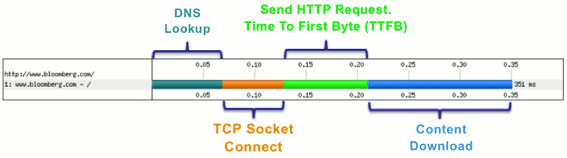
It's important to understand each phase of a request since you can improve the speed of your site by reducing the amount of time spent in each of these phases. Here is a brief overview:
- DNS Lookup [Dark Green] - Before the browser can talk to a server it must do a DNS lookup to convert the hostname to an IP Address. There isn't much you can do about this, and luckily it doesn't happen for all requests.
- Initial Connection [Orange] - Before the browser can send a request, it must create a TCP connection. This should only happen on the first few rows of the chart, otherwise there's a performance problem (more on this later).
- SSL/TLS Negotiation [Purple] - If your page is loading resources securely over SSL/TLS, this is the time the browser spends setting up that connection. With Google now using HTTPS as asearch ranking factor, SSL/TLS negotiation is more and more common.
- Time To First Byte (TTFB) [Green] - The TTFB is the time it takes for the request to travel to the server, for the server to process it, and for the first byte of the response to make it make to the browser. We will use the measurement to determine if your web server is underpowered or you need to use a CDN.
- Downloading (Blue) - This is the time the browser spends downloading the response. The longer this phase is, the larger the resource is. Ideally you can control the length of this phase by optimizing the size of your content.
You will also notice a few other lines on the waterfall diagram. There is a green vertical line which shows when "Start Render" happens. As we discussed in our last article, until Start Render happens, the user is looking at a blank white screen. A large Start Render time will make the user feel like your site is slow and unresponsive. There are some additional data points in the waterfall, such as"Content Download", but these are more advanced topics beyond the scope of this article.
货币贬值,个人应该如何使资产保值? - 知乎
我觉得这个问题的两个限定性条件是许多投资者都面临的情况: 1、作为一个普通人,2、如何用最简单可行的办法使资产保值。
我的基本的原则:低风险,低门槛,兼顾流动性,简单,可操作性强,追求相对较高收益,资金的投资期限影响资产配置的具体选择。
1、配置银行理财。 银行理财产品说明书中标明具体收益率的,前面是否有”预期“两字不是很重要,都可以比较放心。就目前来讲,只要是收益率写到产品说明书上的,虽然有不少写着”非保本浮动收益“的字样,但这类理财一般是带有银行隐性担保的。就中国银行来说,风险评级为1-3级的基本就不需要担心了。目前不少理财能达到5%以上,不少中小股份制银行的理财还能上6%,抗通胀还是有一定成效的。门槛:一般5-10万起。
2、债券。国人普遍投机心理比较重,所以不少人不知道其实还有债券这个抗通胀比较有效的投资工具。目前的证券交易所里有不少公司债券年化收益率达到7%以上的债券,投资者通过持有到期可以忽略价格波动风险,获得稳定的回报。虽然我国迄今为止没有任何债券违约事件,但是在选择债券的时候还是要进行一定的筛选,方法很简单,选择信用级别较高的债券、构建数量较多的债券组合即可。投资债券还有一个方法是买纯债券型基金。 债券和债券型基金的门槛都很低,1000元就可以,手续也很简单。如果买交易所债券,开个证券账户就可以很方便的买入。买债券型基金通过在银行开立基金账户即可。债券还有一个优势是灵活性好,可以随时卖出,且利息是按天计算的。 当然,债券不是什么时候都合适做,一般在加息周期中,债券并不是特别理想的投资标的,但是对于那种买入就持有到期的投资者来说,价格波动可以忽略,只要你对买入时所对于的到期收益率满意即可。简言之,买债券可以简单根据债券评级、债券的剩余期限、到期收益率来进行筛选并建立投资组合来分散风险。
3、分级基金的固定收益类份额。 这个玩意儿有点复杂,但是确实是非常的好:“一旦拥有,从此细水流长,抗通胀不用愁。” 我这个说法是针对分级基金中的部分基金、在目前价格水平下的一个描述,并非是固态的。 比如目前的银华稳进、银华金利,按照近期的价格买入,基本每年的年化收益率可以达到8%以上。每年年初分红母基金份额,只要及时赎回,就可以基本锁定其所规定的票面利率。建议大家好好研究一下,只要你搞明白以合适价格买入,从此一劳永逸,唯一需要做的是每年年初赎回一下所发放的红利即可。 推荐的品种:银华金利、银华稳进等。等待何时的价格买入即可。不过需要提醒一点:平时价格可能会有较大的波动,对短信投资者是价格风险。但是如果你是长线投资者,这个可以不在乎,因为红利发放是按照你所持有的份数来发的,和价格高低没有关系。
4、可转债。可转债其实属于债券,但又不同于债券。有个说法是“保障本金的股票”。实践表明,可转债是抗通胀的有效方式,风险低但语气收益率较高。可转债比较适合在股市熊市背景下开始做,由于可转债市场较小,总共也就20来个可转债,因此可以多选几个构建组合。如果你嫌麻烦,其实买可转债基金就可以。可以考虑:兴业可转债、华宝可转债、华安可转债等。
5、股票或股票型基金。我觉得我们没有必要妖魔化股票,也没必要妖魔化股票型基金。有一次听以为人大的教授讲到中国股市,觉得很有道理,他认为,如果你赞同两个观点,那么你就可以投资股市:1、中国经济在未来5-10年是否还会保持较快增长,比如年5%以上?2、股市从长期来看是否能反映股市的增长?。 我对这两个观点是持肯定的态度的,所以我会愿意投资股市。但是中国的股市由于波动很大,总是出现“过度反应和”反应不足“的现象,因此对于什么时候买入要求较高。可是其实说简单也简单,我觉得股市的买入时机可以通过两个方面来判断:1、定性。如果你发现周围人有不少在骂股市,在批评股市,周围听到不少非常悲观的观点,你就可以考虑开始分批买股票了。反之,如果大家都在说最近股市涨的很好,很多平时什么都不懂的人也想买股了,你就随时准备从股市撤退吧。 2、定量指标。可以根据市盈率,如果市盈率在15倍以下,你就可以逐步开始买入了。如果25倍以上,就要谨慎些了。 至于股票型基金,其实中国的市场还是有一部分长期跑赢市场的,这个不是我说的,是事实就是那样,所以不要不了解情况就轻易下结论。另外,如果你真的对基金经理们毫无信心,那买指数就行了。 股票和基金的门槛也很低,手续也简单。
6、黄金。 09年10年我也像部分客户推荐过买入黄金,但是2011年我基本就相对比较少推荐了。首先我觉得我对黄金还是相对缺乏了解,我不会推荐我不是很了解的东西。 但是今年年初我和一个基金公司的基金经理交流后,我觉得我可能大致把握了黄金的特点。 黄金其实既有货币属性,还有商品属性。就货币属性来说,他应该是稳健增值了。但其商品属性是受供求很大影响的,因此我们会发现黄金和石油等其他大宗商品有时候走势是相似。另外,大家先看以过去20年的黄金走势图:
由上图可以发现,黄金实际上在1990年到2001年是经历了一个大熊市的。从去年下半年开始,黄金价格的波动非常剧烈,剧烈的让人没有安全感,我有个同事去年买了黄金后一直到现在被套。当然这种个案不要夸大,不要替代普遍性,但是一个客观的事实是黄金市场的分歧可能在加大,黄金的商品属性确实在影响着其价格的波动。我觉得我无法确定的把握黄金的走势,因此我一般规避黄金。选择债券等有确定性现金流的投资工具。
综上所述,我觉得适合普通投资者、简单可行的方法是买银行理财,买债券,买债券型基金。如果你愿意花功夫研究一下或能找个靠谱的理财经理可以给你有效建议,那么分级基金固定收益份额,可转债都是不错的选择。而股票,如果你可以长期投资,能掌控好自己的情绪,在别人都很恐惧时你能够勇敢,在别人贪婪时你能够果断离场,那么你是可以驾驭它的。通过低买指数和高卖指数,你就可以省去选股的烦恼了。
最后建议大家研究一下美林投资时钟。在去年这样的滞涨环境下,拿着现金或短期债券或直接把钱及时消费掉是理想的选择。而在今年这样的经济衰退、通胀下行背景下,债券的投资机会相对比较确定。蓝筹股大家也可以考虑一下,毕竟郭主席都发话了:蓝筹股具备罕见的投资价值。
Title
Here some open source product which manages docx/odt to pdf/html converters :
- JODConverter : JODConverter automates conversions between office document formats using OpenOffice.org or LibreOffice. Supported formats include OpenDocument, PDF, RTF, HTML, Word, Excel, PowerPoint, and Flash. It can be used as a Java library, a command line tool, or a web application.
- docx4j: docx4j is a Java library for creating and manipulating Microsoft Open XML (Word docx, Powerpoint pptx, and Excel xlsx) files. It is similar to Microsoft’s OpenXML SDK, but for Java. docx4j uses JAXB to create the in-memory object representation.
- XDocReport which provides:
- docx converters which works with Apache POI XWPF and iText 2.3.7 for PDF.
- odt converters which works with ODFDOM and iText 2.3.7 for PDF.
Here criteria that I think which are important for converters :
- best renderer : the converter must not loose some formatting information.
- fast : the converter must be the more fast.
- less memory intensive to avoid OutOfMemory problem.
- streaming: use InputStream/OutputStream instead of File. Using streaming instead of File, avoids some problems (hard disk is not used, no need to have write right on the hard disk)
- easy to install: no need to install OpenOffice/LibreOffice, MS Word on the server to manage converter.
In this article I will introduce those 3 Java frameworks converters and I will compare it to give Pros/Cons for each framework and try to be more frankly because I’m one of XDocReport developer.
给PDF加水印的方法:
一、Adobe Acrobat JavaScript
1、直接加文字:
this.addWatermarkFromText({
cText: "中华人民共和国",
nTextAlign: app.constants.align.right,
nHorizAlign: app.constants.align.right,
nVertAlign: app.constants.align.top,
nHorizValue: -72, nVertValue: -72
});
2、将某个水印文件加入到PDF中
this.addWatermarkFromFile({
cDIPath: "/C/watermark.pdf",
nHorizAlign: app.constants.align.left,
nVertAlign: app.constants.align.top,
nHorizValue: 144, nVertValue: -72,
nRotation: 45
});
这两种方法速度极快,操作PDF资源占用极小, 而且支持任何东西方语言。当然还有很多细节问题,例如字体等等,具体用法可参阅Adobe Acrobat Scripting developmenthttp://www.adobe.com/devnet/acrobat/pdfs/js_api_reference.pdf
二、用java开源项目itextpdf来实现
下载itext 5.4.1,地址:http://itextpdf.com/download.php
import com.itextpdf.text.Document;
import com.itextpdf.text.DocumentException;
import com.itextpdf.text.Font;
import com.itextpdf.text.Paragraph;
import com.itextpdf.text.pdf.BaseFont;
import com.itextpdf.text.BaseColor;
import com.itextpdf.text.pdf.PdfWriter;
import com.itextpdf.text.DocumentException;
import com.itextpdf.text.pdf.BaseFont;
import com.itextpdf.text.pdf.PdfContentByte;
import com.itextpdf.text.pdf.PdfReader;
import com.itextpdf.text.pdf.PdfStamper;
public static final String CHARACTOR_FONT_CH_FILE = "SIMHEI.TTF"; //黑体常规
public static void AddWaterMark(String filename,String outPutFile,String waterText,
String pdfTitle,String Subject,String Keywords,String Creator,
String Author) throws DocumentException,IOException{
PdfReader.unethicalreading = true;
// 待加水印的文件
PdfReader reader = new PdfReader(filename);
// 加完水印的文件
PdfStamper stamper = new PdfStamper(reader, new FileOutputStream(outPutFile));
HashMap
方法三:利用Apache pdfbox实现,下载地址:http://pdfbox.apache.org/
引入pdfbox相应包,略
public static void main(String args[]){
try{
PDDocument document = PDDocument.load(musiqueFileName);
List pages = doc.getDocumentCatalog().getAllPages();
PDPage page = (PDPage) pages.get(0); //给第一页加水印,如果需要全部加,那么循环即可
//创建有个输出流,注意第3个参数必须为true,
PDPageContentStream contentStream = new PDPageContentStream(document, page,true,true);
//加文字水印
contentStream.beginText();
contentStream.setFont( PDType1Font.TIMES_ITALIC, 12f );
contentStream.moveTextPositionByAmount( 10,10 );
String msg = "Hello World";
contentStream.drawString(msg);
contentStream.endText();
//加图片水印
String image = "D:/img.jpg";
PDXObjectImage ximage = null;
if( image.toLowerCase().endsWith( ".jpg" ) )
{
ximage = new PDJpeg(document, new FileInputStream( image ) );
}
else if (image.toLowerCase().endsWith(".tif") || image.toLowerCase().endsWith(".tiff"))
{
ximage = new PDCcitt(document, new RandomAccessFile(new File(image),"r"));
}
else
{
throw new IOException( "Image type not supported:" + image );
}
contentStream.drawImage( ximage, 0, 0);
contentStream.close(); //这一句很重要,不关闭将无法写入
document.save("C:/lucene/Test.pdf");
document.close();
}
catch (Exception e){
System.out.println(e.getMessage());
}
}
Jedis之ShardedJedis一致性哈希分析 - 鑫鑫哥哥呀的个人页面 - 开源中国社区
ShardedJedis通过一致性哈希实现的的分布式缓存。主要思路:
redis服务器节点划分:将每台服务器节点采用hash算法划分为160个虚拟节点(可以配置划分权重)
将划分虚拟节点采用TreeMap存储
对每个redis服务器的物理连接采用LinkedHashMap存储
对Key or KeyTag 采用同样的hash算法,然后从TreeMap获取大于等于键hash值得节点,取最邻近节点存储;当key的hash值大于虚拟节点hash值得最大值时,存入第一个虚拟节点
sharded采用的hash算法:MD5 和 MurmurHash两种;默认采用64位的MurmurHash算法;
源码:
|
1
2
3
4
5
6
7
8
9
|
public class Sharded<R, S extends ShardInfo<R>> { public static final int DEFAULT_WEIGHT = 1; private TreeMap<Long, S> nodes; private final Hashing algo; private final Map<ShardInfo<R>, R> resources = new LinkedHashMap<ShardInfo<R>, R>(); ........................ ........................} |
这个类维护了一致性哈希后的物理机器和虚拟节点的映射关系,看一张图你会秒懂,

TreeMap<Long, S> nodes,存储的是虚拟节点和key的映射关系。有了虚拟节点,还要找到真正的存储位置。
Map<ShardInfo<R>, R> resources维护了虚拟节点和真正的存储位置的映射关系。
也是说,hash(key) -> virtual node -> real node;
jedis划分虚拟节点的逻辑代码,在Sharded类中,方法是initialize。这是在实例化对象池ShardedJedisPool过程中执行的划分虚拟节点。
|
1
2
3
4
5
6
7
8
9
10
11
12
13
14
15
16
17
|
private void initialize(List<S> shards) { nodes = new TreeMap<Long, S>(); for (int i = 0; i != shards.size(); ++i) { final S shardInfo = shards.get(i); if (shardInfo.getName() == null) { for (int n = 0; n < 160 * shardInfo.getWeight(); n++) { nodes.put(this.algo.hash("SHARD-" + i + "-NODE-" + n), shardInfo); } } else { for (int n = 0; n < 160 * shardInfo.getWeight(); n++) { nodes.put(this.algo.hash(shardInfo.getName() + "*" + shardInfo.getWeight() + n), shardInfo); } } resources.put(shardInfo, shardInfo.createResource()); }} |
以上代码就是划分虚拟节点的逻辑。
那么ShardedJedis客户端是如何执行set key value呢?
通过这里可以看出还是通过Jedis客户端执行的set key value。
|
1
2
3
4
|
public String set(String key, String value) { Jedis j = getShard(key); return j.set(key, value);} |
看一下代码中大体的逻辑,首先通过key得到ShardInfo,然后通过ShardInfo得到泛型Jedis客户端。
Sharded.java
|
1
2
3
|
public R getShard(byte[] key) { return resources.get(getShardInfo(key));} |
|
1
2
3
4
5
6
7
|
public S getShardInfo(byte[] key) { SortedMap<Long, S> tail = nodes.tailMap(algo.hash(key)); if (tail.isEmpty()) { return nodes.get(nodes.firstKey()); } return tail.get(tail.firstKey());} |
Android APK 签名比对 - To build a better world ! - BlogJava
APK签名比对的实现方式
好了,通过Android签名机制的分析,我们从理论上证明了通过APK公钥的比对能判断一个APK的发布机构。并且这个发布机构是很难伪装的,我们暂时可以认为是不可伪装的。
有了理论基础后,我们就可以开始实践了。那么如何获取到APK文件的公钥信息呢?因为Android系统安装程序肯定会获取APK信息进行比对,所以我们可以通过Android源码获得一些思路和帮助。
源码中有一个隐藏的类用于APK包的解析。这个类叫PackageParser,路径为frameworks\base\core\java\android\content\pm\PackageParser.java。当我们需要获取APK包的相关信息时,可以直接使用这个类,下面代码就是一个例子函数:
2
3 PackageParser packageParser = new PackageParser(archiveFilePath);
4 DisplayMetrics metrics = new DisplayMetrics();
5 metrics.setToDefaults();
6 final File sourceFile = new File(archiveFilePath);
7 PackageParser.Package pkg = packageParser.parsePackage(
8 sourceFile, archiveFilePath, metrics, 0);
9 if (pkg == null) {
10 return null;
11 }
12
13 packageParser.collectCertificates(pkg, 0);
14
15 return PackageParser.generatePackageInfo(pkg, null, flags, 0, 0);
16 }
其中参数archiveFilePath指定APK文件路径;flags需设置PackageManager.GET_SIGNATURES位,以保证返回证书签名信息。
具体如何通过PackageParser获取签名信息在此处不做详述,具体代码请参考PackageParser中的public boolean collectCertificates(Package pkg, int flags)和private Certificate[] loadCertificates(JarFile jarFile, JarEntry je, byte[] readBuffer)方法。至于如何在Android应用开发中使用隐藏的类及方法,可以参看我的这篇文章:《Android应用开发中如何使用隐藏API》。
紧接着,我们就可以通过packageInfo.signatures来访问到APK的签名信息。还需要说明的是 Android中Signature和Java中Certificate的对应关系。它们的关系如下面代码所示:
2 for (int i=0; i<N; i++) {
3 pkg.mSignatures[i] = new Signature(
4 certs[i].getEncoded());
5 }
也就是说signature = new Signature(certificate.getEncoded()); certificate证书中包含了公钥和证书的其他基本信息。公钥不同,证书肯定互不相同。我们可以通过certificate的getPublicKey方法获取公钥信息。所以比对签名证书本质上就是比对公钥信息。
OK,获取到APK签名证书之后,就剩下比对了。这个简单,功能函数如下所示:
2 if (s1 == null) {
3 return false;
4 }
5 if (s2 == null) {
6 return false;
7 }
8 HashSet<Signature> set1 = new HashSet<Signature>();
9 for (Signature sig : s1) {
10 set1.add(sig);
11 }
12 HashSet<Signature> set2 = new HashSet<Signature>();
13 for (Signature sig : s2) {
14 set2.add(sig);
15 }
16 // Make sure s2 contains all signatures in s1.
17 if (set1.equals(set2)) {
18 return true;
19 }
20 return false;
21 }
APK签名比对的应用场景
经过以上的论述,想必大家已经明白签名比对的原理和我的实现方式了。那么什么时候什么情况适合使用签名对比来保障Android APK的软件安全呢?
个人认为主要有以下三种场景:
1、 程序自检测。在程序运行时,自我进行签名比对。比对样本可以存放在APK包内,也可存放于云端。缺点是程序被破解时,自检测功能同样可能遭到破坏,使其失效。
2、 可信赖的第三方检测。由可信赖的第三方程序负责APK的软件安全问题。对比样本由第三方收集,放在云端。这种方式适用于杀毒安全软件或者APP Market之类的软件下载市场。缺点是需要联网检测,在无网络情况下无法实现功能。(不可能把大量的签名数据放在移动设备本地)。
3、 系统限定安装。这就涉及到改Android系统了。限定仅能安装某些证书的APK。软件发布商需要向系统发布上申请证书。如果发现问题,能追踪到是哪个软件发布商的责任。适用于系统提供商或者终端产品生产商。缺点是过于封闭,不利于系统的开放性。
服务器处理能力,你估算正确过吗? - IT旁观者 - 博客频道 - CSDN.NET
3.2 TPC-C估算公式
TPC-C是用计算机设备在每分钟内所能处理的标准事务的数量来衡量其处理能力的多少;因此,估算一个应用场景对处理能力的需求,本质上就是估算出每类业务处理事务对应的标准tpc-c事务量,然后在适当考虑冗余量。TPC-C的测算结果是每分钟的事务数,单位是tpmc。
TPC-C的通用估算公式如下:
TPC-C = ∑(每分钟业务事务量 * 标准事务量比率)/ (1 — 冗余率)。
例如:某业务系统有2类业务处理事务操作,业务事务1每分钟30000个,每个业务事务1操作相当于0.5个标准tpc-c事务;务事务2每分钟20000个,每个业务事务2操作相当于2个标准tpc-c事务;考虑30%的系统冗余。则该业务应用需要的处理能力为:
服务器处理能力(tpmc) = ((30000 X0.5) + (20000 X 2)) / (1 – 30%) = 78581。
3.3 SPEC Web估算公式
SPEC Web2005标准的衡量结果是一台Web服务器能够有效响应客户端的Web请求的最大极限个数。因此,测算的结果应该是一个Web请求数字,单位是个。
在评估应用服务器的SPEC Web2005值时,通常的方法是通过系统的在线用户,结合其在线率估算出并发用户数,在参照日常业务使用场景中可能发起的http请求来进行估算。
SPEC Web2005的参考估算公式如下:(注意:公式仅供参考,需根据项目的具体情况自行设计估算模型)
Web访问响应能力(SPEC Web2005) = (在线用户数 * 在线率 * 在线用户平均发起http请求数)/ (1 — 冗余率)。
例如:某业务系统的在线用户数为2000,在线率10%,每在线用户平均发起的http请求数为3,考虑30%的系统响应能力冗余。则负责该业务请求的Web服务器的响应能力为:
Web访问响应能力(个) = 2000 * 10% * 3 / (1 – 30%) = 857。
4 【应用实例】
下面以一个实际工程项目的应用服务器(部署Web Service中间件)的性能估算为例进行示范。
应用服务器上运行中间件产品,承担系统的各类业务逻辑组件运行计算,收敛系统用户对数据库服务器的访问请求,集中对外提供应用服务。通过分析,应用服务器性能需求在于:提供Web应用服务、业务逻辑处理。
Web应用服务方面,根据的业务预测数据,应用服务器平均在线并发用户按120估算,并发在线率20%,每用户平均发起3个http链接,考虑30%系统响应冗余能力,参照SPECweb99的评测标准,Web应用服务性能需求:Web服务器最大并发连接数=(120×20%×3)/(1 - 30%)= 103。
业务逻辑处理性能方面,主要的应用服务组件性能需求在于:集团数据监测分析、省数据监测分析、业务数据查询。据调研统计,集团数据为每分钟3585 条,省数据平均为每分钟51667条,业务信息查询请求平均为每分钟2151次;集团数据监测分析,每次业务操作约需3个标准tpcc事务,省数据监测分析,每次业务操作约需2个tpcc事务,业务信息查询,每次业务操作约需2个tpcc事务;则系统主机的处理能力需求TPCC值计算如下:

因此,应用服务器的处理能力配置不能低于196731tpmc,其Web2005配置指标不能低于103个。服务器处理性能估算实例2计算原则: 以单台服务器性能进行计算,即确保单台服务器工作的时候可以满足系统正常运行的需要;
假设每天有1万人次来窗口办理业务,每人次办理一项业务。即以每日1万笔前台交易为例进行综合系数的推导:
1. 假设每月前台交易数(未来5年内的设计指标)为220,000 (有些业务在月初、月末的处理量比较高,按月统计可以平衡此项差异);2. 每日前台交易数=220000/22=10,000 ,即每日 1万笔;3. 忙时处理能力:每日交易的80%在4个小时内完成,即10000*80%/4=2000(笔/小时)4. 峰值处理能力:2000*2=4000(笔/小时),即峰值处理能力为每小时4000笔,或 67笔/分,假设业务人员同时在线为100人,即每人每分钟处理0.7笔)5. 假设每笔交易对应数据库事务数=20,基准TPC指标值对应的比例=8,cpu保留30%的处理能力冗余,计算值与公布值(最优值)的偏差经验值为4 (这几个参数估算的依据不足,更多的是经验值)
则 tpmC值为:tpmC= 67*20*8*4/(1-30%)= 61257倒算出 综合系数 = 61257/10000=6.1即数据库服务器tpmC= 每日前台交易数 * 6.1 (实际计算值应不高于该值)应用服务器的 tpmC = 数据库服务器 tpmC *50% (一般)应用服务器的 tpmC = 数据库服务器 tpmC *70% (涉及大量计算的,如社保、税务、电力、电信等)