

hadoop中MapReduce多种join实现实例分析 - 蚂蚁 - 51CTO技术博客
对于RDBMS中的join操作大伙一定非常熟悉,写sql的时候要十分注意细节,稍有差池就会耗时巨久造成很大的性能瓶颈,而在Hadoop中使用MapReduce框架进行join的操作时同样耗时,但是由于hadoop的分布式设计理念的特殊性,因此对于这种join操作同样也具备了一定的特殊性。本文主要对MapReduce框架对表之间的join操作的几种实现方式进行详细分析,并且根据我在实际开发过程中遇到的实际例子来进行进一步的说明。
二、实现原理
1、在Reudce端进行连接。
在Reudce端进行连接是MapReduce框架进行表之间join操作最为常见的模式,其具体的实现原理如下:
Map端的主要工作:为来自不同表(文件)的key/value对打标签以区别不同来源的记录。然后用连接字段作为key,其余部分和新加的标志作为value,最后进行输出。
reduce端的主要工作:在reduce端以连接字段作为key的分组已经完成,我们只需要在每一个分组当中将那些来源于不同文件的记录(在map阶段已经打标志)分开,最后进行笛卡尔只就ok了。原理非常简单,下面来看一个实例:
(1)自定义一个value返回类型:
|
1
2
3
4
5
6
7
8
9
10
11
12
13
14
15
16
17
18
19
20
21
22
23
24
25
26
27
28
29
30
31
32
33
34
35
36
37
38
39
40
41
42
43
44
45
46
47
48
49
50
51
52
53
54
55
56
57
|
package com.mr.reduceSizeJoin;
import java.io.DataInput;
import java.io.DataOutput;
import java.io.IOException;
import org.apache.hadoop.io.Text;
import org.apache.hadoop.io.WritableComparable;
public class CombineValues implements WritableComparable<CombineValues>{
//private static final Logger logger = LoggerFactory.getLogger(CombineValues.class);
private Text joinKey;//链接关键字
private Text flag;//文件来源标志
private Text secondPart;//除了链接键外的其他部分
public void setJoinKey(Text joinKey) {
this.joinKey = joinKey;
}
public void setFlag(Text flag) {
this.flag = flag;
}
public void setSecondPart(Text secondPart) {
this.secondPart = secondPart;
}
public Text getFlag() {
return flag;
}
public Text getSecondPart() {
return secondPart;
}
public Text getJoinKey() {
return joinKey;
}
public CombineValues() {
this.joinKey = new Text();
this.flag = new Text();
this.secondPart = new Text();
}
@Override
public void write(DataOutput out) throws IOException {
this.joinKey.write(out);
this.flag.write(out);
this.secondPart.write(out);
}
@Override
public void readFields(DataInput in) throws IOException {
this.joinKey.readFields(in);
this.flag.readFields(in);
this.secondPart.readFields(in);
}
@Override
public int compareTo(CombineValues o) {
return this.joinKey.compareTo(o.getJoinKey());
}
@Override
public String toString() {
// TODO Auto-generated method stub
return "[flag="+this.flag.toString()+",joinKey="+this.joinKey.toString()+",secondPart="+this.secondPart.toString()+"]";
}
}
|
(2)map、reduce主体代码
|
1
2
3
4
5
6
7
8
9
10
11
12
13
14
15
16
17
18
19
20
21
22
23
24
25
26
27
28
29
30
31
32
33
34
35
36
37
38
39
40
41
42
43
44
45
46
47
48
49
50
51
52
53
54
55
56
57
58
59
60
61
62
63
64
65
66
67
68
69
70
71
72
73
74
75
76
77
78
79
80
81
82
83
84
85
86
87
88
89
90
91
92
93
94
95
96
97
98
99
100
101
102
103
104
105
106
107
108
109
110
111
112
113
114
115
116
117
118
119
120
121
122
123
124
125
126
127
128
129
130
131
132
133
134
135
136
137
138
139
140
141
142
143
144
145
146
147
148
149
150
151
152
153
154
155
156
157
158
159
160
161
162
163
164
165
166
167
168
169
170
171
172
173
174
175
176
177
178
|
package com.mr.reduceSizeJoin;
import java.io.IOException;
import java.util.ArrayList;
import org.apache.hadoop.conf.Configuration;
import org.apache.hadoop.conf.Configured;
import org.apache.hadoop.fs.Path;
import org.apache.hadoop.io.Text;
import org.apache.hadoop.mapreduce.Job;
import org.apache.hadoop.mapreduce.Mapper;
import org.apache.hadoop.mapreduce.Reducer;
import org.apache.hadoop.mapreduce.lib.input.FileInputFormat;
import org.apache.hadoop.mapreduce.lib.input.FileSplit;
import org.apache.hadoop.mapreduce.lib.input.TextInputFormat;
import org.apache.hadoop.mapreduce.lib.output.FileOutputFormat;
import org.apache.hadoop.mapreduce.lib.output.TextOutputFormat;
import org.apache.hadoop.util.Tool;
import org.apache.hadoop.util.ToolRunner;
import org.slf4j.Logger;
import org.slf4j.LoggerFactory;
/**
* @author zengzhaozheng
* 用途说明:
* reudce side join中的left outer join
* 左连接,两个文件分别代表2个表,连接字段table1的id字段和table2的cityID字段
* table1(左表):tb_dim_city(id int,name string,orderid int,city_code,is_show)
* tb_dim_city.dat文件内容,分隔符为"|":
* id name orderid city_code is_show
* 0 其他 9999 9999 0
* 1 长春 1 901 1
* 2 吉林 2 902 1
* 3 四平 3 903 1
* 4 松原 4 904 1
* 5 通化 5 905 1
* 6 辽源 6 906 1
* 7 白城 7 907 1
* 8 白山 8 908 1
* 9 延吉 9 909 1
* -------------------------风骚的分割线-------------------------------
* table2(右表):tb_user_profiles(userID int,userName string,network string,double flow,cityID int)
* tb_user_profiles.dat文件内容,分隔符为"|":
* userID network flow cityID
* 1 2G 123 1
* 2 3G 333 2
* 3 3G 555 1
* 4 2G 777 3
* 5 3G 666 4
*
* -------------------------风骚的分割线-------------------------------
* 结果:
* 1 长春 1 901 1 1 2G 123
* 1 长春 1 901 1 3 3G 555
* 2 吉林 2 902 1 2 3G 333
* 3 四平 3 903 1 4 2G 777
* 4 松原 4 904 1 5 3G 666
*/
public class ReduceSideJoin_LeftOuterJoin extends Configured implements Tool{
private static final Logger logger = LoggerFactory.getLogger(ReduceSideJoin_LeftOuterJoin.class);
public static class LeftOutJoinMapper extends Mapper<Object, Text, Text, CombineValues> {
private CombineValues combineValues = new CombineValues();
private Text flag = new Text();
private Text joinKey = new Text();
private Text secondPart = new Text();
@Override
protected void map(Object key, Text value, Context context)
throws IOException, InterruptedException {
//获得文件输入路径
String pathName = ((FileSplit) context.getInputSplit()).getPath().toString();
//数据来自tb_dim_city.dat文件,标志即为"0"
if(pathName.endsWith("tb_dim_city.dat")){
String[] valueItems = value.toString().split("\\|");
//过滤格式错误的记录
if(valueItems.length != 5){
return;
}
flag.set("0");
joinKey.set(valueItems[0]);
secondPart.set(valueItems[1]+"\t"+valueItems[2]+"\t"+valueItems[3]+"\t"+valueItems[4]);
combineValues.setFlag(flag);
combineValues.setJoinKey(joinKey);
combineValues.setSecondPart(secondPart);
context.write(combineValues.getJoinKey(), combineValues);
}//数据来自于tb_user_profiles.dat,标志即为"1"
else if(pathName.endsWith("tb_user_profiles.dat")){
String[] valueItems = value.toString().split("\\|");
//过滤格式错误的记录
if(valueItems.length != 4){
return;
}
flag.set("1");
joinKey.set(valueItems[3]);
secondPart.set(valueItems[0]+"\t"+valueItems[1]+"\t"+valueItems[2]);
combineValues.setFlag(flag);
combineValues.setJoinKey(joinKey);
combineValues.setSecondPart(secondPart);
context.write(combineValues.getJoinKey(), combineValues);
}
}
}
public static class LeftOutJoinReducer extends Reducer<Text, CombineValues, Text, Text> {
//存储一个分组中的左表信息
private ArrayList<Text> leftTable = new ArrayList<Text>();
//存储一个分组中的右表信息
private ArrayList<Text> rightTable = new ArrayList<Text>();
private Text secondPar = null;
private Text output = new Text();
/**
* 一个分组调用一次reduce函数
*/
@Override
protected void reduce(Text key, Iterable<CombineValues> value, Context context)
throws IOException, InterruptedException {
leftTable.clear();
rightTable.clear();
/**
* 将分组中的元素按照文件分别进行存放
* 这种方法要注意的问题:
* 如果一个分组内的元素太多的话,可能会导致在reduce阶段出现OOM,
* 在处理分布式问题之前最好先了解数据的分布情况,根据不同的分布采取最
* 适当的处理方法,这样可以有效的防止导致OOM和数据过度倾斜问题。
*/
for(CombineValues cv : value){
secondPar = new Text(cv.getSecondPart().toString());
//左表tb_dim_city
if("0".equals(cv.getFlag().toString().trim())){
leftTable.add(secondPar);
}
//右表tb_user_profiles
else if("1".equals(cv.getFlag().toString().trim())){
rightTable.add(secondPar);
}
}
logger.info("tb_dim_city:"+leftTable.toString());
logger.info("tb_user_profiles:"+rightTable.toString());
for(Text leftPart : leftTable){
for(Text rightPart : rightTable){
output.set(leftPart+ "\t" + rightPart);
context.write(key, output);
}
}
}
}
@Override
public int run(String[] args) throws Exception {
Configuration conf=getConf(); //获得配置文件对象
Job job=new Job(conf,"LeftOutJoinMR");
job.setJarByClass(ReduceSideJoin_LeftOuterJoin.class);
FileInputFormat.addInputPath(job, new Path(args[0])); //设置map输入文件路径
FileOutputFormat.setOutputPath(job, new Path(args[1])); //设置reduce输出文件路径
job.setMapperClass(LeftOutJoinMapper.class);
job.setReducerClass(LeftOutJoinReducer.class);
job.setInputFormatClass(TextInputFormat.class); //设置文件输入格式
job.setOutputFormatClass(TextOutputFormat.class);//使用默认的output格式
//设置map的输出key和value类型
job.setMapOutputKeyClass(Text.class);
job.setMapOutputValueClass(CombineValues.class);
//设置reduce的输出key和value类型
job.setOutputKeyClass(Text.class);
job.setOutputValueClass(Text.class);
job.waitForCompletion(true);
return job.isSuccessful()?0:1;
}
public static void main(String[] args) throws IOException,
ClassNotFoundException, InterruptedException {
try {
int returnCode = ToolRunner.run(new ReduceSideJoin_LeftOuterJoin(),args);
System.exit(returnCode);
} catch (Exception e) {
// TODO Auto-generated catch block
logger.error(e.getMessage());
}
}
}
|
其中具体的分析以及数据的输出输入请看代码中的注释已经写得比较清楚了,这里主要分析一下reduce join的一些不足。之所以会存在reduce join这种方式,我们可以很明显的看出原:因为整体数据被分割了,每个map task只处理一部分数据而不能够获取到所有需要的join字段,因此我们需要在讲join key作为reduce端的分组将所有join key相同的记录集中起来进行处理,所以reduce join这种方式就出现了。这种方式的缺点很明显就是会造成map和reduce端也就是shuffle阶段出现大量的数据传输,效率很低。
2、在Map端进行连接。
使用场景:一张表十分小、一张表很大。
用法:在提交作业的时候先将小表文件放到该作业的DistributedCache中,然后从DistributeCache中取出该小表进行join key / value解释分割放到内存中(可以放大Hash Map等等容器中)。然后扫描大表,看大表中的每条记录的join key /value值是否能够在内存中找到相同join key的记录,如果有则直接输出结果。
直接上代码,比较简单:
|
1
2
3
4
5
6
7
8
9
10
11
12
13
14
15
16
17
18
19
20
21
22
23
24
25
26
27
28
29
30
31
32
33
34
35
36
37
38
39
40
41
42
43
44
45
46
47
48
49
50
51
52
53
54
55
56
57
58
59
60
61
62
63
64
65
66
67
68
69
70
71
72
73
74
75
76
77
78
79
80
81
82
83
84
85
86
87
88
89
90
91
92
93
94
95
96
97
98
99
100
101
102
103
104
105
106
107
108
109
110
111
112
113
114
115
116
117
118
119
120
121
122
123
124
125
126
127
128
129
130
131
132
133
134
135
136
137
138
139
140
141
142
143
144
145
146
147
148
149
150
151
152
153
|
package com.mr.mapSideJoin;
import java.io.BufferedReader;
import java.io.FileReader;
import java.io.IOException;
import java.util.HashMap;
import org.apache.hadoop.conf.Configuration;
import org.apache.hadoop.conf.Configured;
import org.apache.hadoop.filecache.DistributedCache;
import org.apache.hadoop.fs.Path;
import org.apache.hadoop.io.Text;
import org.apache.hadoop.mapreduce.Job;
import org.apache.hadoop.mapreduce.Mapper;
import org.apache.hadoop.mapreduce.lib.input.FileInputFormat;
import org.apache.hadoop.mapreduce.lib.input.TextInputFormat;
import org.apache.hadoop.mapreduce.lib.output.FileOutputFormat;
import org.apache.hadoop.mapreduce.lib.output.TextOutputFormat;
import org.apache.hadoop.util.Tool;
import org.apache.hadoop.util.ToolRunner;
import org.slf4j.Logger;
import org.slf4j.LoggerFactory;
/**
* @author zengzhaozheng
*
* 用途说明:
* Map side join中的left outer join
* 左连接,两个文件分别代表2个表,连接字段table1的id字段和table2的cityID字段
* table1(左表):tb_dim_city(id int,name string,orderid int,city_code,is_show),
* 假设tb_dim_city文件记录数很少,tb_dim_city.dat文件内容,分隔符为"|":
* id name orderid city_code is_show
* 0 其他 9999 9999 0
* 1 长春 1 901 1
* 2 吉林 2 902 1
* 3 四平 3 903 1
* 4 松原 4 904 1
* 5 通化 5 905 1
* 6 辽源 6 906 1
* 7 白城 7 907 1
* 8 白山 8 908 1
* 9 延吉 9 909 1
* -------------------------风骚的分割线-------------------------------
* table2(右表):tb_user_profiles(userID int,userName string,network string,double flow,cityID int)
* tb_user_profiles.dat文件内容,分隔符为"|":
* userID network flow cityID
* 1 2G 123 1
* 2 3G 333 2
* 3 3G 555 1
* 4 2G 777 3
* 5 3G 666 4
* -------------------------风骚的分割线-------------------------------
* 结果:
* 1 长春 1 901 1 1 2G 123
* 1 长春 1 901 1 3 3G 555
* 2 吉林 2 902 1 2 3G 333
* 3 四平 3 903 1 4 2G 777
* 4 松原 4 904 1 5 3G 666
*/
public class MapSideJoinMain extends Configured implements Tool{
private static final Logger logger = LoggerFactory.getLogger(MapSideJoinMain.class);
public static class LeftOutJoinMapper extends Mapper<Object, Text, Text, Text> {
private HashMap<String,String> city_info = new HashMap<String, String>();
private Text outPutKey = new Text();
private Text outPutValue = new Text();
private String mapInputStr = null;
private String mapInputSpit[] = null;
private String city_secondPart = null;
/**
* 此方法在每个task开始之前执行,这里主要用作从DistributedCache
* 中取到tb_dim_city文件,并将里边记录取出放到内存中。
*/
@Override
protected void setup(Context context)
throws IOException, InterruptedException {
BufferedReader br = null;
//获得当前作业的DistributedCache相关文件
Path[] distributePaths = DistributedCache.getLocalCacheFiles(context.getConfiguration());
String cityInfo = null;
for(Path p : distributePaths){
if(p.toString().endsWith("tb_dim_city.dat")){
//读缓存文件,并放到mem中
br = new BufferedReader(new FileReader(p.toString()));
while(null!=(cityInfo=br.readLine())){
String[] cityPart = cityInfo.split("\\|",5);
if(cityPart.length ==5){
city_info.put(cityPart[0], cityPart[1]+"\t"+cityPart[2]+"\t"+cityPart[3]+"\t"+cityPart[4]);
}
}
}
}
}
/**
* Map端的实现相当简单,直接判断tb_user_profiles.dat中的
* cityID是否存在我的map中就ok了,这样就可以实现Map Join了
*/
@Override
protected void map(Object key, Text value, Context context)
throws IOException, InterruptedException {
//排掉空行
if(value == null || value.toString().equals("")){
return;
}
mapInputStr = value.toString();
mapInputSpit = mapInputStr.split("\\|",4);
//过滤非法记录
if(mapInputSpit.length != 4){
return;
}
//判断链接字段是否在map中存在
city_secondPart = city_info.get(mapInputSpit[3]);
if(city_secondPart != null){
this.outPutKey.set(mapInputSpit[3]);
this.outPutValue.set(city_secondPart+"\t"+mapInputSpit[0]+"\t"+mapInputSpit[1]+"\t"+mapInputSpit[2]);
context.write(outPutKey, outPutValue);
}
}
}
@Override
public int run(String[] args) throws Exception {
Configuration conf=getConf(); //获得配置文件对象
DistributedCache.addCacheFile(new Path(args[1]).toUri(), conf);//为该job添加缓存文件
Job job=new Job(conf,"MapJoinMR");
job.setNumReduceTasks(0);
FileInputFormat.addInputPath(job, new Path(args[0])); //设置map输入文件路径
FileOutputFormat.setOutputPath(job, new Path(args[2])); //设置reduce输出文件路径
job.setJarByClass(MapSideJoinMain.class);
job.setMapperClass(LeftOutJoinMapper.class);
job.setInputFormatClass(TextInputFormat.class); //设置文件输入格式
job.setOutputFormatClass(TextOutputFormat.class);//使用默认的output格式
//设置map的输出key和value类型
job.setMapOutputKeyClass(Text.class);
//设置reduce的输出key和value类型
job.setOutputKeyClass(Text.class);
job.setOutputValueClass(Text.class);
job.waitForCompletion(true);
return job.isSuccessful()?0:1;
}
public static void main(String[] args) throws IOException,
ClassNotFoundException, InterruptedException {
try {
int returnCode = ToolRunner.run(new MapSideJoinMain(),args);
System.exit(returnCode);
} catch (Exception e) {
// TODO Auto-generated catch block
logger.error(e.getMessage());
}
}
}
|
这里说说DistributedCache。DistributedCache是分布式缓存的一种实现,它在整个MapReduce框架中起着相当重要的作用,他可以支撑我们写一些相当复杂高效的分布式程序。说回到这里,JobTracker在作业启动之前会获取到DistributedCache的资源uri列表,并将对应的文件分发到各个涉及到该作业的任务的TaskTracker上。另外,关于DistributedCache和作业的关系,比如权限、存储路径区分、public和private等属性,接下来有用再整理研究一下写一篇blog,这里就不详细说了。
另外还有一种比较变态的Map Join方式,就是结合HBase来做Map Join操作。这种方式完全可以突破内存的控制,使你毫无忌惮的使用Map Join,而且效率也非常不错。
3、SemiJoin。
SemiJoin就是所谓的半连接,其实仔细一看就是reduce join的一个变种,就是在map端过滤掉一些数据,在网络中只传输参与连接的数据不参与连接的数据不必在网络中进行传输,从而减少了shuffle的网络传输量,使整体效率得到提高,其他思想和reduce join是一模一样的。说得更加接地气一点就是将小表中参与join的key单独抽出来通过DistributedCach分发到相关节点,然后将其取出放到内存中(可以放到HashSet中),在map阶段扫描连接表,将join key不在内存HashSet中的记录过滤掉,让那些参与join的记录通过shuffle传输到reduce端进行join操作,其他的和reduce join都是一样的。看代码:
|
1
2
3
4
5
6
7
8
9
10
11
12
13
14
15
16
17
18
19
20
21
22
23
24
25
26
27
28
29
30
31
32
33
34
35
36
37
38
39
40
41
42
43
44
45
46
47
48
49
50
51
52
53
54
55
56
57
58
59
60
61
62
63
64
65
66
67
68
69
70
71
72
73
74
75
76
77
78
79
80
81
82
83
84
85
86
87
88
89
90
91
92
93
94
95
96
97
98
99
100
101
102
103
104
105
106
107
108
109
110
111
112
113
114
115
116
117
118
119
120
121
122
123
124
125
126
127
128
129
130
131
132
133
134
135
136
137
138
139
140
141
142
143
144
145
146
147
148
149
150
151
152
153
154
155
156
157
158
159
160
161
162
163
164
165
166
167
168
169
170
171
172
173
174
175
176
177
178
179
180
181
182
183
184
185
186
187
188
189
190
191
192
193
194
195
196
197
198
199
200
201
202
203
204
205
206
207
208
209
210
211
212
213
214
215
216
217
218
219
220
|
package com.mr.SemiJoin;
import java.io.BufferedReader;
import java.io.FileReader;
import java.io.IOException;
import java.util.ArrayList;
import java.util.HashSet;
import org.apache.hadoop.conf.Configuration;
import org.apache.hadoop.conf.Configured;
import org.apache.hadoop.filecache.DistributedCache;
import org.apache.hadoop.fs.Path;
import org.apache.hadoop.io.Text;
import org.apache.hadoop.mapreduce.Job;
import org.apache.hadoop.mapreduce.Mapper;
import org.apache.hadoop.mapreduce.Reducer;
import org.apache.hadoop.mapreduce.lib.input.FileInputFormat;
import org.apache.hadoop.mapreduce.lib.input.FileSplit;
import org.apache.hadoop.mapreduce.lib.input.TextInputFormat;
import org.apache.hadoop.mapreduce.lib.output.FileOutputFormat;
import org.apache.hadoop.mapreduce.lib.output.TextOutputFormat;
import org.apache.hadoop.util.Tool;
import org.apache.hadoop.util.ToolRunner;
import org.slf4j.Logger;
import org.slf4j.LoggerFactory;
/**
* @author zengzhaozheng
*
* 用途说明:
* reudce side join中的left outer join
* 左连接,两个文件分别代表2个表,连接字段table1的id字段和table2的cityID字段
* table1(左表):tb_dim_city(id int,name string,orderid int,city_code,is_show)
* tb_dim_city.dat文件内容,分隔符为"|":
* id name orderid city_code is_show
* 0 其他 9999 9999 0
* 1 长春 1 901 1
* 2 吉林 2 902 1
* 3 四平 3 903 1
* 4 松原 4 904 1
* 5 通化 5 905 1
* 6 辽源 6 906 1
* 7 白城 7 907 1
* 8 白山 8 908 1
* 9 延吉 9 909 1
* -------------------------风骚的分割线-------------------------------
* table2(右表):tb_user_profiles(userID int,userName string,network string,double flow,cityID int)
* tb_user_profiles.dat文件内容,分隔符为"|":
* userID network flow cityID
* 1 2G 123 1
* 2 3G 333 2
* 3 3G 555 1
* 4 2G 777 3
* 5 3G 666 4
* -------------------------风骚的分割线-------------------------------
* joinKey.dat内容:
* city_code
* 1
* 2
* 3
* 4
* -------------------------风骚的分割线-------------------------------
* 结果:
* 1 长春 1 901 1 1 2G 123
* 1 长春 1 901 1 3 3G 555
* 2 吉林 2 902 1 2 3G 333
* 3 四平 3 903 1 4 2G 777
* 4 松原 4 904 1 5 3G 666
*/
public class SemiJoin extends Configured implements Tool{
private static final Logger logger = LoggerFactory.getLogger(SemiJoin.class);
public static class SemiJoinMapper extends Mapper<Object, Text, Text, CombineValues> {
private CombineValues combineValues = new CombineValues();
private HashSet<String> joinKeySet = new HashSet<String>();
private Text flag = new Text();
private Text joinKey = new Text();
private Text secondPart = new Text();
/**
* 将参加join的key从DistributedCache取出放到内存中,以便在map端将要参加join的key过滤出来。b
*/
@Override
protected void setup(Context context)
throws IOException, InterruptedException {
BufferedReader br = null;
//获得当前作业的DistributedCache相关文件
Path[] distributePaths = DistributedCache.getLocalCacheFiles(context.getConfiguration());
String joinKeyStr = null;
for(Path p : distributePaths){
if(p.toString().endsWith("joinKey.dat")){
//读缓存文件,并放到mem中
br = new BufferedReader(new FileReader(p.toString()));
while(null!=(joinKeyStr=br.readLine())){
joinKeySet.add(joinKeyStr);
}
}
}
}
@Override
protected void map(Object key, Text value, Context context)
throws IOException, InterruptedException {
//获得文件输入路径
String pathName = ((FileSplit) context.getInputSplit()).getPath().toString();
//数据来自tb_dim_city.dat文件,标志即为"0"
if(pathName.endsWith("tb_dim_city.dat")){
String[] valueItems = value.toString().split("\\|");
//过滤格式错误的记录
if(valueItems.length != 5){
return;
}
//过滤掉不需要参加join的记录
if(joinKeySet.contains(valueItems[0])){
flag.set("0");
joinKey.set(valueItems[0]);
secondPart.set(valueItems[1]+"\t"+valueItems[2]+"\t"+valueItems[3]+"\t"+valueItems[4]);
combineValues.setFlag(flag);
combineValues.setJoinKey(joinKey);
combineValues.setSecondPart(secondPart);
context.write(combineValues.getJoinKey(), combineValues);
}else{
return ;
}
}//数据来自于tb_user_profiles.dat,标志即为"1"
else if(pathName.endsWith("tb_user_profiles.dat")){
String[] valueItems = value.toString().split("\\|");
//过滤格式错误的记录
if(valueItems.length != 4){
return;
}
//过滤掉不需要参加join的记录
if(joinKeySet.contains(valueItems[3])){
flag.set("1");
joinKey.set(valueItems[3]);
secondPart.set(valueItems[0]+"\t"+valueItems[1]+"\t"+valueItems[2]);
combineValues.setFlag(flag);
combineValues.setJoinKey(joinKey);
combineValues.setSecondPart(secondPart);
context.write(combineValues.getJoinKey(), combineValues);
}else{
return ;
}
}
}
}
public static class SemiJoinReducer extends Reducer<Text, CombineValues, Text, Text> {
//存储一个分组中的左表信息
private ArrayList<Text> leftTable = new ArrayList<Text>();
//存储一个分组中的右表信息
private ArrayList<Text> rightTable = new ArrayList<Text>();
private Text secondPar = null;
private Text output = new Text();
/**
* 一个分组调用一次reduce函数
*/
@Override
protected void reduce(Text key, Iterable<CombineValues> value, Context context)
throws IOException, InterruptedException {
leftTable.clear();
rightTable.clear();
/**
* 将分组中的元素按照文件分别进行存放
* 这种方法要注意的问题:
* 如果一个分组内的元素太多的话,可能会导致在reduce阶段出现OOM,
* 在处理分布式问题之前最好先了解数据的分布情况,根据不同的分布采取最
* 适当的处理方法,这样可以有效的防止导致OOM和数据过度倾斜问题。
*/
for(CombineValues cv : value){
secondPar = new Text(cv.getSecondPart().toString());
//左表tb_dim_city
if("0".equals(cv.getFlag().toString().trim())){
leftTable.add(secondPar);
}
//右表tb_user_profiles
else if("1".equals(cv.getFlag().toString().trim())){
rightTable.add(secondPar);
}
}
logger.info("tb_dim_city:"+leftTable.toString());
logger.info("tb_user_profiles:"+rightTable.toString());
for(Text leftPart : leftTable){
for(Text rightPart : rightTable){
output.set(leftPart+ "\t" + rightPart);
context.write(key, output);
}
}
}
}
@Override
public int run(String[] args) throws Exception {
Configuration conf=getConf(); //获得配置文件对象
DistributedCache.addCacheFile(new Path(args[2]).toUri(), conf);
Job job=new Job(conf,"LeftOutJoinMR");
job.setJarByClass(SemiJoin.class);
FileInputFormat.addInputPath(job, new Path(args[0])); //设置map输入文件路径
FileOutputFormat.setOutputPath(job, new Path(args[1])); //设置reduce输出文件路径
job.setMapperClass(SemiJoinMapper.class);
job.setReducerClass(SemiJoinReducer.class);
job.setInputFormatClass(TextInputFormat.class); //设置文件输入格式
job.setOutputFormatClass(TextOutputFormat.class);//使用默认的output格式
//设置map的输出key和value类型
job.setMapOutputKeyClass(Text.class);
job.setMapOutputValueClass(CombineValues.class);
//设置reduce的输出key和value类型
job.setOutputKeyClass(Text.class);
job.setOutputValueClass(Text.class);
job.waitForCompletion(true);
return job.isSuccessful()?0:1;
}
public static void main(String[] args) throws IOException,
ClassNotFoundException, InterruptedException {
try {
int returnCode = ToolRunner.run(new SemiJoin(),args);
System.exit(returnCode);
} catch (Exception e) {
logger.error(e.getMessage());
}
}
}
|
这里还说说SemiJoin也是有一定的适用范围的,其抽取出来进行join的key是要放到内存中的,所以不能够太大,容易在Map端造成OOM。
三、总结
blog介绍了三种join方式。这三种join方式适用于不同的场景,其处理效率上的相差还是蛮大的,其中主要导致因素是网络传输。Map join效率最高,其次是SemiJoin,最低的是reduce join。另外,写分布式大数据处理程序的时最好要对整体要处理的数据分布情况作一个了解,这可以提高我们代码的效率,使数据的倾斜度降到最低,使我们的代码倾向性更好。
参考文献:
为你的 Hadoop 集群选择合适的硬件 - 技术翻译 - 开源中国社区
这是在一个平衡Hadoop集群中,为数据节点/任务追踪器提供的推荐规格:
- 在一个磁盘阵列中要有12到24个1~4TB硬盘
- 2个频率为2~2.5GHz的四核、六核或八核CPU
- 64~512GB的内存
- 有保障的千兆或万兆以太网(存储密度越大,需要的网络吞吐量越高)
名字节点角色负责协调集群上的数据存储,作业追踪器协调数据处理(备用的名字节点不应与集群中的名字节点共存,并且运行在与之相同的硬件环境上。)。Cloudera推荐客户购买在RAID1或10配置上有足够功率和企业级磁盘数的商用机器来运行名字节点和作业追踪器。
NameNode也会直接需要与群集中的数据块的数量成比列的RAM。一个好的但不精确的规则是对于存储在分布式文件系统里面的每一个1百万的数据块,分配1GB的NameNode内存。于在一个群集里面的100个DataNodes而言,NameNode上的64GB的RAM提供了足够的空间来保证群集的增长。我们也推荐把HA同时配置在NameNode和JobTracker上,
这里就是为NameNode/JobTracker/Standby NameNode节点群推荐的技术细节。驱动器的数量或多或少,将取决于冗余数量的需要。
- 4–6 1TB 硬盘驱动器 采用 一个 JBOD 配置 (1个用于OS, 2个用于文件系统映像[RAID 1], 1个用于Apache ZooKeeper, 1个用于Journal节点)
- 2 4-/16-/8-核心 CPUs, 至少运行于 2-2.5GHz
- 64-128GB 随机存储器
- Bonded Gigabit 以太网卡 or 10Gigabit 以太网卡
记住, 在思想上,Hadoop 体系设计为用于一种并行环境。
如果你希望Hadoop集群扩展到20台机器以上,那么我们推荐最初配置的集群应分布在两个机架,而且每个机架都有一个位于机架顶部的10G的以太网交换。当这个集群跨越多个机架的时候,你将需要添加核心交换机使用40G的以太网来连接位于机架顶部的交换机。两个逻辑上分离的机架可以让维护团队更好地理解机架内部和机架间通信对网络需求。
Hadoop集群安装好后,维护团队就可以开始确定工作负载,并准备对这些工作负载进行基准测试以确定硬件瓶颈。经过一段时间的基准测试和监视,维护团队将会明白如何配置添加的机器。异构的Hadoop集群是很常见的,尤其是在集群中用户机器的容量和数量不断增长的时候更常见-因此为你的工作负载所配置的“不理想”开始时的那组机器不是在浪费时间。Cloudera管理器提供了允许分组管理不同硬件配置的模板,通过这些模板你就可以简单地管理异构集群了。
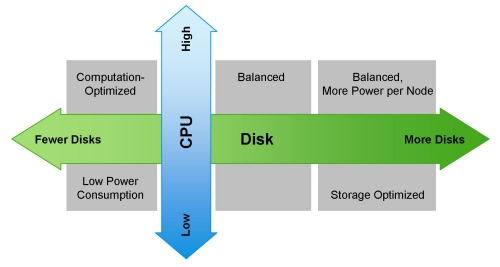
下面是针对不同的工作负载所采用对应的各种硬件配置的列表,包括我们最初推荐的“负载均衡”的配置:
- 轻量处理方式的配置(1U的机器):两个16核的CPU,24-64GB的内存以及8张硬盘(每张1TB或者2TB)。
- 负载均衡方式的配置(1U的机器):两个16核的CPU,48-128GB的内存以及由主板控制器直接连接的12-16张硬盘(每张1TB或者2TB)。通常在一个2U的柜子里使用2个主板和24张硬盘实现相互备份。
- 超大存储方式的配置(2U的机器):两个16核的CPU,48-96GB的内存以及16-26张硬盘(每张2TB-4TB)。这种配置在多个节点/机架失效时会产生大量的网络流量。
- 强力运算方式的配置(2U的机器):两个16核的CPU,64-512GB的内存以及4-8张硬盘(每张1TB或者2TB)。
(注意Cloudera期望你配置它可以使用的2x8,2x10和2x12核心CPU的配置。)
下图向你展示了如何根据工作负载来配置一台机器:
超越MapReduce
Hadoop不仅仅是HDFS和MapReduce;它是一个无所不包的数据平台。因此CDH包含许多不同的生态系统产品(实际上很少仅仅做为MapReduce使用)。当你在为集群选型的时候,需要考虑的附加软件组件包括Apache HBase、Cloudera Impala和Cloudera Search。它们应该都运行在DataNode中来维护数据局部性。
由于垃圾回收器(GC)的超时,HBase的用户应该留意堆的大小的限制。别的JVM列存储也面临这个问题。因此,我们推荐每一个区域服务器的堆最大不超过16GB。HBase不需要太多别的资源而运行于Hadoop之上,但是维护一个实时的SLAs,你应该使用多个调度器,比如使用fair and capacity 调度器,并协同Linux Cgroups使用。HBase是一个可靠的列数据存储系统,它提供一致性、低延迟和随机读写。Cloudera Search解决了CDH中存储内容的全文本搜索的需求,为新类型用户简化了访问,但是也为Hadoop中新类型数据存储提供了机会。Cloudera Search基于Apache Lucene/Solr Cloud和Apache Tika,并且为与CDH广泛集成的搜索扩展了有价值的功能和灵活性。基于Apache协议的Impala项目为Hadoop带来了可扩展的并行数据库技术,使得用户可以向HDFS和HBase中存储的数据发起低延迟的SQL查询,而且不需要数据移动或转换。
Impala使用内存以完成其大多数的功能,在默认的配置下,将最多使用80%的可用RAM资源,所以我们推荐,最少每一个节点使用96GB的RAM。与MapReduce一起使用Impala的用户,可以参考我们的建议 - “Configuring Impala and MapReduce for Multi-tenant Performance.” 也可以为Impala指定特定进程所需的内存或者特定查询所需的内存。
搜索是最有趣的订制大小的组件。推荐的订制大小的实践操作是购买一个节点,安装Solr和Lucene,然后载入你的文档群。一旦文档群被以期望的方式来索引和搜索,可伸缩性将开始作用。持续不断的载入文档群,直到索引和查询的延迟,对于项目而言超出了必要的数值 - 此时,这让你得到了在可用的资源上每一个节点所能处理的最大文档数目的基数,以及不包括欲期的集群复制此因素的节点的数量总计基数。
以下为淘宝Hadoop集群机器硬件配置:
淘宝Hadoop集群现在超过1700个节点,服务于用于整个阿里巴巴集团各部门,数据来源于各部门产品的线上数据库(Oracle, MySQL)备份,系统日志以及爬虫数据,数量总量已经超过17个PB,每天净增长20T左右。每天在Hadoop集群运行的 MapReduce任务有超过4万(有时会超过6万),其中大部分任务是每天定期执行的统计任务,例如数据魔方、量子统计、推荐系统、排行榜等等。这些任务一般在凌晨1点左右开始执行,3-4个小时内全部完成。每天读数据在2PB左右,写数据在1PB左右。
Hadoop包括两类节点Master和Slave节点,
-
Master节点包括Jobtracker,Namenode, SecondName, Standby,
-
硬件配置:16CPU*4核,96G内存。
-
-
Slave节点主要是TaskTracker和DataNode,
-
硬件配置存在一定的差别:8CPU*4核-16CPU*4核,16G-24G内存
-
(注:通常是一个slave节点同时是TaskTracker和DataNode,目的是提高数据本地性data locality)。
-
每个slave节点会划分成12~24个slots。整个集群约34,916个slots,其中Map slots是19,643个,Reduce slots是15,273个
-
所有作业会进行分成多个Group,按照部门或小组划分,总共有38个Group。整个集群的资源也是按各个Group进行划分,定义每个Group的最大并发任务数,Map slots与Reduce slots的使用上限。每个作业只能使用自己组的slots资源。